Unless you have make an attempt to change the table prefix before installing your WordPress blog, chances are that your WP database is still using the default ‘wp_’ as the table prefix. With this default prefix, hackers can easily perform a SQL injection attacks on your database and wreak havoc to your site. The best way to prevent this from happening is to change the table prefix to another term that is difficult for hackers to guess.
If you are new to blogging and are looking to install your first WordPress blog, then it is easy. Simply change the $table_prefix entry in wp-config.php file, upload the file to the server, then proceed on with the famous 5-mins installation.
For those who have already been blogging for sometime, follow the method below to change your table prefix.
Preparation
Download the following two plugins, install and activate them in your WordPress blog.
WP-DBManager
WordPress Table Rename (modified version, original download page)
Get started
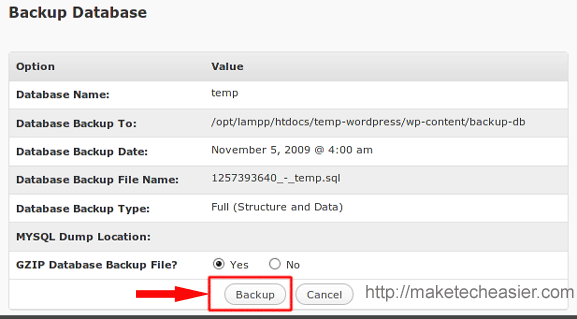
Before you do anything to your database, first perform a db backup.
On the left pane, go to Database –> Backup DB. Do a backup of your database.
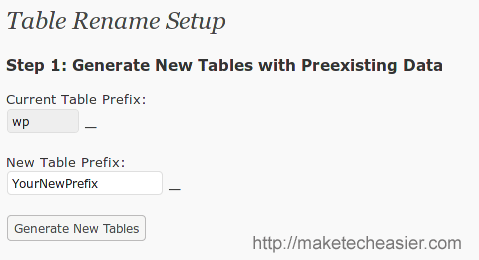
Next, go to Settings –> Table Rename
Enter a new term for the table prefix.
Click the Create New Tables button to generate new tables with the new prefix. If you have a big database, this process will take a long time.
When it is done, you will see the success message.
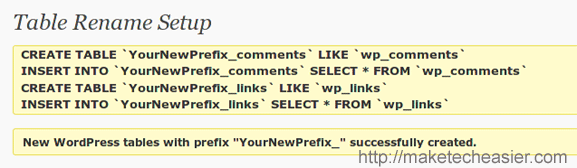
If you have a big database, the page might issue a timeout and show a blank page.
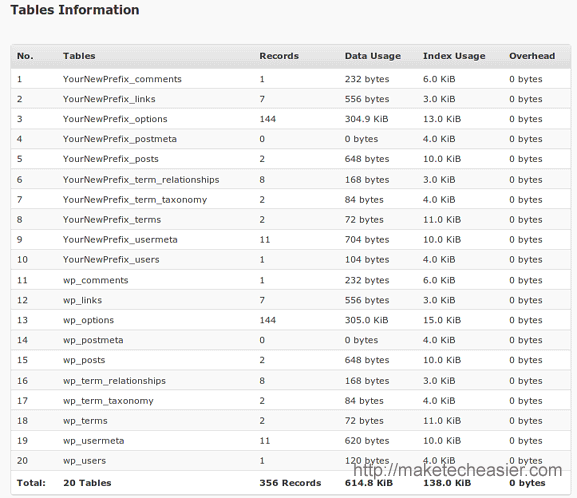
Verify your new database tables
Now go to Database->database. You should see the new tables in place.
Migrating your blog
While the plugin provides a way to change the table_prefix value in wp-config.php file, it won’t work in most cases unless you have set the wp-config.php file readable/writable (which I strongly advised against). The best way is to change the value manually.
With your favorite FTP program, download your wp-config.php from the root server.
Open it up with any text editor and scroll down to the section where you see
$table_prefix = 'wp_'
Change it to
$table_prefix = 'YourNewPrefix_'
Save it and re-upload this file back to the server.
Almost there
You have just completed the migration from the old table prefix to new table prefix, there are still several things that you need to do
1. Browse through your site and make sure all the pages, images and content are loading correctly. If you see errors, or that the site is not loading, change the $table_prefix back to ‘wp_‘ and re-upload back to the server.
2. Browse through the settings for each individual plugin and make sure that all the configurations are intact. Some of the plugins use the table prefix for their storage and these values were not changed by the plugin. For such plugins, you will see the settings fall back to their default values. What you have to do is to reconfigure it and re-save it. It will now store in the database with the new table prefix.
3. (Optional) Go to the Database –> Empty/Drop Tables, check the Drop button for all the table with the old prefix. Click the Empty/Drop button to remove them from your database.
Important: Do this only if you are sure that the new tables (with the new prefix) are working correctly.
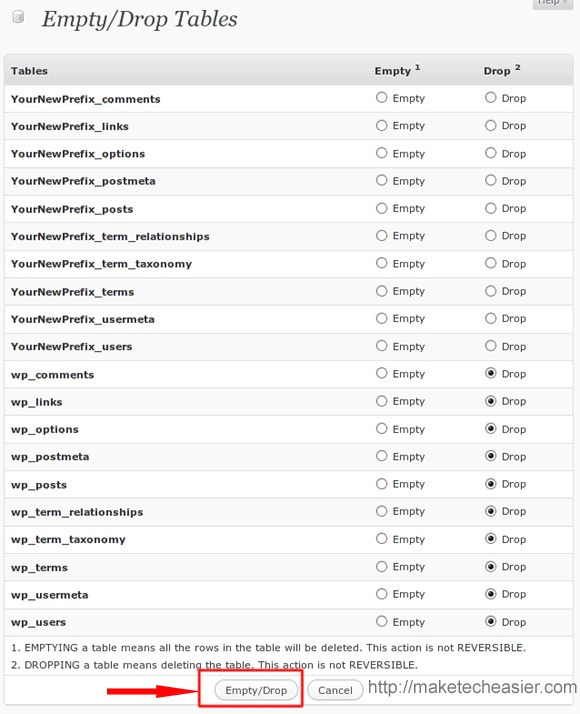
Note that this is purely optional. Leaving your old table in the database will not hurt your blog and it can serve as a backup and allow you to switch back to them quickly in the event your blog got hacked into. However, if you have a big database, the extra tables could add plenty of overhead to your server. So, make your own judgement.
Last part
Once you are happy with everything, backup the new database. If you have previously schedule a daily backup, you have to reschedule it again to include the new tables.
You can also deactivate and uninstall the WordPress Table Rename plugin. There is no use for it now.
That’s it. You have successfully changed your WordPress database table prefix.








