In the past, for those who wanted to set up a WordPress multi-users site, the only solution is to use WPMU. Unfortunately, setting up a WPMU site can be difficult and tricky. Furthermore, migrating your existing WordPress blog to a multi-users site is almost impossible. With WordPress 3.0 (currently still a release candidate as of this post), the new “Network” feature can easily transform any blog into a multi-users site. You can even upgrade/migrate your existing WP blog to a multi-users site with few clicks.
Let’s see how this can be done.
Note:
1. The current version of WordPress 3.0 is still in release candidate and is not suitable for production use. You may want to clone your live blog to a local server and test it out in the localhost.
2. While upgrading your blog to multi-users site, your site might be down for a brief moment. You might want to create a maintenance holding page to inform your readers about the downtime.
3. Not all web hosts support WP multi-users site. Check with your web host before you proceed
Installing WordPress 3.0
As of this post, WP3.0 is not officially released yet. Therefore you won’t be able to make use of the Upgrade function in the Tools section.
Installing via the manual way:
1. Download WordPress 3.0 RC from the download site here.
2. Extract the zip file. Upload all the folders and files (except the WP-CONTENT folder) within the WordPress folder to your server root. When prompted, select Overwrite.
Configuring wp-config.php
With your FTP program, download the wp-config.php file from the server root to your desktop.
Open it with a text-editor and add the following line:
define ('WP_ALLOW_MULTISITE', true);
Save the file and upload it back to the server.
Installing multi-user network
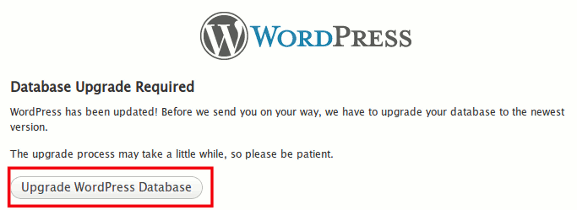
Login to the site WP’s dashboard. You will be asked to upgrade your database. Click “Upgrade Database“.
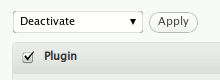
When you are in the dashboard, head over to the Plugins section. You will need to deactivate all the plugins before you can upgrade your site to multi-users site.
Check all the active plugins and deactivate them.
Go to Tools -> Network. Select between Sub-domains or Sub-directories
Note: If you select sub-domains, you will need to configure the wildcard DNS record for it to work.
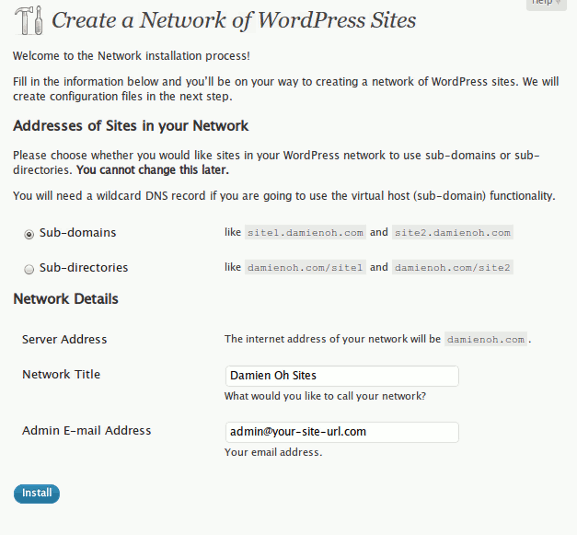
Enter the network name and the super-administrator’s email and click Install.
Now, if you have chosen “Sub-domains” in the previous page and you have not configured the wildcard DNS record, you will see the following error.

Ignore the error (for the time being) and proceed to the next step.
Copy the 2 sections of code and paste them in your wp-config.php file. Re-upload to the server.
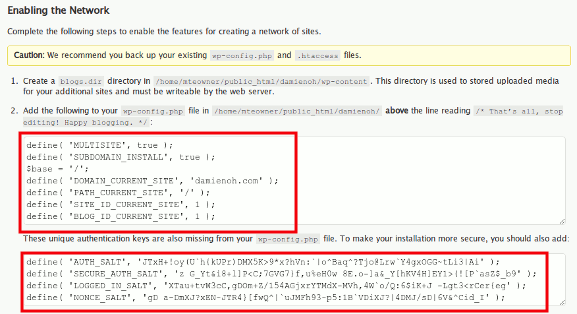
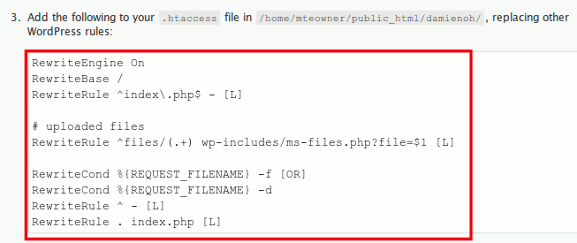
Copy the last section of code and replace the content in your .htaccess file. Re-upload to the server.
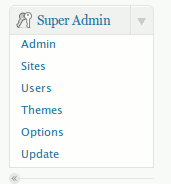
Now log out and log in again. You should see a super-admin section in the left pane.
Your site is now configured for multi-users blog network.
Configuring wildcard DNS
Note: Skip this step if you are using the Sub-directories or you have already configured the wildcard DNS.
Unless you own a VPS/dedicated hosting/reseller account, you won’t be able to configure the DNS record. However, you can submit a ticket to your web host and request them to help you to do so.
For those who have the access to WHM/cPanel, follow the instruction here to configure the wildcard DNS.
Things that you need to do after installation
1. Reactivate your plugins.
2. Create a blog.dir folder in the wp-content folder and make it writable (For Filezilla, right click on the blog.dir folder and select File permissions. Set the numeric value to 777).
3. Go to Super Admin -> Themes and activate the new themes.
4. Go to Super Admin -> Options and configure your multi-users site settings.
That’s it.








