

If you’re looking into building a computer or workstation, you may hear a lot of strange, unfamiliar terms that simply may not make any sense. RAID is probably one of them.
RAID stands for “Redundant Array of Independent Disks,” and it is a technology used with multiple hard disks for performance reasons, such as keeping backups (redundancy) or increasing storage space.
RAID isn’t often used outside of servers, but some enthusiast desktop builders like to have a RAID array anyways due to the capabilities RAID introduces.
So, what is RAID really?
RAID is the technique of using two or more hard drives to boost storage space, performance or redundancy within a computer. Different levels of RAID do these things with various techniques.
Of course, RAID isn’t the be-all, end-all of storage. Certain RAID configurations, especially those focused on performance or storage space, will have you losing all of your data should any disk in the array fail. Even if you’re using an implementation of RAID that keeps parity data and disks, you should always be prepared for infection or drive failure with secure, external backups for all of your important files. RAID is not a substitute for backing up your files.
RAID implementations and how they work
RAID has a great number of implementations, each designed around using multiple disks in different ways. RAID levels 2 to 5 all require three or more disks, while RAID 6 needs four of them.
There are seven standard forms of RAID, rated at different levels.
- RAID 0: Increases performance by spreading data across multiple drives. This technique is called “data striping.” It also boosts storage capacity.
- RAID 1: Mirrors the disks, making all their contents identical. Provides a performance boost in read times, but write times remain the same.
- RAID 2: Stripes data in a more precise manner at a bit level instead of RAID 0’s block level. Rarely used.
- RAID 3: Stripes data at a byte level between the level of precision between RAID 0 and RAID 1 and creates a “parity disk” which can be used in the case of the main disk failing. This is also rarely used.
- RAID 4: Stripes data at the default level used by RAID 0 and creates a “parity disk” which can be used in the case of the main disk failing. This also uses a parity disk. This method can cause performance bottlenecks.
- RAID 5: Stripes data like RAID 3 at a byte level. “Parity data,” used for backups, is on all disks in this setup. It provides great performance and fault tolerance and will survive one drive failure.
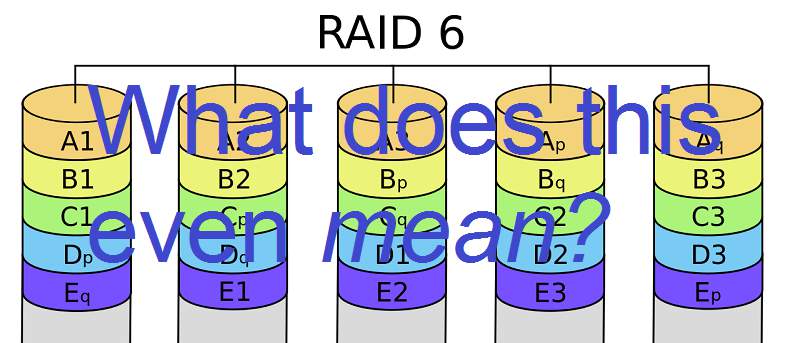
- RAID 6: Stripes data at the default block level and uses two different parity types. This system survives two drive failures.
- RAID 10: Multiple RAID 1 mirrors, and then RAID 0 applied over them all.
Most users prefer RAID 0, RAID 1, or RAID 5.
There are also special implementations of RAID, often hybrids of the others. They are, as follows:
- RAID 0+1: A combination of 0 and 1.
- RAID 7: Adds caching to 3 and 4, trademarked by Storage Computer Corporation.
- RAID 1E: RAID 1 with several (more than two) disks. Striping is combined with mirroring.
- RAID S: Parity RAID, a special method used and owned by EMC Corporation.
To use RAID, find the RAID array appropriate for your needs and find out how to implement it on your system.
Software vs. Hardware RAID
If you don’t want to do RAID through your operating system (called “software RAID”), you can also do “hardware RAID” which is done by buying dedicated hardware or compatible motherboards. To find out if your motherboard is compatible, look up your motherboard online – otherwise there are a variety of hardware RAID controllers for sale.
If you’re wondering which of the two is the better option, it depends. Hardware RAID is more expensive, requiring extra specialized hardware and a more complicated setup process. It is, however, more dependable than software RAID and won’t use any of your computer’s processing power.
Software RAID is done through your operating system and processor, so therefore it has its own overhead. On most modern machines, this shouldn’t be an issue, but on older desktops and servers, this could be a concern. Looking at price and performance, software is easily the best option – but if you need just a little bit of extra dependability, hardware may be better suited for your needs.
Coming soon, we’ll be covering software RAID tutorials for Windows and Linux. Stay tuned!
Image credit: The new RAID, Set up RAID-1 Array