Smartphones are becoming one of the main ways that people are using to browse sites. People are using them as a computer, telephone, camera, MP3 player, game system, etc. They provide flexibility and mobility when you are constantly on the move. Due to the increasing demand for smartphones, companies and individuals are having to ensure that their sites and blogs are mobile-friendly. If you are using WordPress to power your blog or site, there is a plugin that does the work for you. It’s called MobilePress.
What is MobilePress?
MobilePress is a WordPress plugin that uses customized themes to allow your WordPress blog or site to be viewable via smartphones. It also allows developers to create their own custom mobile themes if they do not want to use the ones provided. Mobile SEO is another feature that detects Google and Yahoo mobile search bots. The bots will use the mobile version of your blog/site, which will help with optimization on Google and Yahoo.
How do I install it?
- If you are using WordPress 2.7 or higher, you are able to search for the MobilePress plugin on the plugin search page and automatically install it.
- If you don’t, then you can click this link: Download MobilePress here
– Upload mobilepress.1.0.4.zip file into the /wp-content/plugins/ directory.
– Login to your WordPress admin page, click Plugins -> Installed. Look for MobilePress, and click the Activate link.
How do I customize it?
After installing the MobilePress plugin, go to MobilePress->Options.
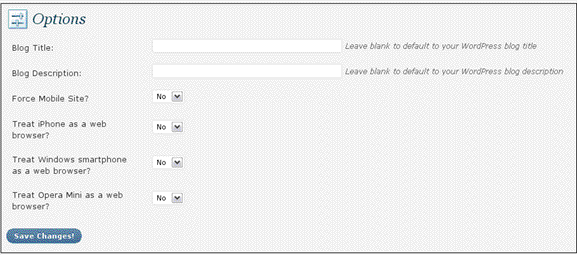
- If you want the mobile search bots to show a different title and description for your blog/site, then enter them in Blog Title and Blog Description. If not, then leave them blank.
- For Force Mobile Site?, leave it at the default, if you only want mobile sites to pick up the mobile theme. If you want normal web browsers and smartphones to pick up the mobile theme alike, then change it to “Yes.” It’s best to leave it at “No.”
- For Treat iPhone as a web browser, Treat Windows smartphone as a web browser, Treat Opera Mini as a web browser, leave it at the default if you only want the mobile theme to be displayed on the smartphone. If you want the regular web version of your blog/site to be displayed on your smartphone, change the appropriate one to “Yes.” As above, it’s best to leave on the default “No.”
How do I choose the mobile theme that I want?
After choosing your options, go to MobilePress->Themes.
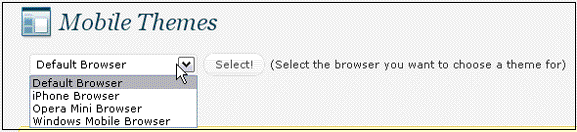
Choose the mobile theme you want, and press the Select! button.
What if I want to use my own mobile theme?
Upload your mobile theme to the /wp-content/plugins/mobilepress/themes/ directory. It will then appear in the MobilePress theme selector. You will now be able to use your custom mobile theme.








