I love using browser bookmarklets for two reasons. First, they do not require any installation and you can easily save or backup them in case you are formatting your system. Second, browser bookmarklets work seamlessly with multiple browsers and there aren’t any compatibility issues as such.
Another great thing about browser bookmarklets is that they don’t hog down your system’s memory because they are invoked only when you use them. Else, they sleep silently in your bookmarks toolbar.
While it is easy to add multiple bookmarklets to your browser, managing them can be an painful task. You have to search the desired bookmarklet from the bookmarks toolbar and repetedly click the folder containing the bookmarklets. Not to mention the valuable screen real estate taken up by the bookmarklets.
In this tutorial, we will learn how you can combine and concatenate multiple browser bookmarklets into one and use all of them without having to clutter your bookmarks toolbar. Moreover, you can share the bookmarklet collection with anyone and can use it from any computer you want.
How to Combine Multiple Browser Bookmarklets
1. First backup your existing bookmarks and bookmarklets as an HTML file. This will be handy if you want to revert to the older settings.
2. Go to the Bookmarklet Combiner website. You will see the following interface:
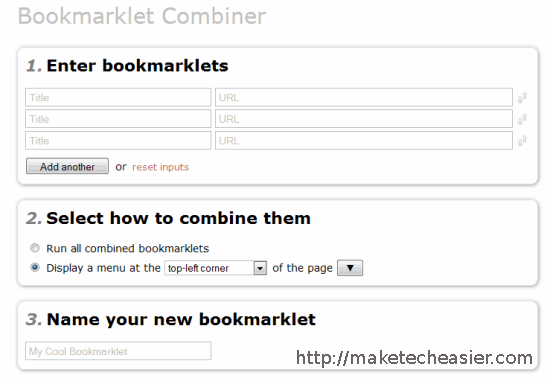
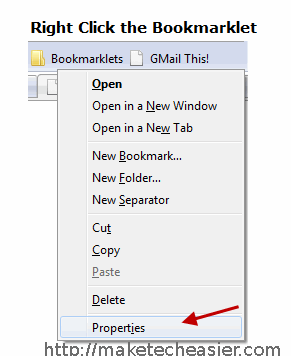
3. Now you have to copy the address property of a bookmarklet and paste it in the URL field in the Bookmarklet combiner website. To find the address property of a bookmarklet, right click it and select properties
4. This will open a small pop up window containing the location and other properties of the bookmarklet, as shown below:
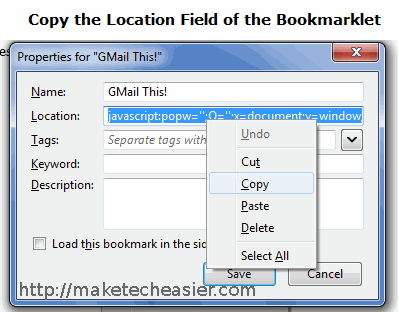
Copy the entire code shown in the “Location” field of the boomarklet.
5. Paste the code in the Bookmarklet Combiner website’s URL field. I have combined three bookmarklets in the following example, you can simply click the “Add Another” button to add a row and then enter the address of a new bookmarklet.
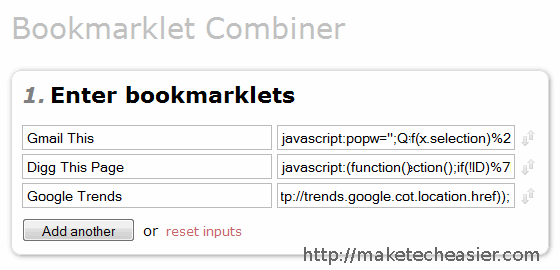
Make sure you enter a relevant title for the bookmarklet because this will be required to identify a bookmarklet from a crowd of many.
6. Now you have to select an action which will be triggered once you hit the combined bookmarklet button. You have two choices here:
- Run all the bookmarklets at once. This may be required when you want to perform multiple actions on a webpage by clicking a single button. For example – you can combine Tweet this, Digg This, Stumble it bookmarklets into one and click the combined bookmarklet to share a webpage instantly on these social bookmarking sites. Hitting this bookmarklet will automatically open three new browser tabs and all you have to do is sign in and take the required action.
- The second option is however much better – it allows you to select individual bookmarklets from the drop down list. Thus you have to click the drop down list each time you want to invoke a bookmarklet.
If you are a power user, go for the first option and combine groups of bookmarklets that solve similar purpose. If you are no geek and want an easy option to merge multiple bookmarklets and declutter your bookmarks toolbar, go for the second option.
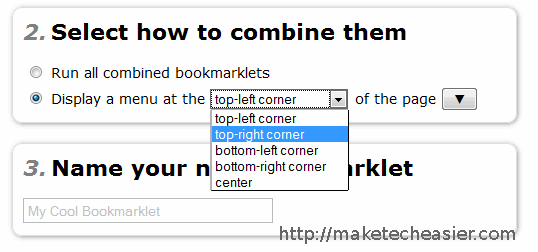
7. In the next step, specify a location where you would want to save the bookmarklet in your bookmarks toolbar.
You can also name your bookmarklet, this will be useful when you are dealing with different sets of bookmarklets as mentioned earlier.
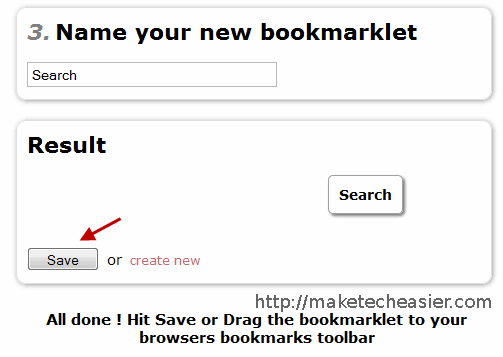
8. You are all done. Hit “Save” and the combined bookmarklet will be saved in your bookmarks toolbar. You will also be given a Unique URL containing all the address of the combined bookmarklet.
Here is how it works when you hit the combined bookmarklet:
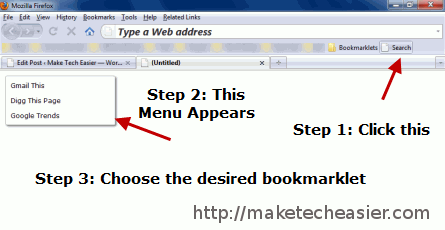
You can share the bookmarklet combination with anyone by sending them the URL. This is also useful in the sense that you don’t have to backup or export anything, a copy is stored in the Bookmarklet combiner website. When you are working over a friend’s house or on an internet cafe, simply open that URL and drag the bookmarklet combination in your bookmarks toolbar. Neat !
What are the browser bookmarklets you use or recommend ? Please share your ideas in the comments section.








