


Introduced in 2007 and required by 2012, sandboxing is a tool used by macOS to limit the damage that a hijacked app can do. Apple says, “While App Sandbox doesn’t prevent attacks against your app, it does minimize the harm a successful one can cause. macOS app sandboxing protects users by limiting how much trouble an application can cause.
Also read: 4 of the Best Sandbox Applications for Windows to Keep You Safe
What is macOS App Sandboxing?
Each app gets its own area to play in: a “sandbox.” If the application wants to reach outside its sandbox, it needs to ask the operating system for permission. Depending on the sandbox settings, the OS will either deny or approve the application’s request while providing the least specific information possible to complete the request.
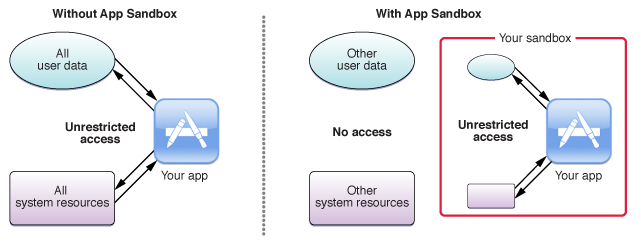
Think of a car. The driver is protected by multiple security features like anti-lock breaks, air bags, crumple zones, and more. In 2007, the time of App Sandboxing’s introduction, no analogous computer systems existed. As the introductory presentation asked, where were the seat belts for computers? Sandboxing protects users like cars protect their drivers: meeting failures with damage-reduction systems. Whether caused by malicious activity or coding errors, damage goes down.
Because sandboxing limits what apps can do, it can restrict developer freedom. Sandbox apps run more slowly and take longer to develop. Thanks to the Mac’s enormous capability, sandbox limits can have a huge impact on the compatibility of various apps. As a result, power users are often driven to choose apps that run outside the sandbox, either for performance or feature issues.
How Does App Sandboxing Work?
Sandboxing is based on the principle of least privilege. In short, systems can do what they need to do but no more. By limiting each part of a system to completing only its declared goal, you reduce the chance of your app being hijacked. For example, there’s no reason for a flashlight app to have access to your contacts list.
Apps can reach outside their sandbox but only with operating system permission. Take the “Save and Open” dialog box in macOS. The app, inside its sandbox, cannot directly access filesystem resources on your hard drive. It cannot, for example, draw an open panel at “~/Documents.” Instead, the app must ask the Powerbox API with NSOpenPanel and NSSavePanel classes to access the panel.
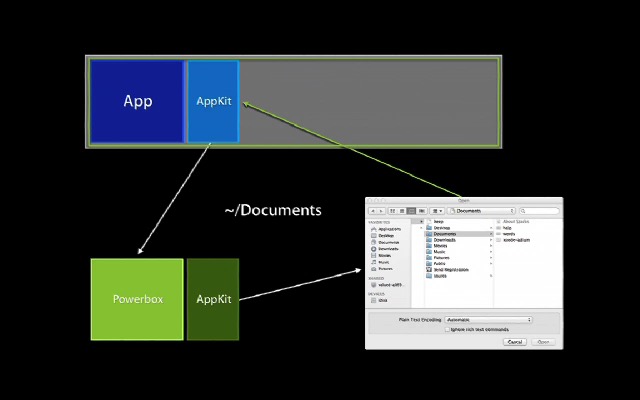
The application cannot see what’s happening inside Powerbox directly. Only the opened or saved file will be accessible to the app. This way the apps can perform critical functions without unnecessary risk.
That functionality is enabled by an entitlement (specifically com.apple.security.files.user-selected.read-write). App developers set entitlements which declare what an app does. Based on the declared entitlements, the operating system permits the application an appropriately-limited level of functionality.
This thought process underlies the entirety of the app sandboxing model and mechanism: apps must declare intention and ask permission from an OS-level boss to accomplish anything dangerous.
Sandboxed Apps vs. Non-Sandboxed Apps
Since June 1st, 2012, all third-party applications distributed through the Mac App Store must be sandboxed. While sandboxing does permit a large range of app functionality, you’ll find that Mac App Store apps are often more limited than their non-sandboxed components. Some developers even maintain two versions: a fully-featured app for direct download and a gimped version for the Mac App Store. Thanks to the greater complexity of sandbox development, adding new functionality to an application is more difficult – if that functionality is even permitted by the OS, that is.
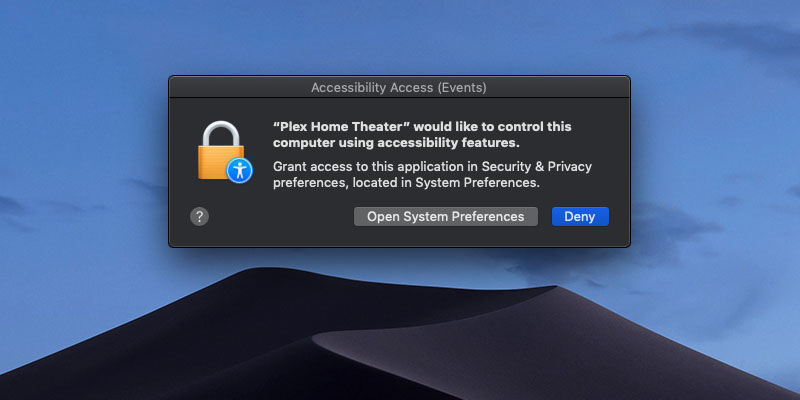
While sandboxed apps can get the benefit of Mac App Store distribution, you can guess how valuable we think that is. Sandboxing can also be extended with security permissions. While an app cannot turn on Accessibility permissions for itself, it can ask the user to do so.
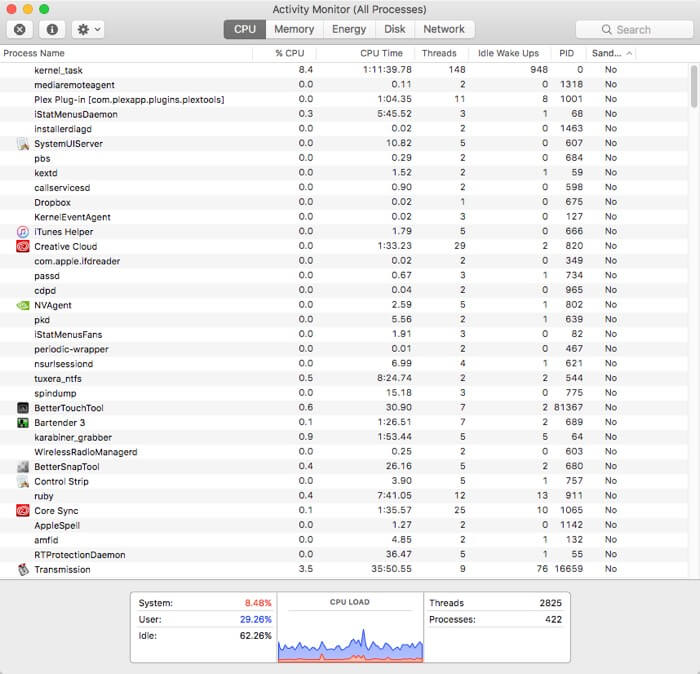
To see which of your apps are sandboxed, open Activity Monitor, and right-click the column titles to add “Sandbox” to the window.
There are some apps that can simply never exist in a sandbox. In fact, a variety of valuable use cases are prevented by sandboxing. Sandboxing prevents inter-application communication, observation, or modification, significantly limiting how applications can interact. System-wide shortcuts like TextExpander are totally prohibited, since that level of functionality could be permitted by the sandbox.
Conclusion
While promising, macOS app sandboxing wasn’t executed well. It limited the unique selling points of Mac apps, like speed and enhanced functionality. Apps running outside the sandbox are almost always more capable and faster. From this power user’s perspective, my most-used apps are non-sandboxed. Apps like TextExpander, SnagIt, and TotalFinder are all crucial to my daily work. To avoid similar widespread avoidance, future security systems need flexibility and power balanced with transparency.
Image credit: Apple