A few weeks ago I was re-listening to an audiobook by Seth Godin called “Purple Cow”. One part talked a little bit about a person who randomly sent people at Google an email if the word count got too high on the main search page. These emails help them keep the search page exactly what it is designed to do. Compare the main search pages of Yahoo.com and Google.com; which one are you more likely to get distracted on?
My main personal homepage has been iGoogle for a long time. I use the tabs to keep things sorted. In those tabs are some RSS feeds, a couple of gadgets, webmaster tools and some mindless time wasters. I have to admit, I really don’t use the different things on the homepage much; they are what I am used to.
When I am sitting at my desk and trying to focus on work, it is all too easy to lend my attention to something much more interesting than what I should be doing. Going to a search site or looking at the auto-suggestions when typing in a bookmark tag can easily steal your attention.
I have recently been trying out a different homepage at work. 43marks isn’t as flashy as some of the home pages out there, but flashy is usually distracting. How 43marks differs from other homepages, is how much it offers in such a simple layout. 43marks combines two things people use on a daily basis: bookmarks and search engines.
Having four options to search at your fingertips without all of the typical distractions and random links associated with some sites is a breath of fresh air. Google, Yahoo, Bing and Wikipedia are probably the most commonly used search engines. All of them aggregate the “top sites” in a different way. Type in a search term and get the results from Google; to see what Yahoo,Bing or Wikipedia simply click that tab and the results shift to the other search engine’s results.
To personalize your 43marks homepage, follow these steps:
1. Click on the the “customize yours” tab in the top right corner of the main page.

2. Enter in a user name, email address and a password twice.
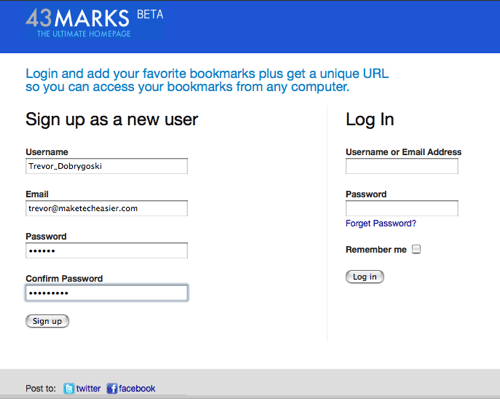
3. Once you are all set up, you will have a default list of bookmarks and RSS feeds.
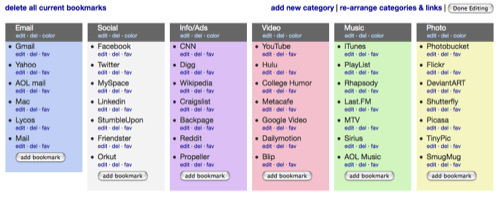
4. To change the bookmarks and RSS feeds, click [Manage]
5. Three options are presented to you: Manage Bookmarks, Manage RSS Feeds and User Settings.
If you want to wipe the slate clean, 43marks does give an option to delete all bookmarks.

6. In the RSS Manage RSS Feeds tab, the same option to start from scratch is available.
* A pretty easy way to add a feed is to click on the RSS icon most sites have. This will pull up a page with the feed address listed. The feed URL should look something like this – http://feeds.feedburner.com/MakeTechEasier
The RSS part works well, but if you want to change a feed from ESPN to Make Tech Easier, you need to delete the old one and add in the new name and address.
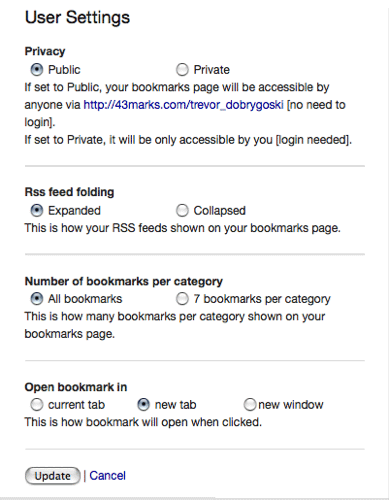
7. In the User Settings, you are presented a four options:
- Choose whether you want your page to be private or public so anyone can see your list of bookmarks and RSS feeds. If you choose public, just give our the URL to your page. Mine is 43marks.com/trevor_dobrygoski

- How you would like the RSS feeds displayed – Expanded or collapsed
- The maximum number of bookmarks to display in each category column
- How you want the bookmark or RSS link to open when clicked
With all of the distractions present to anyone who works online, 43marks is a great solution to wrangle the information you NEED to look at and none that you don’t.
What tools do you use to cut down on distractions when you work online?








