No one, except YouTube TV, was happy when their bills jumped by $10 per month at the end of 2024. While this led to many users cancelling, the service is trying to keep other users by hiding away a special YouTube TV discount to help you reduce your bill by $10/month.
Temporary Monthly Discount to Ease the Pain
I know $10 doesn’t sound like much of an increase, but with most of our favorite streaming services increasing over the last year, it all adds up. The pain to our wallets is all too real. YouTube TV apparently understands that.
Some users were offered a discount back in December when they started the cancellation process. That was only for six months and now the service is back to full price.
Once again, many users are being offered a temporary monthly discount of $10/month. This places the service back at $73/month. Just like the previous discount, it only lasts six months, but that’s $60 back in your pocket.
Check for Your YouTube TV Discount
I want to make it clear that not all users will see this discount. And, it’s not immediately obvious, especially if you rarely check out your account settings.
You must do the following from a computer or the YouTube TV mobile app. You can’t manage your membership from your TV.
Log in to your YouTube TV account, click your profile icon, and click Settings -> Membership. Click Manage next to your Base Plan.
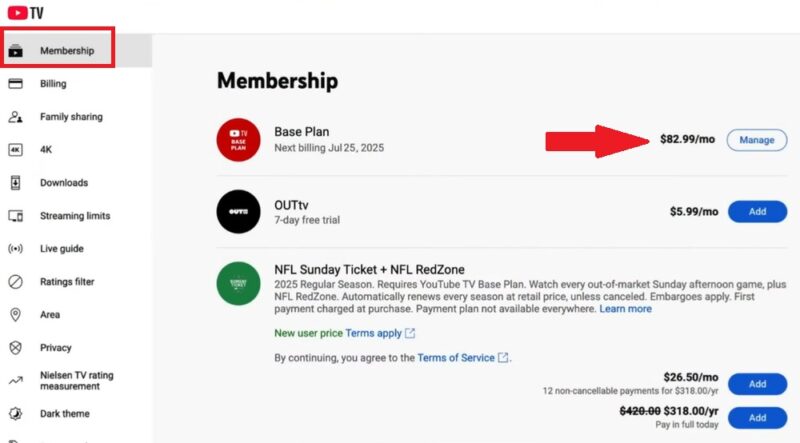
Look for Get $10 off your current plan. If you don’t see it, YouTube TV’s not currently offering you the discount. I suggest checking back every few weeks as this deal may be rolling out gradually to more users.
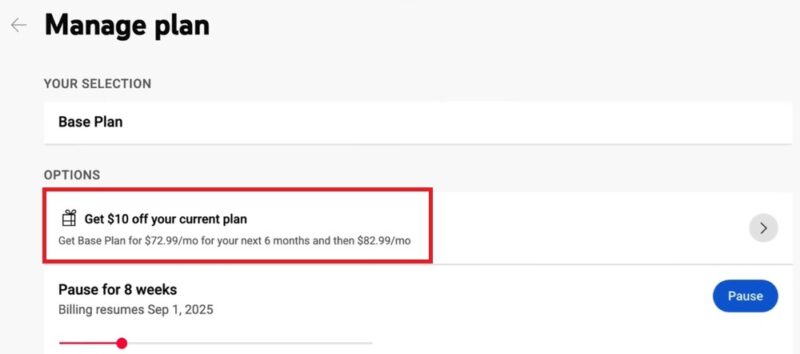
If you do see it, click it. This redeems the offer and you should see the discount applied during your next billing cycle.
Remember, after six months, your service jumps back up to the regular price.
Try the Fake Cancel Method
If you don’t have the offer, try the fake cancel trick. It doesn’t always work, but it’s well worth trying. In your YouTube TV account, click your profile icon and go to Settings -> Membership -> Manage next to Base Plan. Scroll to the bottom and select Cancel.
Some users are offered a YouTube TV discount for a set period during the cancelling process. If you’re not offered anything, just don’t go through with cancelling.
Another option is to cancel and wait. Often, YouTube TV offers welcome back offers if you’re patient.
Pause YouTube TV When You’re Not Using It
Unlike traditional cable that often hit you with huge early cancellation fees, YouTube TV works like every other streaming service. You’re only on the hook for one month at a time. If you tend to only watch your favorite local and cable networks certain times of the year, such as various sports seasons or fall TV premieres, score a discount of hundreds per year.
YouTube TV lets you pause your service for up to eight weeks at a time without cancelling. In the course of two months, you’d save $166. Do this a few times a year and you’ll have over $330 back in your pocket.
In your YouTube TV account, click your profile icon and go to Settings -> Membership -> Manage next to Base Plan. Click Pause.
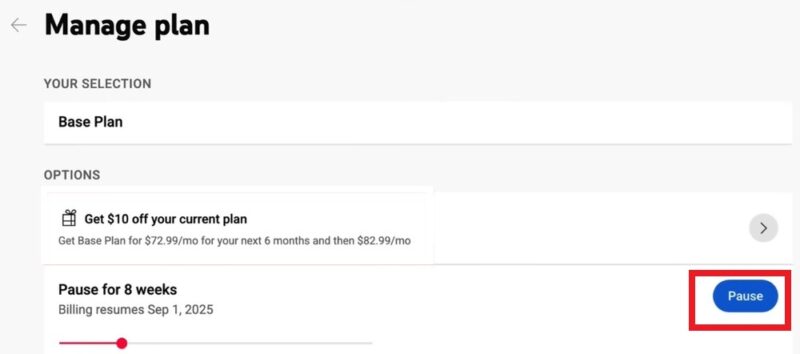
This goes into effect with your next billing cycle. If you’ve already paid for the month, you usually won’t receive a refund. Instead, the eight weeks start after your current paid period ends.
Another benefit is you may be offered a discount to come back sooner.
Cancel Add-Ons
Another way to reduce your YouTube TV bill is to cancel add-ons. If you’ve added other services or upgrades, see if you really need them. For instance, if you’re paying for 4K streaming, but rarely watch any content in 4K, it’s not worth the extra.
Also, check to see if any other streaming services you subscribe to offer the same content. For example, Paramount+, Peacock, MAX, Netflix, Amazon Prime, and more are all offering various live sports streaming. Paying for the same content twice isn’t worth it.
Opt for FAST Services or Other Alternatives
Obviously, the benefit of YouTube TV is the unlimited DVR. Just fast-forward through pesky ads. If you’re not eligible for the YouTube TV discount or are looking for a more traditional TV experience while you have your service paused, try FAST (free ad-supported TV) services.
You’ll find many current TV shows and movies from your favorite cable networks for free. You just have to put up with ads. In my experience, ads are usually around 4-5 minutes total for a half hour show.
Of course, you can mix and match streaming services and skip YouTube TV altogether. You’ll often find your local news and sports on other services. For example, your local CBS affiliate and station is on Paramount+. Plus, there are various ways to save on streaming.
Also, check out YouTube. Many local news stations stream their news and weather for free. If you subscribe to YouTube Premium, which is significantly cheaper than YouTube TV, you’ll get the content ad-free.
The lesson is, you do have other options. As far as live TV streaming services, they’re all priced similarly and keep going up. Taking a stand by cancelling or pausing could score you major discounts.