
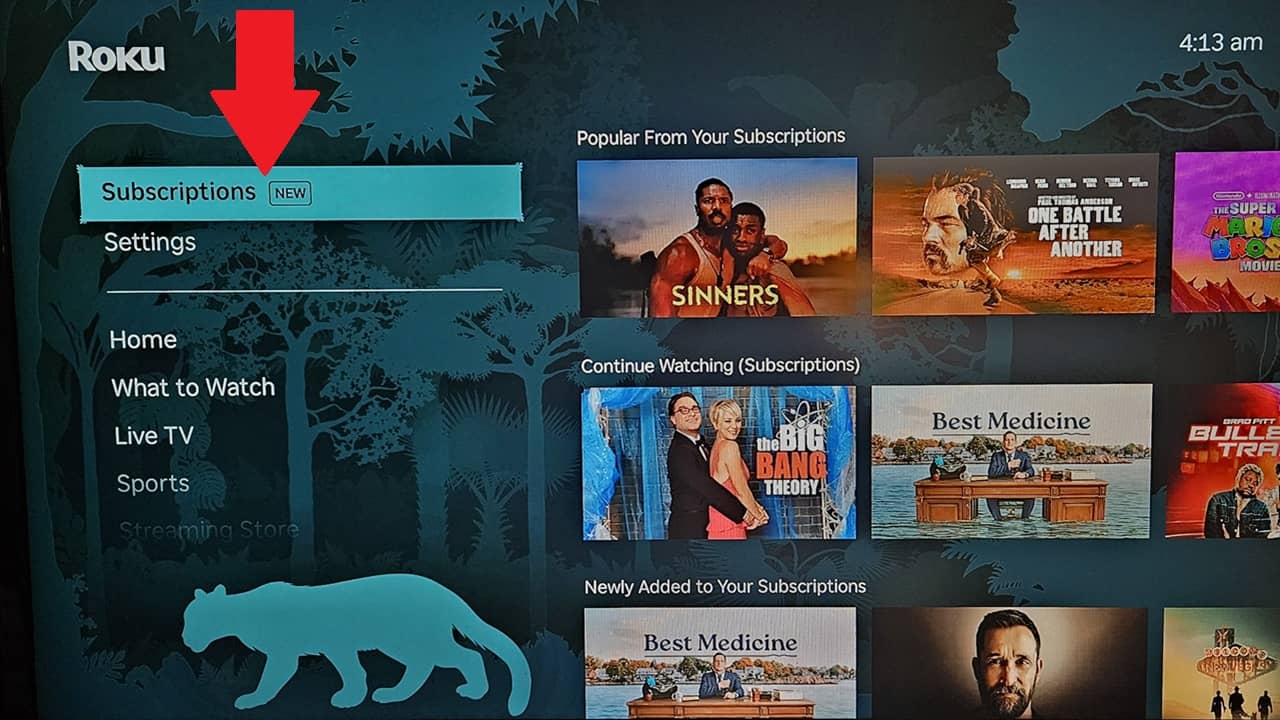

The one thing I love about Google TV is having the shows I’m currently watching and the latest releases from my subscriptions in one place. Now, as a Roku user, I’m thrilled with the latest Roku Subscriptions feature that makes Roku even more user-friendly.
What is Roku Subscriptions
I woke up to a shiny new Roku system update, Roku OS 15.1, which added a new feature to the left-hand menu. The new Subscriptions option instantly stood out, but as usual, Roku doesn’t really tell you much about updates. You just kind of explore and find out what changed.
While Roku’s layout has always been my favorite for accessing my streaming apps, I’ve also used Google TV and loved having an easy way to jump back into my what I was watching last without jumping from app to app.
Now, Roku Subscriptions does just that without cluttering up my home screen like it does on Google TV. I get the best of both worlds.
All your subscriptions are listed in this one section. You don’t have to subscribe to the services via Roku for them to show up, though those subscriptions show up there too. For example, I only have one premium subscription directly through Roku. That one and all my others show up happily together on the same Subscriptions screen.
Let me point out this is completely different from viewing premium content from subscriptions within the Roku app itself.
If you’re a sports fan, you may also want to check out the Sports Zone section to find all your favorites in one place.
View the Latest Releases From All Streaming Apps
Usually, to view the latest releases from streaming apps I’m subscribed to, I have to open each app individually and scroll through to see what’s new.
Now, I open Roku Subscriptions from the Roku home screen. Look for Newly Added to Your Subscriptions. Here, all the latest releases are listed. At the time of writing, I had 35 shows/movies listed. As you scroll, it shows exactly which app has the show. It’s that easy. Considering I have nine streaming apps, this saves me a lot of time.
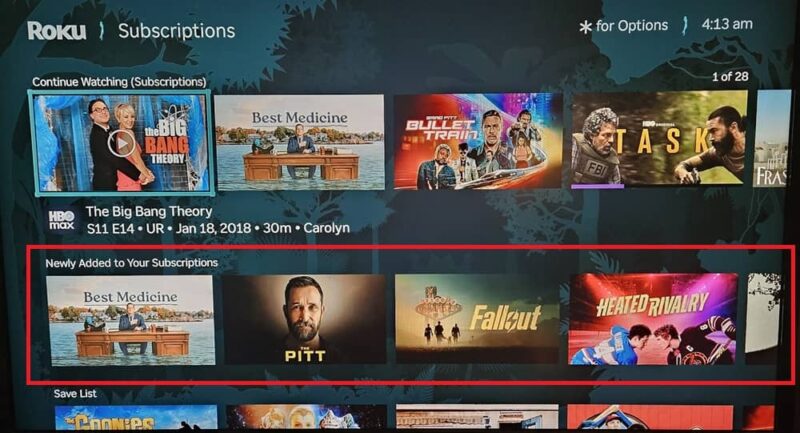
Pick Up Where You Left Off
Just like with newly added content, look for the Continue Watching (Subscriptions) row. This only includes content from premium subscriptions, not FAST TV services.
Jump right back in where you left off. My favorite part is if you have multiple profiles on a subscription, it lists which profile is associated with that show/movie. This makes it easier to keep track of who was watching what.
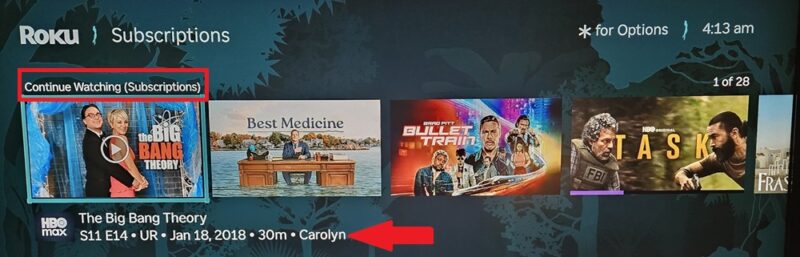
I’m not sure how many shows/movies may display in this row, but I currently have 28 showing.
Check Out Popular Picks
Want to check out all the latest shows everyone’s talking about? Just browse the Popular With Your Subscriptions section. This isn’t always the latest releases, but what’s most popular on the streaming apps you subscribe to.
Typically, I have to visit each app and scroll down numerous rows just to see what’s currently popular. I’ve found out more about what’s popular on my favorite apps in a few minutes than I usually discover in 30 minutes.
View Trending and Recommended Per Subscription
Roku Subscriptions also breaks down each individual subscription with its own row. No matter how many you have, each premium streaming service gets its own row. This gives you a mixture of trending, newly released, and recommended shows/movies based on what you usually watch.
Just scroll down to Included with App Name Subscription to view content. Each row has approximately 40 options. This is a great way to find something to watch without having to open each individual app.
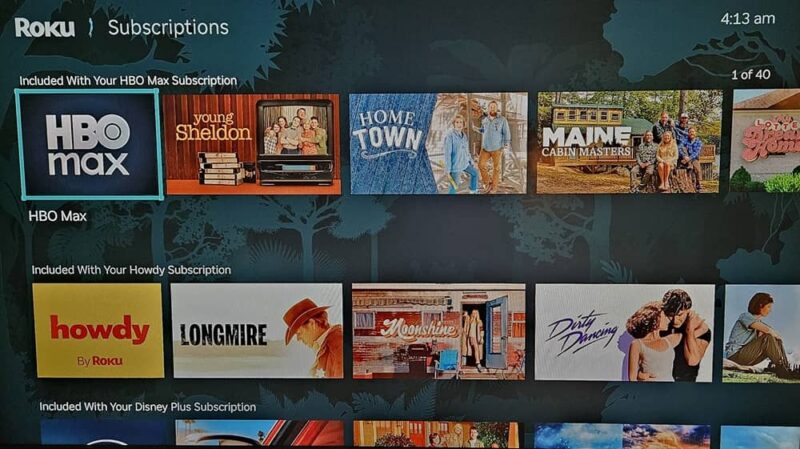
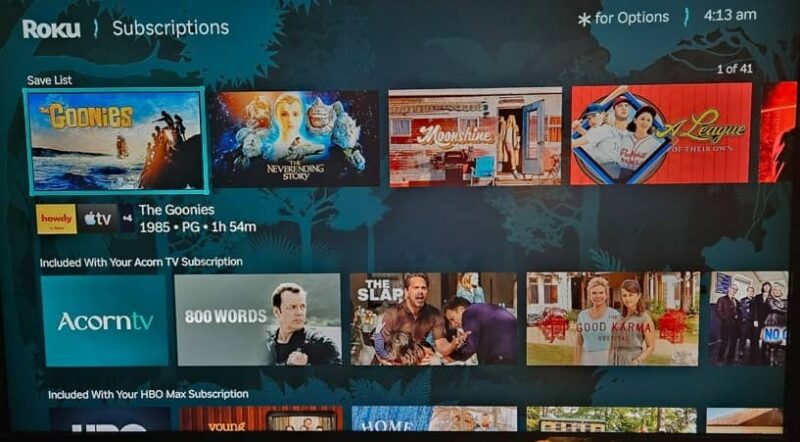
It kind of feels like a digital TV Guide on my Roku home screen. The image above also showcases that Roku Subscriptions shows streaming services I subscribed to within and outside of Roku. For instance, I subscribe to Howdy from Roku itself. I subscribe to HBO Max and Disney Plus through Disney Plus.
Browse Your Save List
If you’ve saved anything in your Roku Save list, you’ll find those shows and movies here too. If any shows are on multiple services, you’ll see a list of those services under each title.
View Extra Content You’re Not Subscribed To
This new feature mainly focuses on content you’re subscribed to. But, what if you want to know what’s trending on other apps?
Scroll down past the Your Subscriptions section, which shows all the apps you’re subscribed to, to view recommendations from other premium apps. Anything with a dollar sign means you’ll need a subscription to view it.
Get Roku Subscriptions Feature Now
By default, your Roku device should automatically check for updates daily. If your device hasn’t updated for any reason and you don’t see Subscriptions on the Roku menu on the left, go to Settings → System → Software Update. Check for updates and let your system update to the latest version.
While Roku Subscriptions lets you jump directly into your premium services, you can still just use the app icons from the home screen if you know exactly what you want to watch. If those icons disappear, here’s how to fix them.