If you haven’t been bothered by Google ads, you have never been on the Internet. They are everywhere and seem to follow you in a creepy way – it’s as if they know everything about you. Finally, Google has created “My Ad Center,” allowing you to control which ads you see where and how often. Just don’t think you’re going to eliminate them forever, as that is never going to happen.
My Ad Center
No matter what you’ve searched for, Google knows about it. Whether you’re searching for medical symptoms you’re experiencing and what they mean, activities for your next vacation, or what a former love is up to, you’ll see ads next to those search results. And if you’re not bothered by it, you’ve picked up an ability to somehow ignore it.
Offering users ways to control the personalized ad experience isn’t new for Google – you can already do that. But Google is going further with My Ad Center, offering you more control and an easier way to get it.
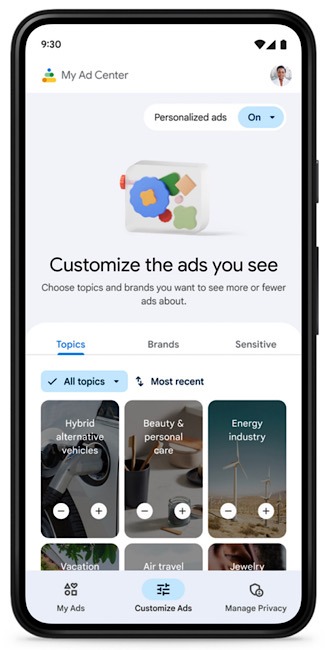
Google announced My Ad Center on October 20, 2022, by stating that the new feature would “start rolling out to users around the world to help you control the kinds of ads you see across Google on Search, YouTube and Discover.” This control also includes blocking sensitive ads so that you never have to see them and an option to learn about how Google uses your information to personalize ads that you see.
The announcement also promises that “you will never have to spend time searching for the right control or decoding how your information is used.” It will allow you to manage all that at the moment it strikes you that you need to change that, causing less interruption.
Google vows that its “privacy principles” will not allow it to “sell your personal information to anyone, and we never use the content you store in apps like Gmail, Photos, and Drive for ads purposes.” It also will not use your sensitive information to personalize ads.
How My Ad Center Will Affect You
Google’s example of how it can help you asks you to imagine spending months researching a beach trip. Now that you’ve returned, it imagines you no longer want to see vacation ads. And that is, of course, why Google shouldn’t be controlling that information. You’re back from a cruise vacation and certainly don’t want to be met with reality; continuing to dream about a bigger, better cruise vacation would be a much more pleasant experience than dealing with the realities of life.
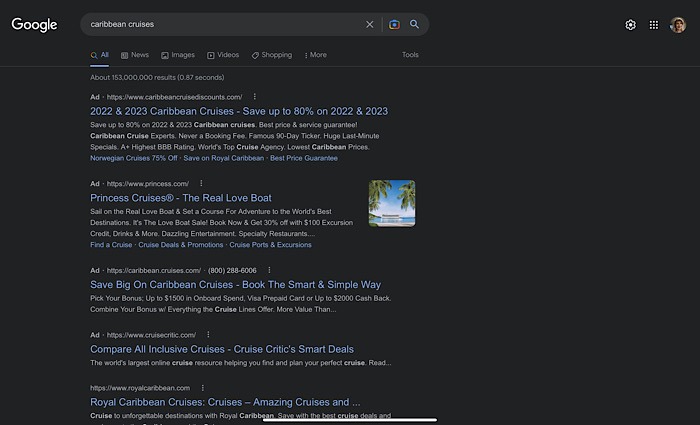
Let’s change that example. Perhaps you don’t feel well and are concerned that you may have COVID. You hit Google and search COVID symptoms. You take a test and find out that you do indeed have COVID. But once you recover, you’re so glad to be feeling well again that the last thing you want to see is multiple ads about COVID tests, vaccinations, etc.
Now you’ll be able to tap the three-dot icon near a COVID-related ad and choose to see fewer ads like that. You can also choose to see more ads like that, but let’s keep this plausible. The same applies to YouTube. Click the three-dot icon next to an ad and choose to see less or more of that ad topic.
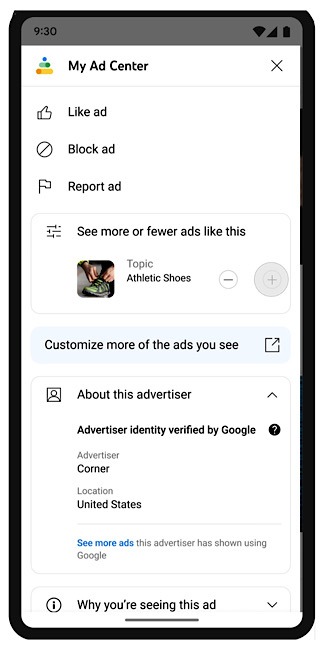
Previously, your YouTube history was used to set up the personalized ads you would see. But if you don’t want your Google history used in that manner, you can visit My Ad Center and turn it off. You can also adjust or turn off how categories in your Google activity will inform your ads. If you’re Googling the best dating apps, you can turn off ads for singles.
You will not have to make these adjustments on all of your devices. If you set your preferences in My Ad Center on your phone, it will automatically apply to all the devices where you’re signed in to your Google account.
Google said it would start rolling out this feature, but it is still not on my devices at the time of writing.
If it’s images you’re searching for, check out these other image search engines you can try.
Image credit: Unsplash. All screenshots by Laura Tucker.