When you are writing for a website of any kind, the overall goal is to get traffic. If you don’t get traffic to your site, then it isn’t really worth your efforts. SEO or Search Engine Optimization is something you need to consider if you rely on “organic” search engine traffic to feed your site. Typically if you are writing good quality posts, there isn’t a need to stuff them with all kinds of words and phrases to attract the search engine traffic; it will happen over time.
Since a lot of web designers and web workers use Firefox, it makes sense there would be a multitude of extensions to test the SEO of a site. Even if you don’t actively do much to insert keywords into your site, it isn’t a bad idea to know how to do the basics.
1. KeywordSpy SEO / PPC Plug-in (Update: no longer exist)
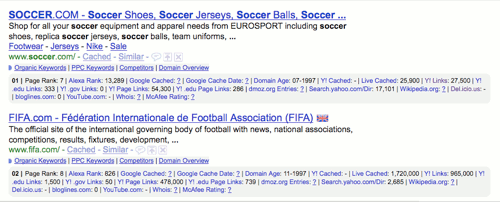
KeywordSpy works in conjunction with your favorite search engine. Once the plug-in is installed, you will immediately notice the difference when you search. Searching for anything will display a bunch of additional links and options are added under the site description. Some of the new additions are: Rankings, number of links to the site, organic and PPC keywords.
If you need more information, one of the 3 paid options could be purchased. According to the list of client who use this service, you would be in the company of some heavy hitters like American Express, IBM and Toyota. That means it must be good right?
2. SeoQuake
Seoquake has similar options as KeywordSpy. The layout in the search window is a little more cramped, the logos for the sites whose information is being displayed makes it a little easier to decipher. If you like, SeoQuake allows you to save and download the information to CSV (comma separated values) file for you to view later in Excel.
One thing I really like about this plug-in, is just under the main Google search bar now resides a [related keywords] link. If you would like a better idea of phrases or keywords a competitor is using, simply click on [more keywords]. You will be whisked away to a page with plenty more.
3. SearchStatus
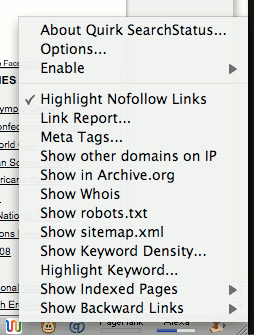
SearchStatus seems to be the easiest on the plug-ins so far. It is very straight forward and least invasive. Your Google searches still look as they did before.
If you want to put SearchStatus to work, you can Ctrl (or right) click on the icon in the status bar. Doing this brings up a contextual menu with all of your options. These features will stay turned on as you move from page to page.
For example, say you wanted to see all of the nofollow links on a site. Turn this option on in the menu and where ever you go these kinds of links will be highlighted.
SearchStatus will highlight the keyword you are searching for, as well as telling you how many times it is used on the page. Sometimes it is a good idea to see how your competitors are working these words into their content.
4. KGen
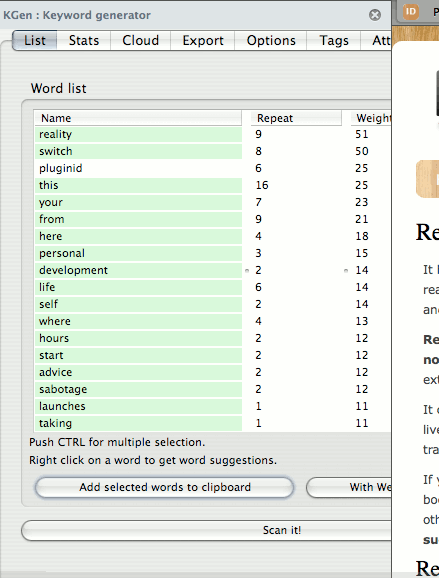
KGen, short for keyword generator, is a sidebar pop out which makes it stand out from the others. This plug-in’s sole purpose is to display the keywords on a specific page. The words are ranked by the number of times they are repeated and the weight of the word.
5. Foxy SEO Tool
Foxy SEO Tool is fast becoming my favorite plug-in. It seems to have the best mix between tools and usability allowing access to the search options one of two ways.
The first is via the toolbar. I am personally not a big fan of addon tool bars, but when you are using Foxy SEO Tool for multiple searches, it does make things easier. Click on the menu you want to see and out comes the drop down with all of your choices for that menu.
The second option is the standard Ctrl (or right) click contextual menu option. This option is handy to take a quick look at something that catches your eye.
6. SEO for Firefox
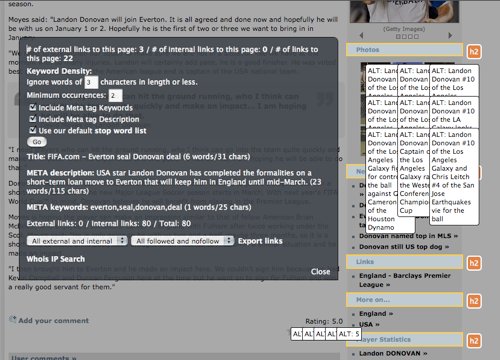
I have used this extension for a while. I find it to be very handy when I am looking for information on a site I am working with or checking out a competitor. It is easily toggled on and off by clicking the icon in the status bar.
When its time to use SEO for Firefox, you can access it by Ctrl (or right) clicking and working your way over to the options. The feature that sets this SEO for Firefox a part from the rest is the SEO xray.
What makes this option so great is it shows the incoming, outgoing, nofollow, Meta keywords, HTML tags and all kinds of other stuff in a pop out window. Then if you want to see the keywords, there is an option for that as well.
What kinds of tools do you use to better your search engine rankings?
Image credit: Jeffrey Beall








