Spotify Wrapped has become an annual digital ritual, and the 2025 version has come with a few new features. If you’re confused about the new Wrapped Party and Music Club features and want to make the most of your stats, here’s how.
How to Actually Explore Your Wrapped
Wrapped 2025 is both a recap and a dashboard if you know where to look. If you haven’t gone through your Wrapped before, it’ll be a dashboard banner right on your Spotify home screen. But if you have, you’ll see it right next to All at the top of the screen on your homepage.
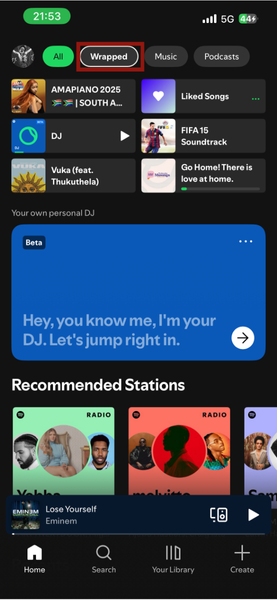
After clicking the Wrapped category, you’ll see Your Stories, Wrapped Party, and other categories at the top of the screen. This allows you to skip the trouble of sitting through the entire slideshow again.
But you might want to do that to ensure you don’t miss anything. To go through your entire Wrapped again, tap the Your 2025 Wrapped banner in the middle of the screen.
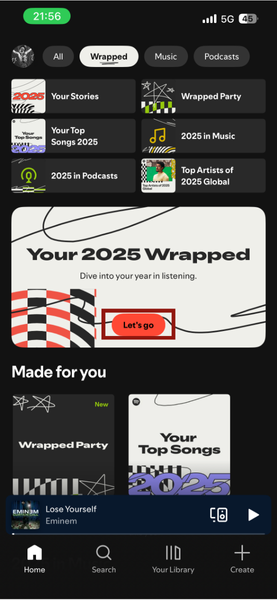
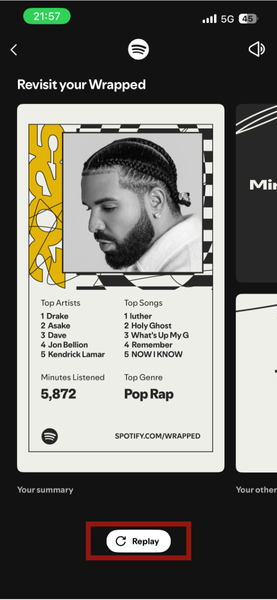
Right below the screen, you’ll see a Replay button that replays your Spotify Wrapped from start to finish.
Use Wrapped Party with Friends to Receive Awards
At its core, Wrapped Party is a shared listening comparison engine. To use it, you create a Party with your friends or people who share similar tastes.
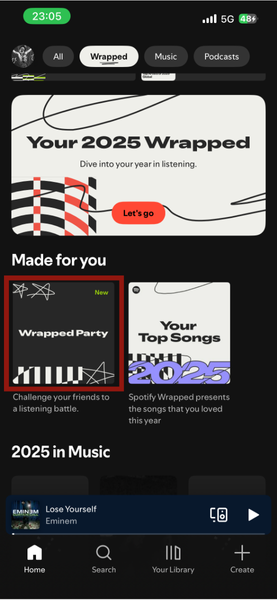
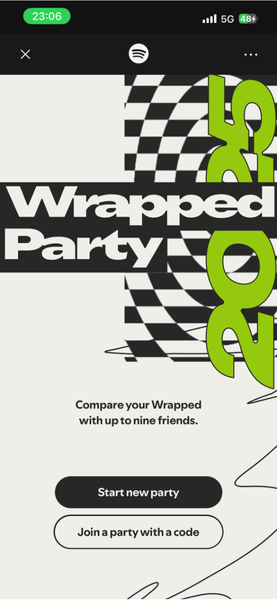
Under the Wrapped category -> Made for you section, you’ll see Wrapped Party. Once you tap it, you’ll be taken to a page where you can either start a new party or join a party with a code if someone else created it.
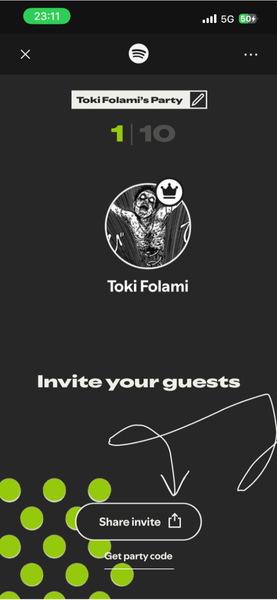
If you click Start new party, you automatically become the host and control the experience. You get to edit your profile before inviting members, or you can continue with the party creation directly. As a host, you can edit the party name and invite others by sharing a link or a party code. The invite link lets people join directly, while the code gives them a number they can enter to join your party.
Once your party starts, stats like Most Minutes Listened, Rarest listen, and Who discovered the most artists? get compared. You might receive awards like The Inner Stillness Award or The Onion Chopper Award.
However, awards are not determined by how many total minutes listened, but by your listening behavior. You may get some awards with certain people and not with others.
Good to know: To have a party, all members must join at the same time. You can only have a maximum of 10 members, yourself included. Also, you have to actively end the party, by closing the listening session yourself.
Join Your Music Club and Check Your Club Favorites
The Music Club is how Spotify groups listeners based on similar music tastes. You can find your assigned club within the Listening Club story in Wrapped.
Simply open your Wrapped and swipe horizontally to the end of the screen.
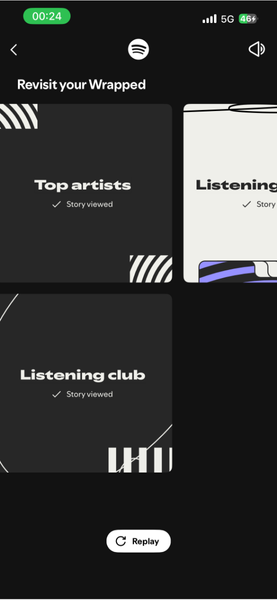
The club you see reflects the listening patterns your activity most closely aligns with. You are also given a Club Role and Club Favorites.
Club Favorites are artists that most people in your Music Club are listening to. If you see an artist you don’t recognize, it is a good opportunity to explore them and discover new music, as they likely align with your taste.
Dive Into Your Listening Archives
You can access your Listening Archives the same way you’d access other Wrapped stories.
Your archives are snapshots from different days during the year, and they differ from person to person. It shows your total listening minutes, tracks played, and artists streamed on specific days, helping you review your listening habits rather than just discover new music.
Turn Your Auto-Created Playlists Into Real Playlists
Spotify automatically creates Wrapped playlists, including Your Top Songs 2025. But these playlists are fully editable and can be reused long after Wrapped ends.
Your Top Songs 2025 playlist is under the Top song sub-category of Wrapped. You can also find it on your home screen if you accessed it recently or in Your Library.
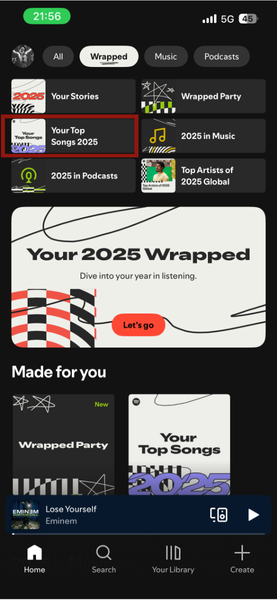
From there, you can reorder tracks, remove songs you are tired of, or add new songs that fit the same vibe.
Tip: If you want a fresh version, use Smart Shuffle to let Spotify recommend similar tracks without overwriting the original list. Also, if you prefer smaller playlists, duplicate the Wrapped playlist, rename it, and trim it down to songs you will realistically replay.
Save Your Wrapped Data Before It Disappears
Spotify Wrapped is temporary. Once January hits, the stories disappear, and some data becomes inaccessible.
Save a Playlist
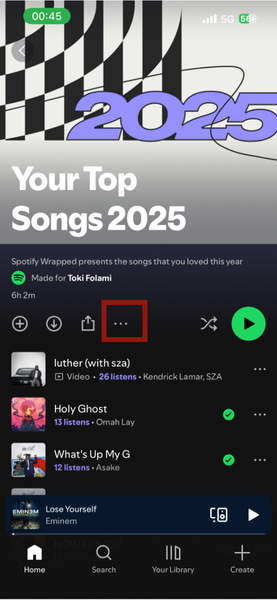
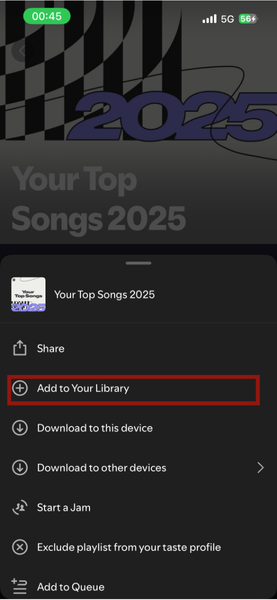
After opening a Wrapped playlist, tap the three dots and select Add to Your Library (or tap the Plus (+) button).
Save the Visuals (The Cards)
To keep the colorful infographics, like your Top 5 Artists or Listening Personality, you can either download directly or take a screenshot.
When viewing your Wrapped story on the mobile app, tap the Share this story button at the bottom of any card. Instead of posting it to Instagram/TikTok, look for Download or Save Image. This saves the image directly to your phone’s photo gallery.
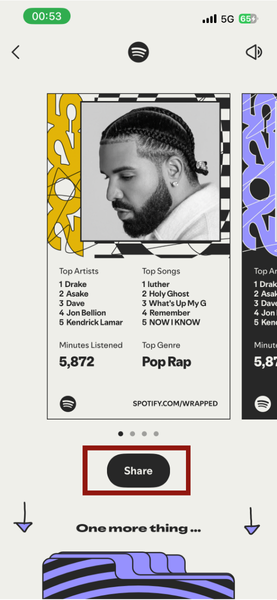
Go through your Wrapped story one last time and screenshot every slide you care about.
Export Your History
If you’re a data nerd, or you’re just in need of the spreadsheet which has everything you’ve listened to and not just the wrapped summary, you can request a raw data file.
Log in to your account page on Spotify (using a web browser). Then click on your profile and then Account -> Security and Privacy -> Account privacy.
Scroll down to Download your data. Here, you can download three categories of data that can be obtained separately or all at once. They include Account data, Extended streaming history, and Technical log information.
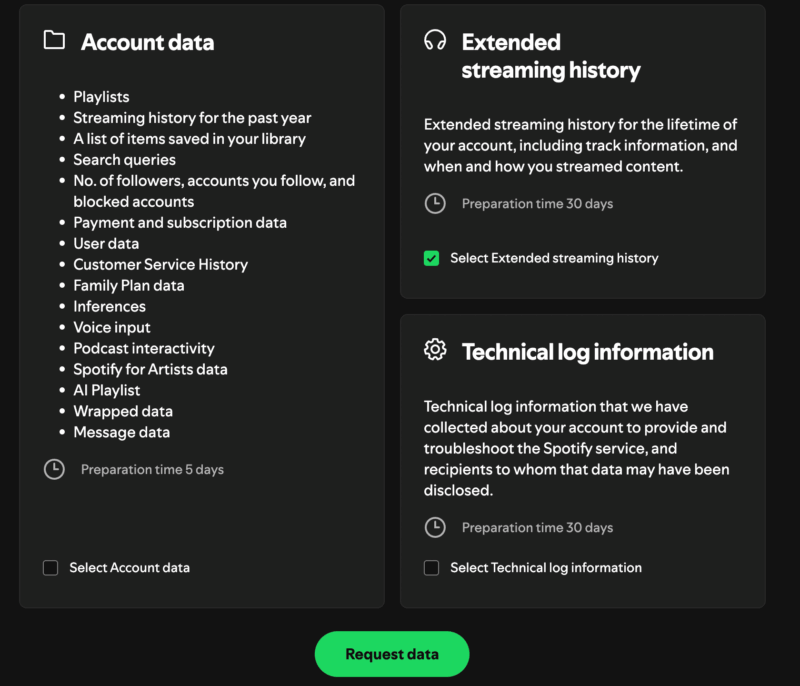
For this process, you should select Extended streaming history because it gives you the most detail and covers your account’s lifestyle.
Next, click Request data to get this.
Note: It can take up to 30 days for Spotify to email you the file. It will be in JSON format, which you can then view with a text editor.
How to Become a Top 0.005% Listener next Year
Being in the top 0.005% of listeners is driven by consistency, not just occasional binge-listening. To increase your chances, actively follow the artists you care about and listen to them regularly.
It does not end there. Add their songs to playlists and play those playlists often. This can mean every day of the week. Long sessions matter more than short skips. Avoid skipping tracks frequently if you are intentionally supporting an artist.
Truth be told, I’d advise you to listen to them every day for at least 5 hours. Make sure you don’t mix in other artists during this period. Also, if you play background sounds like Lo-fi or Jazz, you may have to assign the hours you listen to them and give these hours to the artist you’re aiming for.
The most important thing is you have to be intentional about this or you’ll end up forgetting halfway into the year.
Your Spotify Wrapped data disappears after New Year’s, but Spotify now offers a new feature that continues tracking your listening. If you want to explore another way to track your Spotify stats, you might want to check our post on how Stats.fm does this.