


Feeling stuck in a music rut? If your usual Spotify playlists have lost their appeal, and you’re unsure what to play next, Spotify’s latest feature, AI Playlist, is here to save the day. This innovative tool uses AI to generate a fresh playlist from a simple prompt. Let’s explore how you can build your own AI-powered playlist on Spotify.
Good to know: if your Spotify web player is not working, learn how to get it back on track.
What Is the Spotify AI Playlist Feature?
Spotify is no stranger to using AI to boost your musical experience. For example, the app leverages AI to allow users to search more accurately for content or to create Spotify Wrapped, which features a list of your listening highlights at the end of each year. Its newest addition to the AI camp is the AI Playlist feature. Currently in beta, it allows users to ask for specific recommendations.

Basically, you tell Spotify what you want to listen to by writing a prompt, and the app obliges. The AI bot scans your searches for keywords to curate a playlist filled with songs that align with your instructions. By tapping into its rich database of song metadata, Spotify ensures the selections match your taste seamlessly. Even if the results aren’t 100% to your liking, you can further refine the playlist.
Spotify’s AI Playlist offers a new way to find new music. The app already offers various means of discovery, including home screen recommendations and mixes, but with AI Playlist, you take a more active approach by describing what you want to listen to.
AI Playlist is a complementary feature that can be used in concert with the other discovery options on Spotify. This approach ensures that you never run out of new music to listen to.
Unfortunately, since this is a beta feature, AI Playlist is currently available only for users in select regions. If you’re in the U.K., Australia, or the U.S., you probably already have the option, but only if you’re a Premium user. According to Spotify, the feature will roll out to additional users over the next few months.
Tip: learn how to use Spotify before bed to ensure you can drift off to sleep smoothly.
Create an AI Playlist in Spotify
Spotify’s AI playlist is currently available only via the mobile app. The feature is not available in the Spotify desktop client or web player – at least for now. Make sure your app is up-to-date before trying to find the feature.
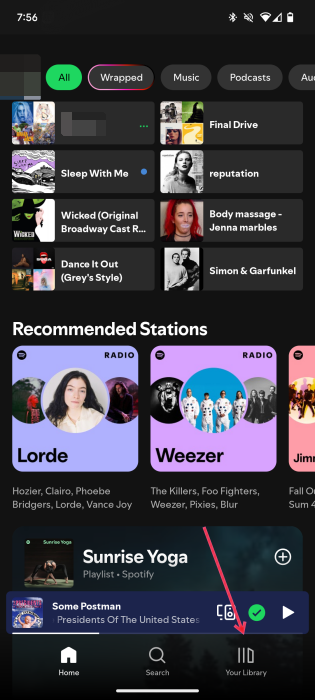
Open the app on your phone, and tap Your Library at the bottom.
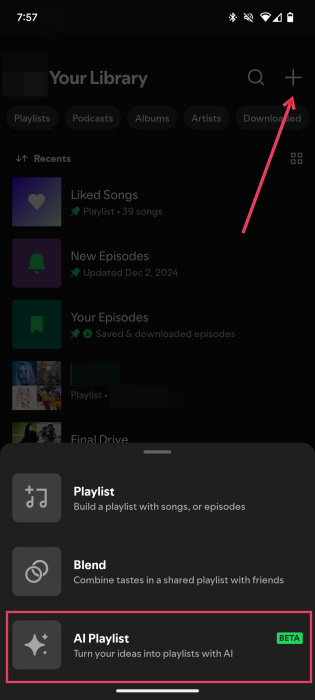
Press the + button in the upper-right corner, and select the AI Playlist option at the bottom.
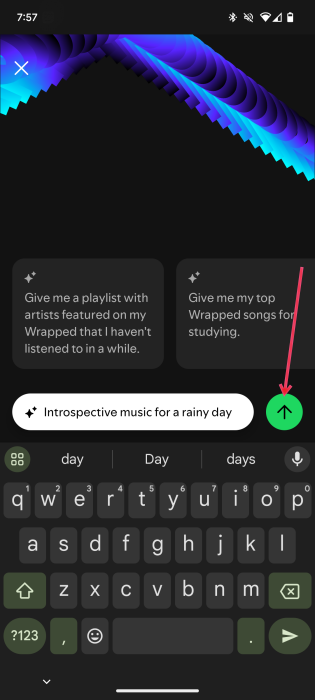
A new page will open with a text input box at the bottom for your prompt.
Now it’s time to ask the app for something to listen to. According to Spotify, the most successful playlists are generated by using prompts that mention different genres, moods, artists, and decades.
You can initially browse the prompts, such as “Chilled music to sip mimosas by the pool.” Or dive right in with your own prompts. Some examples include:
- “80s rap music from Europe”
- “Energy songs for running”
- “Introspective music for a rainy day”
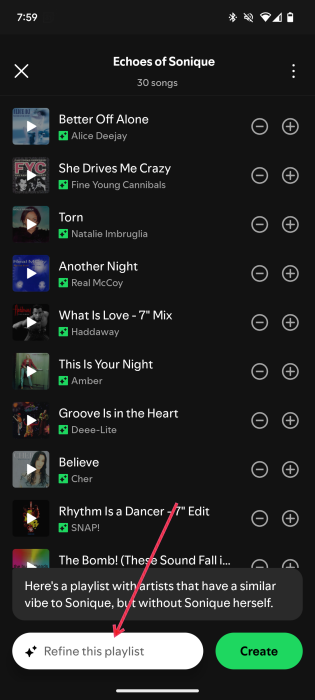
- “Artists that sound like Sonique but aren’t Sonique”
Tap the green arrow on the right to start the process. Spotify will begin showing suggestions. Press the Create button to generate the playlist.
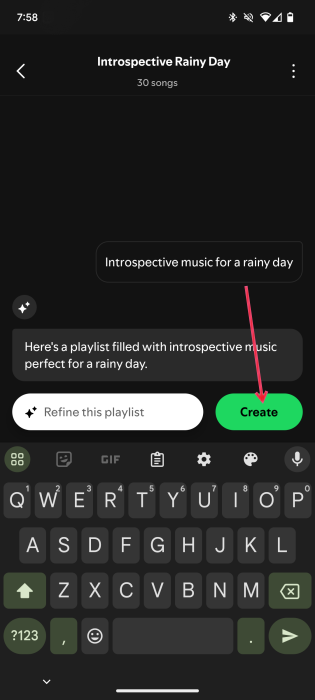
Based on my time using this feature, it appears that Spotify doesn’t take into account your previous preferences and will mix in some songs that you’ve heard before. Given its beta status, it could take a little time before Spotify refines it to perfection.
FYI: learn how to share a song and playlist on Spotify.
Edit an Existing Spotify AI Playlist
Once the playlist appears on your screen, go through it to make sure it’s what you had in mind. If you notice songs you think should not be included, remove them from view.
Tap the “–” button next to the song to remove it, or add the “+” to confirm you want to keep it on your playlist.
If you want Spotify to further refine your playlist, use the prompt box at the bottom to offer more directions. The more details you add, the better. These instructions will give Spotify the chance to narrow down the types of songs you want to hear.
Tip: Spotify lets you create collaborative playlists.
If you’re a big fan of Spotify playlists, learn how to manage them better. For instance, check out how to remove duplicates from your Spotify playlist and how to create a podcast playlist on Spotify.
Image credit: Spotify music and audio streaming service logo by DepositPhotos. All screenshots by Alexandra Arici.