Charging your phone shouldn’t mean keeping a fire extinguisher nearby. With growing Google Pixel 6a battery overheating issues, many users are terrified to charge their phones. If you’re affected, you have a few options to make charging safe again.
Google’s Acknowledged the Battery Overheating
The good news is Google has actually acknowledged the dangerous Google Pixel 6a battery overheating issues. While it’s not affecting every device, those that are affected are overheating, melting, and even catching on fire.
Google has stated the exact cause, but the lithium-ion batteries used in Pixel 6a are usually safe. Since the issue only appears to be affecting this particular Pixel model, a manufacturing or engineering defect is the likely culprit.
The good news is even though these are older phones, Google is still offering support for users.
Install the OTA (Over the Air) Update
Google’s already released a mandatory OTA update to address the Google Pixel 6A battery overheating problem. The update started rolling out in early July for impacted phones. This should automatically download and install as long as your phone is connected to the Internet.
Go to Settings -> System -> System Update to manually check for updates and see if you have the latest update.
If the update isn’t downloading or installing like it should, you can manually download it. I only recommend this for more advanced, tech-savvy users as installing it wrong can wipe your device. If you take this approach, please back up your files before proceeding. Visit the Full OTA Images site, complete with installation instructions, and download “bluejay” for Pixel 6a. Ensure you’re getting the July 2025 version.
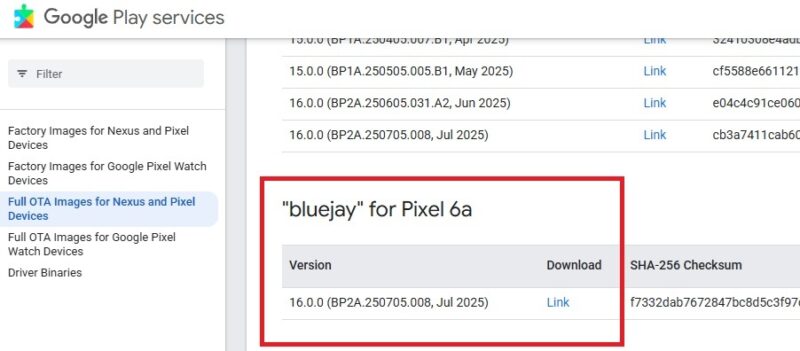
For a manual installation, you’ll have to download and use ADB in the Android SDK Platform Tools.
Problems With the Update
The update that was supposed to fix the battery overheating on Pixel 6a devices didn’t work for all users. To prevent issues, the update capped charging capacity and devices won’t charge quite as fast.
Some users are reporting the issue still exists even after updating. One Reddit user stated their device caught fire after the update. For other users, overheating didn’t occur until after the update.
It’s important to note that no battery modifications occur on devices with less than 400 recharge cycles. So, if you don’t charge all that often, you weren’t eligible for the battery portion of the update just yet.
For users who weren’t experiencing any Pixel 6a battery overheating issues, the update has caused other issues, such as faster battery drain even when idle, Bluetooth connection problems, and charging not working at all. This isn’t happening to all users, but this is reminiscent of the Apple iPhone battery incident.
Get a Pixel 6a Battery Replacement
Impacted devices may be eligible for a free battery replacement. You’ll need to sign in to your Google account and go through the registration to see if your device qualifies for the Pixel 6a Battery Performance Program.
Confirm your email address and enter your IMEI number. Find this number by dialing *#06# on your phone. You’ll get a 15-digit number, which is your IMEI. You can also go to Settings -> About Phone.
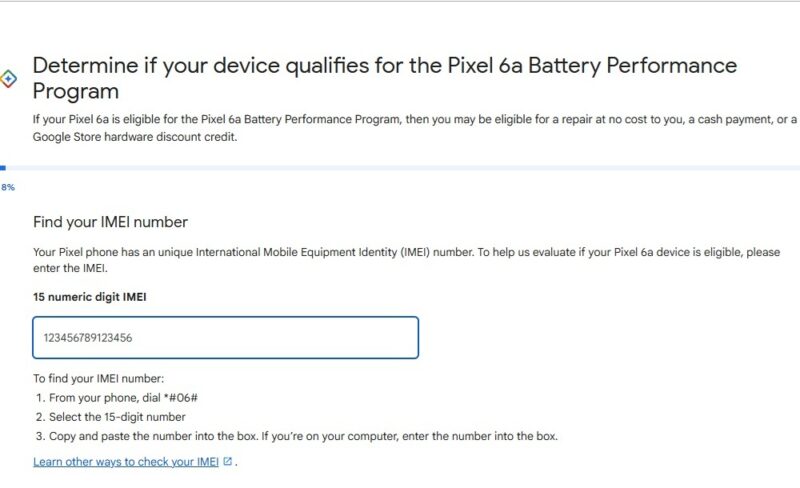
If you’re eligible, you’ll get details on how to get a new battery at a local repair shop or by mail. Currently, the program is only available in the US, Japan, Canada, Singapore, India, UK, and Germany.
A free battery is the ideal option since you won’t have to deal with the same battery draining and charging issues other users are having after the update.
Get Cash Toward Another Google Pixel
For those who had their devices ruined by the battery melting or catching fire, you might not exactly like the idea of buying another Pixel. Yet, that’s another option Google’s offering.
Impacted devices that qualify for the Battery Performance Program may also see two other options, especially if a battery replacement isn’t available to you. Cash or credit toward a new phone are your only other options, at least from Google. You can score up to $150 credit or $100 cash to use toward new devices.
If you don’t want another Google Pixel, get the cash and check out comparable Android devices or an iPhone.
Currently, Google isn’t offering any compensation for devices destroyed by the Pixel 6a battery overheating issues. Why? The phones are older and Google wants you to upgrade.
Exploring Other Options
If you have a Pixel 6a and aren’t having any issues, you should still be careful. You can continue using it, but never leave it charging unless you can supervise it. Definitely don’t charge it while you’re not around or asleep.
If Google says you don’t qualify for the battery replacement, purchase one yourself and replace it. Or, upgrade to a newer phone. It doesn’t have to be a Pixel, but this might be a sign it’s time for a newer and safer phone. I’d opt for a mid-range phone to save money without compromising on features.