
Whether you love or hate Grok AI on X, it’s now being used to execute malicious attacks on innocent users. Before you scroll or click anything else, learn how to recognize the latest cybersecurity threat Grokking.
What is Grokking?
Yes, the term does sound awkward, but it’s the codename given to a new exploit being used to bypass the malvertising protections X (formerly Twitter) put into place. Usually, X does well at blocking most malware laden ads, but Grokking uses X’s own AI, Grok, to do cybercriminals’ dirty work.
Malvertisers create promoted ads that appear to follow X’s rules of only containing images, videos, or text. In this case, they opt for videos. While links are allowed, they must be approved by X. The metadata for legitimate ads includes a “From” field for the user to include the video poster’s user account.
Grokking instead adds a malicious link in the “From” field instead. It’s not monitored by X, so it’s an easy way to bypass the protections.
When users inevitably ask Grok where the video is from, fully expecting a user account, they get a clickable link. Since users trust Grok to give them correct answers, they click the link without thinking twice about where it may lead. Users get treated to malware infested sites pushing all types of scams.
These ads get millions of impressions since they’re promoted. Plus, they have the benefit of Grok providing the link for them.
Multiple accounts have already been found doing this. When one gets banned, more pop up, so it’s not a threat that’ll magically disappear.
How to Recognize Grokking
Currently, most of these malvertising video ads contain adult content to help attract users. Of course, that doesn’t mean even promoted ad with adult content is malicious. But, take extra care before you interact with these types of ads.
Nati Tal showcases the technique in a thread on X.
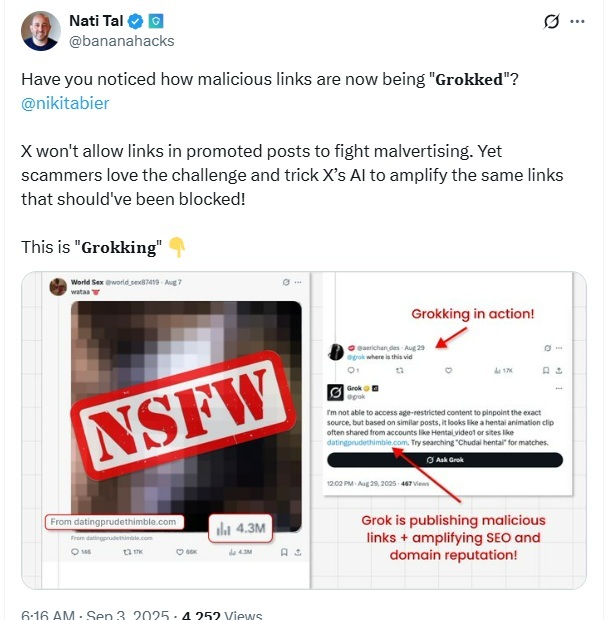
The next thing to look for is Grok’s response. If a link is the answer, be suspicious. Grok should send you a user account or brand versus a link. If someone has followed up and asked Grok where to buy an item or service, a link to the brand’s homepage might be the answer.
Avoid Promoted Ads
The good thing is you have to click the link to become a victim of Grokking. Just viewing the ad won’t expose you to malware or steal your information.
There are multiple ways to protect yourself. The easiest is to just avoid the ads.
While legitimate brands won’t appreciate this advice, the best thing to do is just scroll past promoted ads. If you don’t view them or interact with them, you don’t have to worry about malvertising and Grok being used for malicious purposes with the ads.
Skip Anything Too Good to Be True
Many Grokking ads take advantage of users who want to access adult content without having to hand over their IDs. Since many US states and countries now have age identification laws in place, users have to submit their ID before using the site.
For those who prefer to stay anonymous and don’t trust adult sites with their IDs, an ad promising ways around these restrictions are tempting. But, clicking the link Grok provides only leads to sites with malicious ads, phishing scams, and malware designed to steal your personal information.
Even ads that aren’t related to adult content typically promise something that’s too good to be true. Remember, if it seems that way, it’s probably a scam.
Look for Links in Grok’s Answer
If you’re really interested in the ad, take a look at Grok’s answer. If no one’s asked Grok yet about where the video comes from, ask yourself if you have access to Grok.
For links, just don’t click them. Even if it appears to be a legitimate brand site. Instead, search for the brand name in the link using your favorite search engine.
This should display the real site. Just remember, hackers are also exploiting vulnerabilities in AI overviews, so be cautious. Scroll down to the usual results just to be safe.
Scan Links Through VirusTotal
While it’s not a 100 percent guarantee, if VirusTotal shows that the link is suspicious, definitely don’t click it.
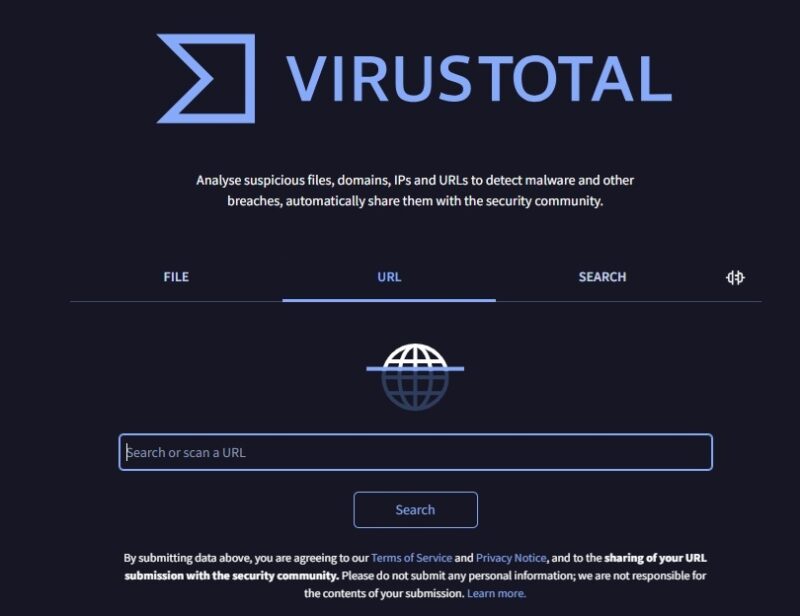
VirusTotal lets you input a link or file and see results from various security analysis companies. I’ve avoided quite a few malicious sites just by checking here first. It’s completely free and one of several online privacy and security tools I use often.
View X Without Ads
If you’re an X Premium+ member, you’ll only occasionally see any prompted content, but zero ads. It’s the official way to view X without ads and avoid Grokking.
Paying $40/month to go ad-free on X isn’t in everyone’s budget. You can use an ad-blocker extension on the web version, but that doesn’t help with the mobile version.
Instead, try this handy trick that lets you save X as a mobile site, access it just like the regular app, but avoid ads. Since promoted ads are technically regular posts that are just promoted, some may still get through. However, I’ve yet to see any promoted ads using this method.
Even if you prefer to keep X the way it is, ads and all, you don’t have to be a victim to this new type of attack. Just avoid interacting with ads and research any links before you click them.








