RCS (Rich Communication Services) protocol has greatly improved communication by offering better features than SMS and MMS, like read receipts, rich media support, longer messages, and much more. However, it also made it easier for businesses and spammers to reach users. Let’s learn why RCS spam is on the rise and what you can do to protect yourself.
Why RCS Spam Messages are Increasing
RCS really took off when Google made it part of the default Android Messenger in 2019. Since then, Google has pushed hard to make it the default messaging method. Even Apple caved in and has started supporting RCS in iOS 18+ devices.
Being supported on both Android and iOS devices by default has greatly affected the total number of users. In fact, in 2025, there are over 1.5 billion active RCS users, with the numbers expected to double by 2028.
At the same time, Google rolled out RCS Business Messaging (RBM), a simple way for companies to send rich, interactive messages straight to your chat app. With such a massive audience, businesses of all sizes jumped in – whether it’s appointment reminders, customer support chats, or outright ads.
To make matters worse, third‑party platforms can send RCS messages with looser rules, it’s all too easy for unknown or spammy senders to slip in. Furthermore, RCS runs over data or Wi‑Fi rather than per‑text fees, so thousands of messages cost almost nothing. Unless carriers and Google step up their spam defenses, our inboxes are only going to get more crowded.
Make Sure Spam Protection is Enabled
Google Messages’ built‑in spam filter is powerful: it combines blocklists, sender verification, and on‑device AI models to detect phishing links, excessive promotional language, and fraud schemes.
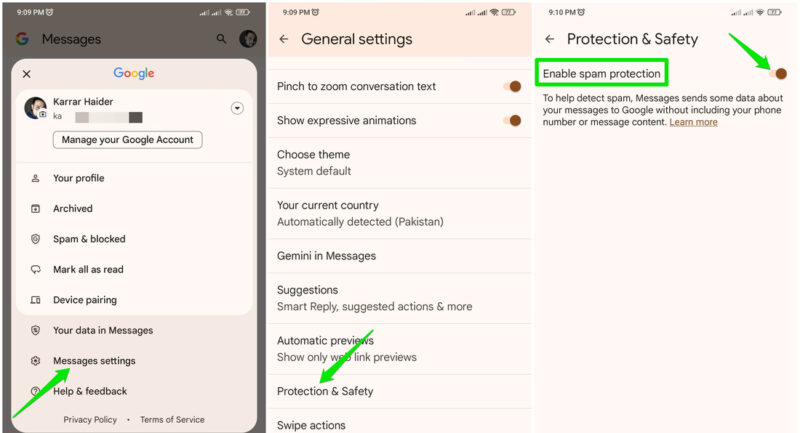
Even though it shares some of your messages’ data with Google anonymously, enabling spam protection is your best defense against spam. Here’s how to enable it:
Tap on your profile picture in the top-right corner and select Messages settings. Move to General -> Protection & Safety and toggle on Enable spam protection.
Block and Report Spam
The block and report function of Google Messages does more than just get rid of the messages from your app. It actually helps Google’s spam filters to learn what is potentially spam. With enough reports, Google can mark a sender as spam permanently and protect all users.
The more users report spam, the less spam everyone will get. If you are getting spam messages from unknown businesses or even too many ads from known businesses, you can report them.
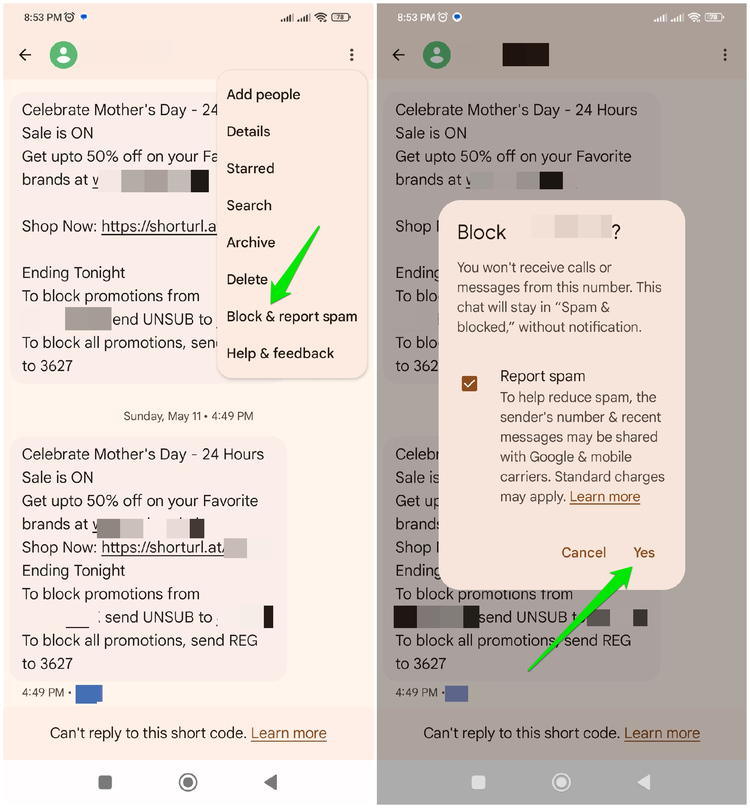
To report, open a message from the sender, tap on the three-dots menu in the top-right corner, and select Block & report spam. On the pop-up, make sure Report spam is selected and then tap Yes.
Disable Read Receipt
While a much-appreciated feature of the RCS protocol, read receipts can also be used by spammers to target you. Businesses often use the read receipt status of their delivered messages to know whether a customer is opening their messages or not. They can target you with more messages if they know that you are reading their messages and are showing interest in their ads.
You can disable read receipts to possibly decrease spam in your phone inbox. Of course, this is a two-way street option, so you will also not be able to see the read status of messages you send.
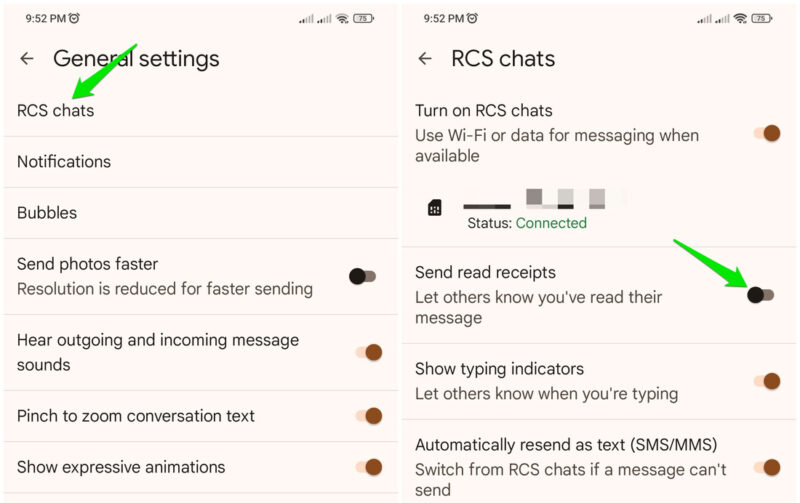
In the Message settings, go to General -> RCS chats and disable the Send read receipts option.
Disable RCS Chat
Many people don’t even use text messages on their phone, yet they still have to deal with RCS spam. With messaging apps like WhatsApp, Telegram, Signal, etc., many users never have to use the RCS capabilities of Google Messages to communicate.
If you don’t use Google Messages, you can disable RCS chat to block all possible spam via the RCS protocol. You will still be able to use SMS to communicate, and other RCS users will automatically switch to SMS/MMS when texting you. You also won’t miss any important business/service messages as they automatically resort to SMS if RCS is disabled.
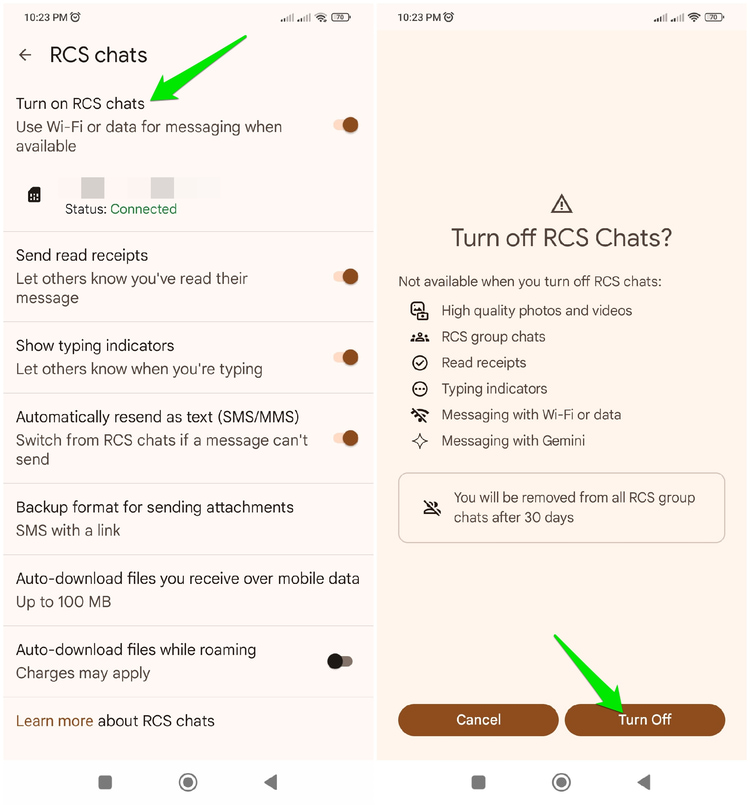
To disable RCS chats, go to General -> RCS Chats in Messages settings and toggle off the Turn on RCS chats option. Afterward, tap Turn Off on the confirmation prompt.
RCS protocol popularity mainly comes from the fact that it’s default on both Android and iOS – the two main operating systems on smartphones. But that shouldn’t deter you from taking extra steps to keep your inbox spam-free or even outright disabling RCS. If you are looking to ditch RCS chat, try these alternative apps for communication.