One of the best things about Spotify is having a DJ in the palm of your hand who works hard to understand who you are and what tunes make you tick. What’s even better is discovering you can interact with the Spotify DJ to get even better music to suit your mood and activity.
Spotify DJ Takes Voice Requests
A human DJ has been able to do one thing Spotify’s version can’t – take requests. At least until now. Spotify finally listened and gave users a way to request songs from DJ X. The best part is you simply use your voice.
You must be a premium Spotify user to access this feature. Currently, it’s available in 60 markets. If you don’t see the feature just yet, be patient as it’s rolling out to more users gradually.
Either search for DJ or tap Search -> Made for you -> DJ to open DJ. Then, long-tap and hold the small DJ button at the bottom right to turn on the voice request feature. Give Spotify access to your mic, otherwise, DJ can’t take requests. You’ll only need to give permission this one time.
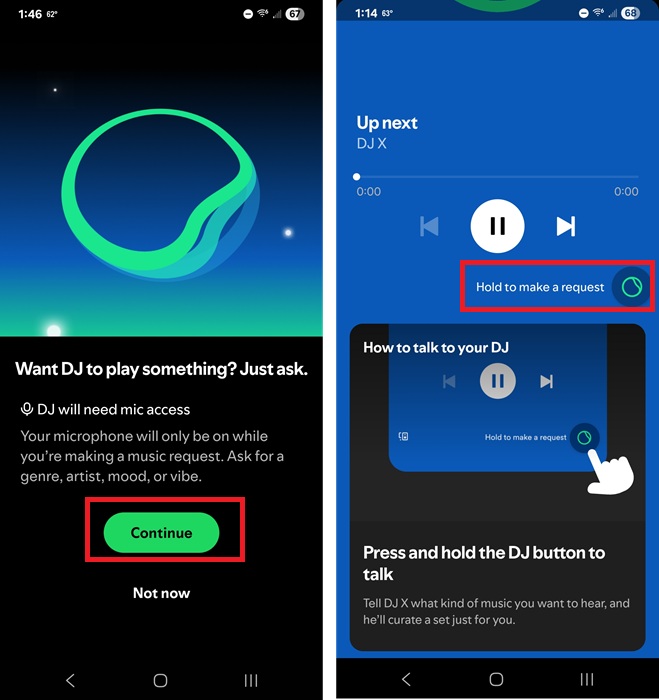
Give DJ your request when prompted. Get as specific as you want. Need something for work? Just ask DJ to play motivational music to keep you focused while working. Working through some major emotions? Ask DJ to create a soundtrack of emotional music perfect for crying to.
Of course, feel free to keep it simple. Ask DJ to play more from a specific artist or genre. Or, ask for a party or date night playlist. There are no limits to how many requests you can make.
The downside is you do have to use your voice. If you’re listening in public, be prepared for a few odd looks for suddenly audibly requesting music from your phone.
For now, you can’t request audiobooks or podcasts. You’re limited to music-only, but it’s still a nice upgrade from what DJ could do when it was first released.
If you can’t talk to the Spotify DJ right now, but still want to create a custom playlist for your mood, activity, etc, try creating an AI playlist. Spotify’s AI Playlist feature lets you type a prompt to create a unique playlist.
Tell DJ to Change It Up
Before voice requests, one of the best ways to interact with the Spotify DJ was to request a new set of music. DJ works by creating short playlists (3-5 songs) focused on a specific mood, year, genre, etc. Each playlist has its own theme. If something’s not hitting right for you at the moment, tell DJ to change to something new.
While DJ is playing, tap the DJ button at the bottom right. You don’t have any control on what comes next, but it’ll be something different from what you were listening to before.
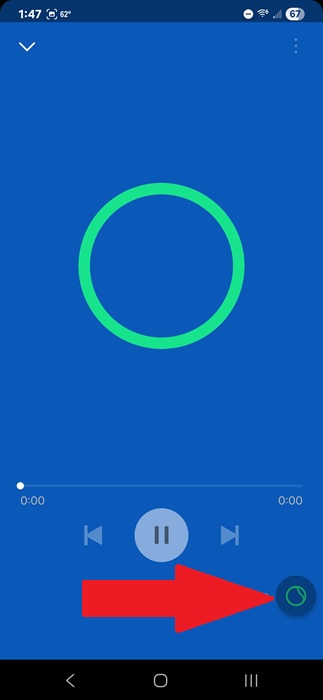
For example, DJ usually wants to toss in some Halloween-themed music in November since I listen to Halloween playlists in October. I find myself having to tap the DJ button for the first few weeks in November to get rid of the spooky tunes.
Skip What You Don’t Like
It’s a simple tip, but one that’s often overlooked. Just like with any playlist on Spotify, skip songs you don’t like. Use the Next button in the controls to skip to the next track. Skip several in a row and Spotify DJ jumps to the next themed group of music.
This is a good option if you’re driving and you don’t have access to the DJ button. A few quick skips and DJ understands you want something new.
Like, Follow, and Save
You can’t expect a DJ to know what to play if you don’t provide any feedback. The same is true with the Spotify DJ. Skipping songs is a good start, but to truly learn your tastes, you need to interact with the DJ a bit more.
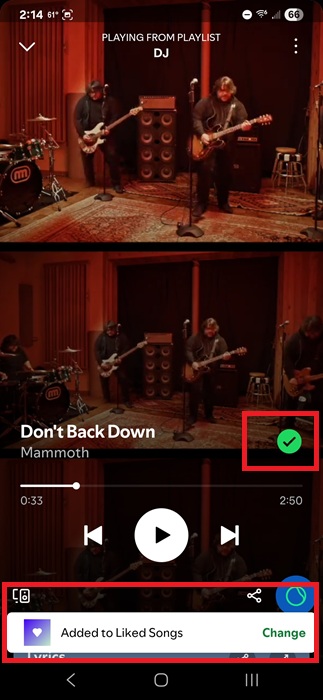
Love a song you hear? Take a minute to like it by tapping the + button (it’ll be a green check mark if you’ve already liked it). This adds it to your Liked Songs playlist. Or, tap Change when adding a song to your Liked Songs list to add it to different playlists. This saves the song to any playlist(s) you choose. Just make sure you tap Done to save your changes.
The next step is to follow any artists you enjoy. I know you’re not going to want to follow every artist with a great song. After all, one-hit wonders are a thing. But, if you enjoy the majority of what an artist does, follow them. This tells Spotify and DJ to recommend more artists like this one.
If you don’t have Spotify premium or you’re just looking for something different, try these free music streaming services. You can even listen to free radio stations, including some with tracks from popular DJs.