Google’s Salesforce data has been recently stolen using a vishing (voice phishing) attack. While it doesn’t immediately threaten user accounts, as no passwords were stolen, the information is enough to carry out more sophisticated phishing and vishing attacks against affected contacts. Here’s what you need to know to stay safe.
What Data Was Leaked and How It Affects You
The hacker used social engineering and a vishing attack to convince a Google Salesforce employee to authorize a malicious connected app that gained brief access. During access, the hackers stole business and customer names, contact information, and related notes.
While no passwords are stolen, the stolen information can be used for targeted phishing and vishing attacks. Since the breach has stolen customer information in relation to businesses, regular business customers are most vulnerable.
There are also reports of a wave of similar Salesforce-focused intrusions, which suggests the information will be used for broader attacks. Below are security measures you can take to improve security.
Run Google’s Security Recommendations
First, let’s go through Google’s security recommendations that they provided with the reveal of this leak. These recommendations will ensure the overall security of your Google account and especially help against phishing attacks.
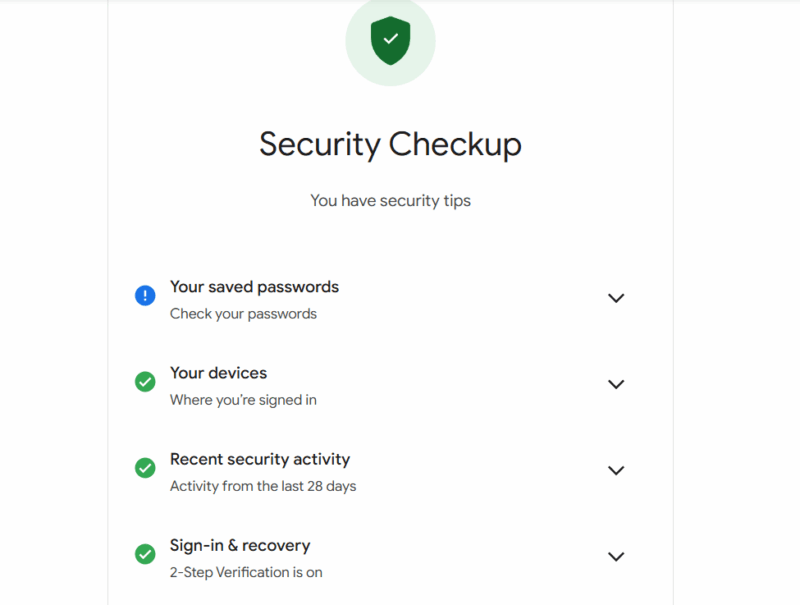
- Run Google Security Checkup: Google recommends clearing all steps in its Security Checkup tool to secure your Google account. This mainly involves checking password leaks, recent activity, connected devices, recovery options, etc.
- Enroll in the Advanced Protection Program: Google has an Advanced Protection Program, mainly created for high-profile users, that offers the best account protection. It’s not meant for regular users, as it forces advanced security measures like hardware security keys. If you don’t want to take any chances, enrolling in it is your best option.
- Use Passkeys or Hardware Security Keys: Google not only wants you to enable 2-factor authentication, but also prioritizes passkeys over regular 2FA methods. Passkeys are inherently more secure as they remove passwords and prevent interception. For even more security, you can get a good hardware security key.
These measures will dramatically reduce account takeover risk, even if an attack is successful against you.
Don’t Entertain Unsolicited Contacts
The stolen information contains contact information and custom notes that are now being utilized for personalized attacks. The hackers can contact you with personalized information like your name, company, role, or even recent interaction to make the message look authentic. The contact can be via email, SMS, or even a phone call.
If you are contacted without initiating a contact yourself, be very skeptical. In most cases, they will eventually ask you to share a code, password, or approve something. They might even ask you to log in using a specific link. No matter what they say, you should never entertain such requests and don’t click on any untrustworthy links.
Review Connected Apps
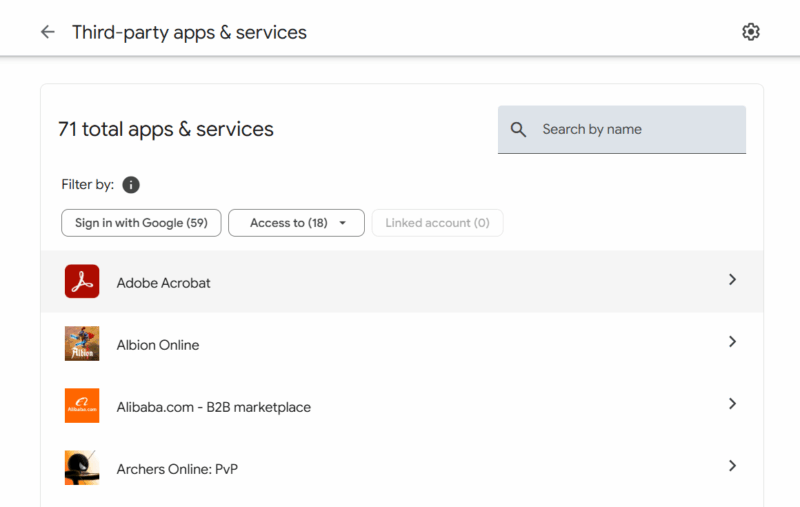
The Google Salesforce attack heavily depended on a malicious connected app. There is a chance that something similar can happen to you, especially if you have an admin role. You should look at your current connected apps to your Google account to ensure no unrecognized or untrustworthy app is connected.
In your Google account settings, go to Security → Your connections to third-party apps & services. Here, you will see all your currently connected apps and services. If you see an app that you don’t recognize or don’t use anymore, click on it and remove its access.
Improve Account Recovery Channels
Most targeted attacks often exploit account recovery methods to gain access to your account. Using your personal information, they may try to exploit recovery channels to gain access. For example, if your recovery email is less secure than your main email, it can be used to gain access to your main account.
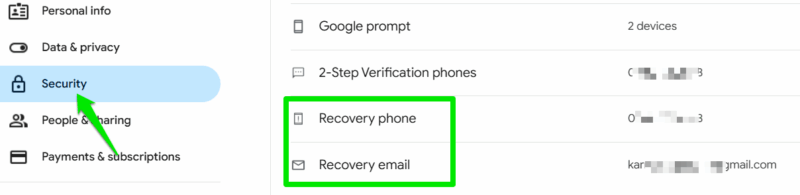
Go to the Security section of your Google account settings and check both recovery phone number and recovery email. Make sure they are up-to-date and you have access to them. Furthermore, the recovery email should have the same security measures applied as the main account.
For 2FA recovery codes, don’t store them in a notes app or other vulnerable storage methods. Either store them in an encrypted password manager vault or create a printed copy. Never share your recovery information with anyone, no matter how trustworthy they sound; no official company representative will ask for it.
Simply having the latest security measures in place, like Passkeys, will work as a powerful deterrent for most hacking attempts stemming from this leak. Just make sure you don’t fall for common hacker traps that may put your account at risk. If you have already fallen for a trick and are now locked out of your Google account, here’s a guide to help recover your account.








