Gone are the days of app developers and big tech companies not wanting users to stray from their platforms. Third-party apps are now embraced, and the biggest tech companies are now working together on Matter. Additionally, the remote work concept has not disappeared, so there is a continual effort to enhance collaboration efforts. Google is taking all of this in, introducing third-party smart chips in Docs.
[related_post slug=”matter-official-smart-home-devices”]Third-Party Smart Chips
Google first introduced internal smart chips with the use of “@” as part of “smart canvas” last year. The chips allowed Docs to include information about Sheets, Slides, and other Docs; other users; Google Calendar events, and places and map directions. Anyone reading your document could click on or hover over a chip to access that information.

Now you’ll be able to add smart chips from third-party apps to enhance your Google Docs even more. The company is also adding new capabilities and integrations to Meet, Chat, and Spaces. The improved Google Workspace was announced at this week’s Google Cloud Next conference.
To expand on that, third-party smart chips will allow you to tag people and information from third-party apps with the use of “@.” The first third-party “partners” to be added to this concept are AODocs, Asana, Atlassian, Figma, Miro, Tableau, and ZenDesk. Each of these companies is working on developing smart chips to coordinate with Google Docs.
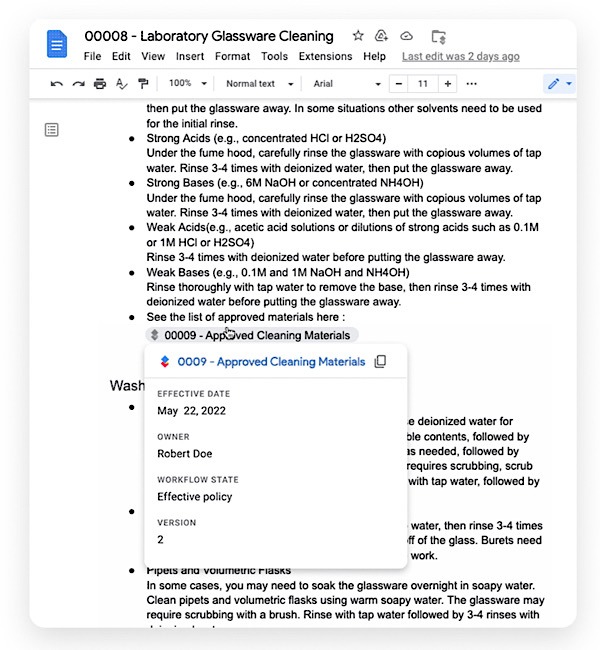
If you’re an AODocs user, you’ll be able to use the new smart clips to link documents on that platform inside a Google Doc. Asana is working on new smart chips to allow you to work with your tasks and projects from a document. The smart chips Atlassian is working on will let you see the details of your Jira and Confluence projects from within your document.
Figma’s smart chips will allow you to embed information into documents from the product designs you’re working on. Tableau’s new chip will allow you to see a live preview of data and related metadata in your doc. Miro links will work with new smart chips to get a visual summary of your work. Zendesk ticket information will be available through its smart chips on your document.
Other Google App Integrations
The app integrations aren’t limited to Google Docs – it also extends to Google Meet. Once again, Google recently started allowing internal integrations so that you could join meetings from within Docs, Sheets, etc. This has unlimited usage during Meet meetings.
Just like Docs, Google is now allowing third-party app integrations in Meet. The Meet API and SDK add-on will allow third-party app developers to utilize Meet in the same way. With the SDK add-on, users can stay in their meetings while collaborating on a project in a third-party app, such as Figma. It means you’ll be able to whiteboard while in a Meet video call.
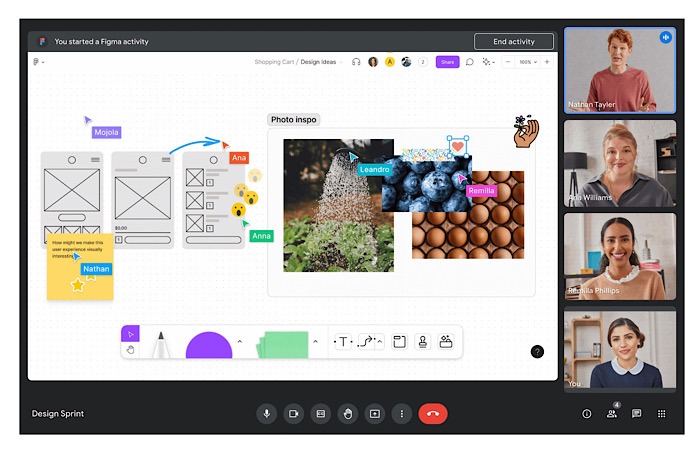
The Meet API will allow users to stay on the third-party app while scheduling and joining meetings. Google is working with Asana to allow users to add tasks and create agendas while in their meetings. Figma would like to bring users’ files into a Meet meeting. Google is also advertising that third-party apps that work with them will be able to register their apps in the Google Workspace Marketplace to gain more users.
Third-party app integrations between Google Chat and Spaces already exist. They’re being expanded to allow even more functionality, such as creating direct messages and group chats. Your Chat messages will be available from within the third-party app as well.
While third-party smart chips, API, and SDK add-ons that integrate with Google apps are definitely the way to go, this does make you wonder why this hasn’t been done before. This is the way all apps are moving: integration between platforms. Instead of forcing you to stay within one app to do everything, now there are ways to do your work in other apps. It seems apps realize if they provide you with more options to integrate, you’ll keep coming back.
Google said that smart chips will be available to third-party developers in the coming weeks and will start rolling out to all Docs users next January. Read on to learn how to share or send Google Docs via email.
Image credit: Unsplash