Is your inbox looking messy with a lot of inboxes, newsletters, and promos? Then, the new Gmail manage subscriptions feature is here to help you take control. This simple feature helps you to see and remove all unwanted email subscriptions with just a tap. However, it’s only available on Android and is gradually being released for users via a server-side update. So, let’s dive in and explore how to use it.
Find and Use the Manage Subscriptions Feature
Using Gmail’s manage subscriptions feature is easy. Simply open the Gmail app on your Android. It’s not necessary to update it as the feature shows up automatically, since it’s a server-side rollout.
Open the side menu by tapping the three-line icon in the top-left corner. Locate and tap Manage Subscriptions – it might have a “New” label beside it.
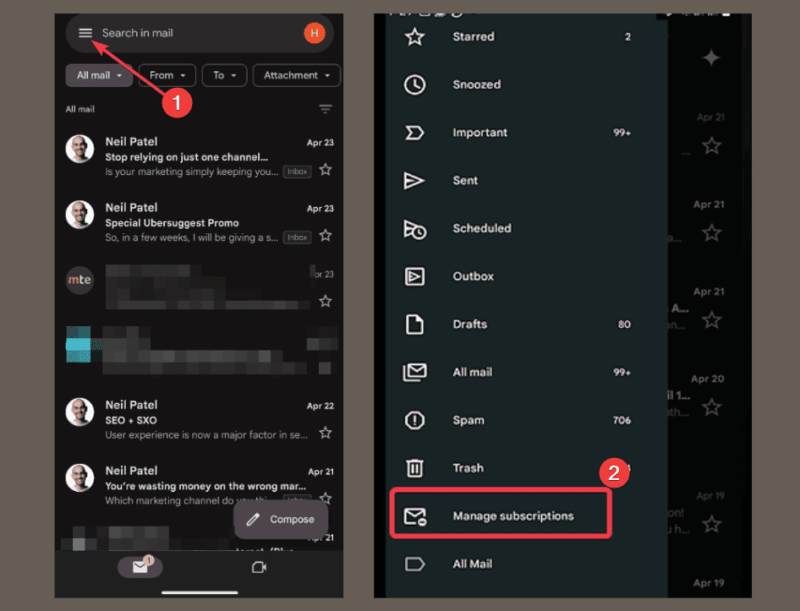
FYI: you’ll find the feature below Trash in the side menu. If you don’t see it, don’t panic. It’s a slow rollout from Google. So, check back in a few days.
You’ll see a list of all your email subscriptions alongside their logo to easily identify them. Identify the unwanted subscriptions and tap Unsubscribe next to their name. Gmail will take care of the rest, although it could take a couple of days before effects. However, some may redirect you to their website to confirm.
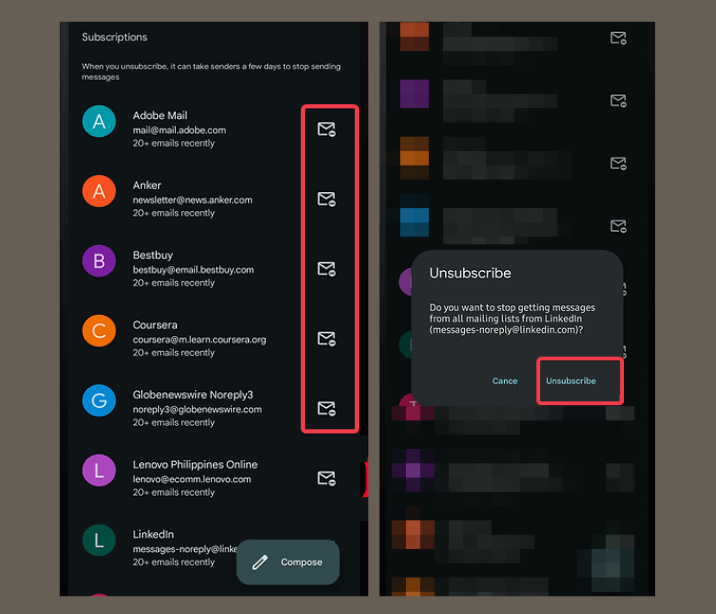
If you can’t find this feature yet on your Android and need to declutter, kindly check out our guide on how to unsubscribe or block unwanted emails in Gmail.
Benefits of Using Gmail’s Subscription Management
Here’s why the new Gmail’s manage subscriptions feature is a game-changer:
- It prevents you from hunting through emails to find unsubscribe links before removing unwanted subscriptions.
- Clears inbox clutter as you can finally remove all those newsletters and promos.
- It’s very easy to use with just one tap to unsubscribe.
- It’s ideal for small businesses and project managers who deal with a lot of marketing and ad emails.
The good thing is, it works great with Gmail’s Promotions tab to ensure your inbox is clean. If you want more inbox cleanup tips, use these hacks to learn how to clean your Gmail inbox.
Current Limitations and What to Expect Next
While this Gmail manage subscriptions feature is great, it has a few hiccups:
Firstly, it’s only available on Android. So, if you use Gmail on the web or an iOS user, you’re out of luck for now.
Despite being Android exclusive, the rollout is slow because of the gradual server-side launch. It may take some time before you can use it.
Also, there’s no room for bulk unsubscribing. You can only unsubscribe from one sender at a time. Hence, the process may be stressful for heavy subscribers.
Although Google may add this for iOS and web users later, pending the time, you can learn how to unsubscribe from email newsletters in Gmail here.
So there you have it, Gmail’s manage subscriptions feature is an amazing tool to stop emails from unwanted companies without breaking a sweat. If you don’t see it yet, keep checking your app. However, if you’ve tried it, let us know how it’s going for you in the comments below.