

The findings of a 2017 Return Path study suggest that 68.4% emails in the average Gmail user’s inbox are promotional. The same study hints that primary emails now account for less than 3% of all Gmail messages. In other words, you might find only one out of thirty emails immediately useful for your daily needs.
Not all unproductive emails, however, are of equal concern. Blocking occasional senders is easy, but when spammers ignore your request to unsubscribe, you can’t avoid reading their unwanted emails. Also, it opens a can of worms in that other spammers find a path to your inbox.
Luckily, with a few minor tweaks, you can coast through your Gmail inbox every day. By adopting effective email habits, you need not worry about unwanted emails again.
1. Use Gmail’s “Report Spam” Feature
First, after logging in you must adopt the latest Gmail version appearance to smoothly accept the changes below. If you prefer the “Classic” Gmail look, simply toggle between the different appearances by clicking the gear icon.
Use Gmail’s bulk selection in the “Report Spam” feature to flag multiple emails as spam at the same time. This would ensure that any future emails from undesirable senders directly reach the Spam folder. The technique is fast and accurate enough in dealing with repetitive senders.
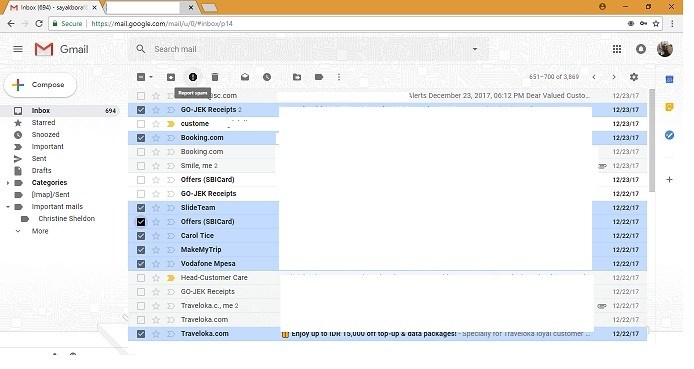
With just a few minutes of practice, you can get a handle on the everyday annoying stuff which sucks time and energy. Later, if you want to unblock a sender, you can manually do it in the Spam folder. It is important that you do not accidentally delete a desirable email sender. To avoid this, use Gmail’s latest “Archives” and “Snooze functionalities.”
2. Filters and Blocked Addresses
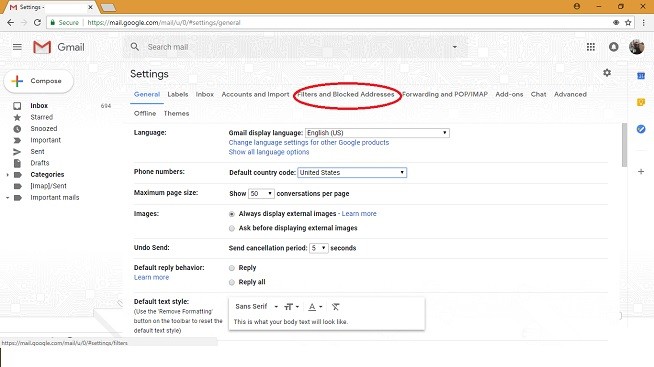
For those pushy email senders who always disregard recipient privacy, a more permanent solution is necessary. Gmail’s filtering algorithms are mature enough to battle annoying spammers, as they quickly identify their presence. The menu for “Filters and Blocked Addresses” can be found in Settings.
Once set up correctly, the Rule Engine can identify the sneakiest of spammers, and stop them in their tracks. It is highly effective in handling spammers who try to enter through email lists, aliases, and phishing.
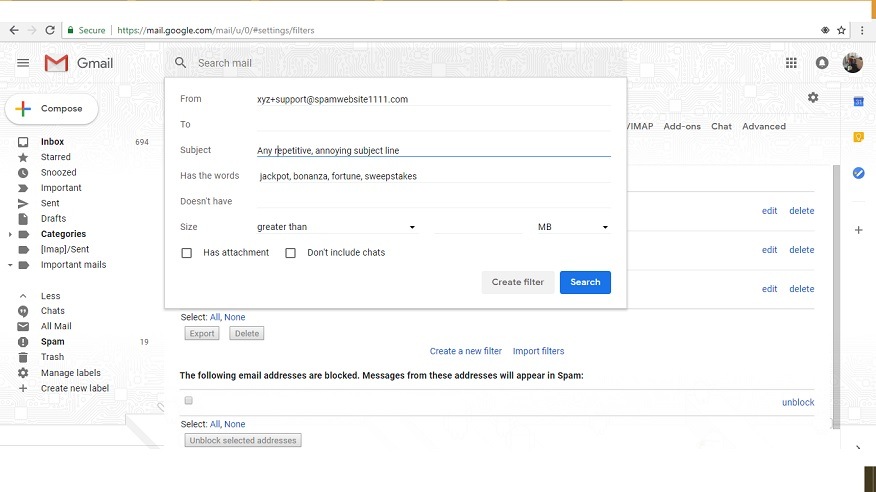
After identifying the spamming email addresses, open a new Gmail tab and click the visible link to create a new filter.
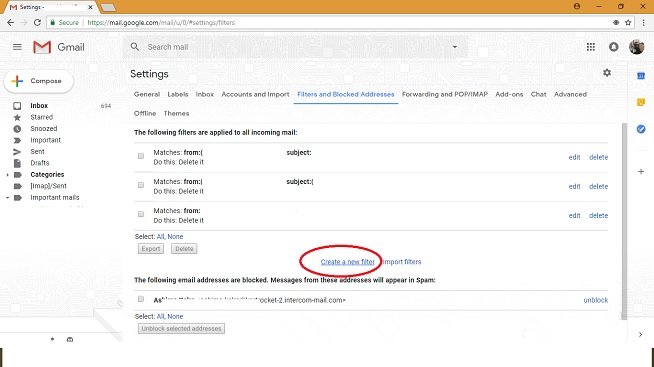
Before creating a filter, it is important to understand the concept of email aliases. Spammers use a combination of aliases and subject lines to reach a user’s inbox. What this means is that you can evade them by mentioning all the aliases (with a + sign) in the “From” section. The “+” sign here refers to another alias.
You should ideally add your email alias with a “+” sign in the “To” field while registering on the website. This prevents undesirable emails from showing up in the inbox. It is important to know that there are no limits on the numbers of such aliases or keywords.
Also read: Better Manage Your Gmail Inbox With Aliases
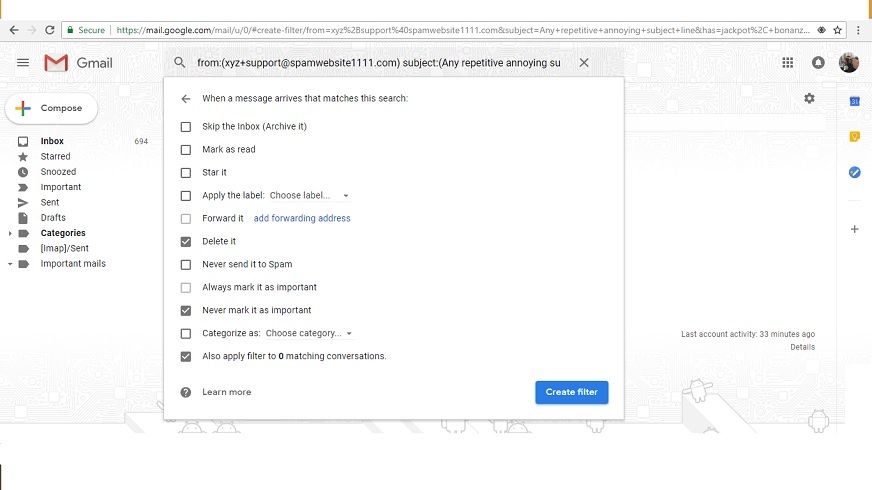
In the last stage you must check the “Delete” option. Once you properly mark the aliases for removal, you will never hear from that entire group of spammers again.
3. Prevention Is Better than a Cure
Instead of struggling with spammers gaining access to your Gmail account, it is better to keep them at bay. Most unnecessary emails originated at a time when you innocently gave away your email address. To avoid compromising data, it might be a good idea to use disposable email addresses. Emailondeck, Yopmail, and Mailinator are a few temporary email services that help users gain access to eBooks, vBulletin forums, discounts, and coupons. However, do remember that many of them are often blocked by authority websites.
Additionally, social media and job and e-commerce websites are some of the biggest sources of unwanted emails through notifications. Thankfully, you can disable them all at the source.
Conclusion
No one likes to receive spam emails in their inboxes, but the fact is they exist and are persistent. Using the above tricks, you will be able to keep spam emails to a minimum.
What other ways do you use to block unwanted emails?