
AI overviews and summaries are convenient, but blindly trusting them could lead you right to scammers. A new threat involves fake phone numbers in Google AI overviews. While scammers want you to believe they’re legit, you don’t have to be a victim.
Hackers Taking Over AI Overviews
Google AI Overviews, AI Mode searches, and ChatGPT are all being plagued by this new scam. In the past, cybercriminals could create fake search results or sites with fake numbers to businesses and customer support. But, they had to compete with numerous other results. It was difficult to ensure their result was the top option.
With AI, hackers force the AI to show only their result as the top option for a specific customer support or business number query. Since users have become accustomed to trusting AI summaries and overviews, they call the numbers, believing they’re real. Plus, AI overviews often only include the one result, making it feel even more trustworthy.
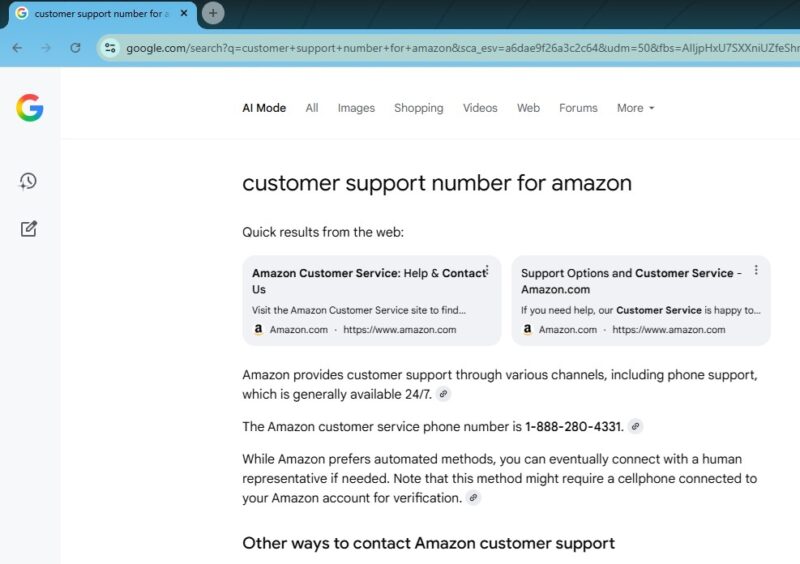
You’ll get support, which also involves handing over payment information, personal details, or even sharing your device screen. By the time the call’s over, the scammer has everything they need to steal your account, money, or even your identity.
While Google and ChatGPT are trying to counter this threat, it takes time. Plus, hackers are notorious for staying ahead of protections companies put into place.
Visit the Company Site Directly
The easiest way to avoid fake phone number scams in AI overviews is to just visit the company’s site directly. For instance, if you need customer support from Amazon, go to Amazon.com and look for support options directly on the site.

If you’re not sure what the company’s site is, perform a search as usual. But, skip the AI summarized portion. Look at the traditional search results. Usually, the official company site is one of the first few results. Remember, scammers could be inserting scam sites into the AI summaries as well as fake numbers.
Another option is to look at any emails or physical mail you’ve received from the company recently. These usually have official phone numbers included. Even if it’s not a customer support number, the business can give you the correct number directly.
Also, many companies only offer online chat or email for support. If you need phone support, you have to use one of the other contact methods to request the number.
Turn Off AI Search
To make sure you’re not seeing AI overviews, turn them off in Google. Or, enter your search query along with -AI at the end. If you’re using ChatGPT as your default search engine, use a different search engine to look for phone numbers. This leaves you with normal search results. You’re far more likely to see the actual company’s website, along with official support options, using this method.
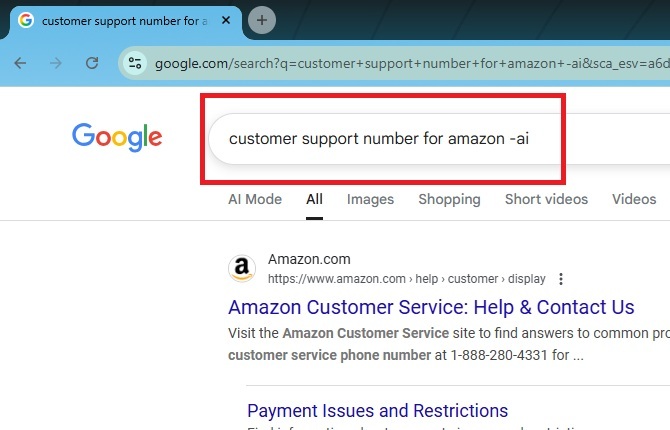
You’re free to use AI search for other queries, but be careful of calling any phone numbers or clicking any support sites provided. Just because other search engines aren’t the focus of this scam just yet, it doesn’t mean they won’t be soon.
Verify With Other Search Engines
Google and ChatGPT aren’t the only search options. Hackers are targeting these two currently because they’re two of the largest AI search engines. Try some Google search alternatives.
Yes, some of them use AI as well, but if you’re getting different phone numbers when using other search engines, it’s a red flag the AI overviews are affected by these fake phone number scams.
No one wants to have to perform extra searches. But, when it’s your identity and finances on the line, it’s worth the extra 30 seconds to search a few other sources.
Never Provide Personal Information
When you call a support number you’ve found in an AI summary or overview, keep your personal information to yourself. Support agents should never ask for your password, financial information, security codes, or anything else.
If they can’t look you up by your name or username, hang up. Usually, customer support verifies your identity by asking for your address, phone number, or something else that can’t be used to log into your account.
If you ever feel uncomfortable with any details they ask for, hang up or ask to speak to a manager.
And, never give customer support access to your screen. They do not need to see you log in to your account. Offer to provide screenshots with any personal details blacked out. If that’s not good enough, end the call immediately.
AI scams are becoming the norm. The best way to stay safe is to look for red flags and don’t always trust what AI tells you. Android devices even have built-in protection to help you avoid scam calls, but it can’t help you if you call the number first.








