
Google Gemini has been incredibly vague about the free tier limits, but now Google’s making Gemini almost unusable for even casual users. If you don’t want to shell out for a premium plan, there are several workarounds to bypass the new limitations.
Google Gemini Free Tier Limits
If you were enjoying using Google Gemini every day with seemingly no limits, the honeymoon is over. Google finally announced limits for free users and they’re far more severe than anyone expected.
Free users only get the following:
- Up to five prompts per day with Gemini 2.5 Pro – Every prompt counts, including follow-up questions.
- No Deep Research using Gemini 2.5 Pro
- Five Deep Research reports per month using Gemini 2.5 Flash
- Up to 100 images daily
- No Deep Think queries
- No video prompts
- 20 Audio Overviews per day
As you can imagine, even a casual user could easily burn through the five prompt limit in just a few minutes by asking follow-up questions.
There’s also another issue. Google doesn’t guarantee you’ll get five prompts per day, just “up to” five. Over a 48-hour period, I tested Gemini 2.5 Pro and was given five prompts one day and just three the next before I was cut off. So, it’s likely you won’t even get five prompts.
Switch to Google Gemini 2.5 Flash
Most limitations are on Gemini 2.5 Pro. Unless you need a more thorough answer, just switch to Gemini 2.5 Flash. In my tests, the results didn’t vary much at all for general queries. I still got detailed answers and both had minor mistakes. The biggest difference is 2.5 Flash is free and doesn’t cut you off after a few prompts.
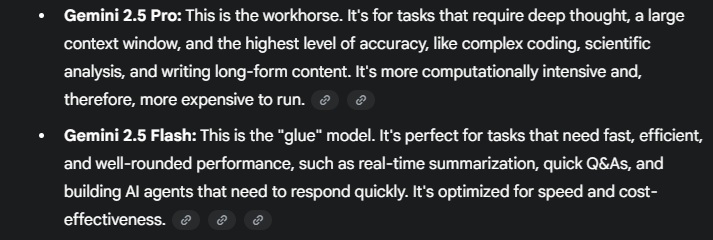
According to a Google Gemini answer, 2.5 Pro is the “workhorse” and 2.5 Flash is the “glue.” Use the Pro for long-form content, coding, and highly complex queries. Use Flash for quick questions, summaries, and even building simpler AI agents.
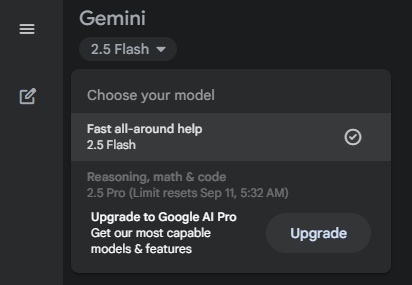
To switch, look at the top of your screen. It’s on the left on your desktop/browser and in the center on the Gemini app. You’ll see the current model. Click this to open a drop-down box. Select Flash 2.5 from the list to switch.
Combine Multiple Prompts into One
If you’ve gotten into the habit of refining your prompt with follow-up prompts, it’s time to start combining your prompts. This is the easiest way to bypass the Google Gemini prompt cap, especially for free users.
For example, if you wanted Gemini to create a workout plan for the week ahead, don’t start with “Create a seven-day workout for me.” Instead, try “Create a seven-day workout with different exercises each day. Make each workout a 30-minute HIIT routine. Focus on exercises that don’t require equipment and can be performed easily at home.“
Get detailed. Take time to think about everything you might need to ask or refine before you start. Since Gemini 2.5 Pro handles more complex prompts well, combining multiple prompts into one is perfect for this model.
Just be aware that the more detail you add, the longer the response may take.
Sign Up For a Second Google Account
If you absolutely need more 2.5 Pro prompts per day, but don’t want to hand Google $20/month, create another account. The Google Gemini prompt cap is tied to your individual account.
Switch your Google account and start interacting with 2.5 Pro again. Creating multiple Google accounts is free.
While using Gemini, click your profile icon. If you’ve used other Google accounts on that device before, simply click the other account you want to use and sign in. If you haven’t used another Google account on that device, click/tap Add another account.
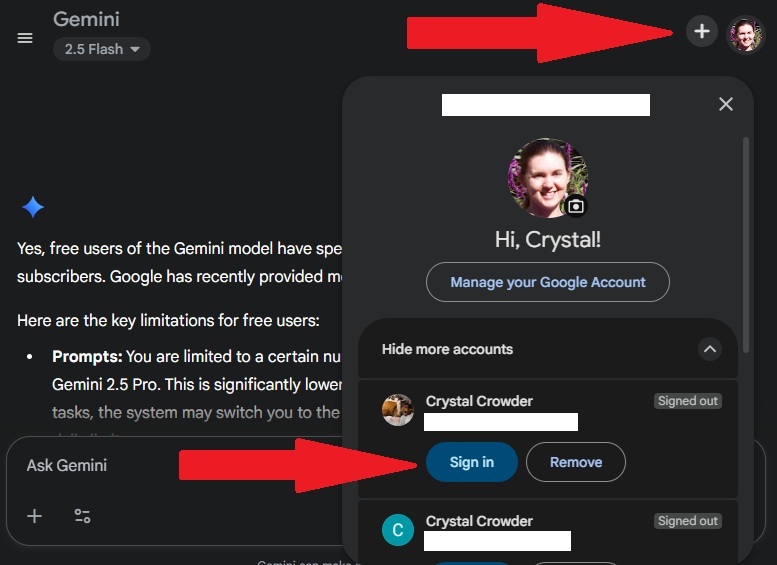
On the Gemini mobile app, tap the arrow beside your name to expand the list of accounts.
Carry On Your Conversation Elsewhere
Gemini is far from the only chatbot available to answer your queries. If you get abruptly cut off, copy what Gemini’s told you so far, paste it into another chatbot, and ask your follow-up question.
Obviously, ChatGPT is one of the most popular alternatives, but there are other options available too. For more research-based prompts, Perplexity works well and you can even use it within WhatsApp.
This is a good option if you only have one or two more follow-up questions and don’t want to go through the hassle of creating another Google account.
Use AI Mode in Google Search
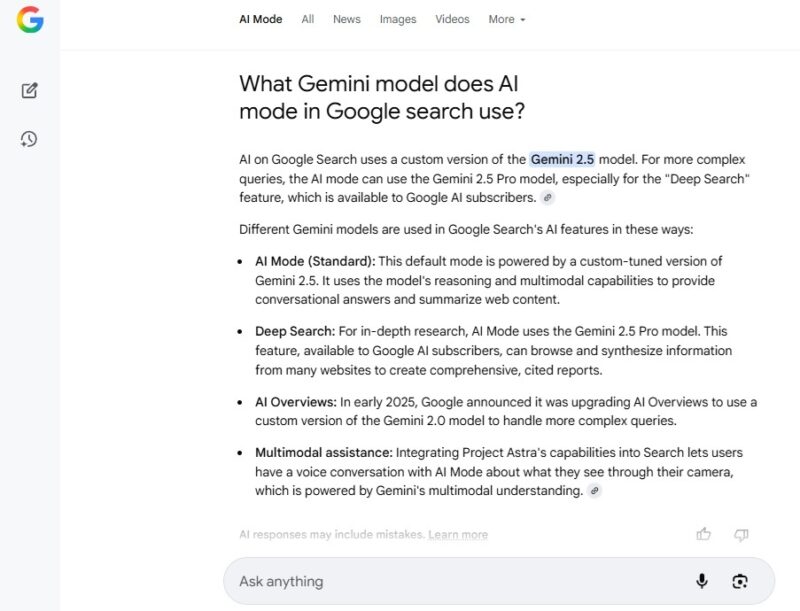
AI Mode uses a custom Gemini model. You’ll still need a premium plan if you want to access deep research results. But, for most users, AI Mode works well and doesn’t require you to login.
From any Google search or the Google homepage, click AI Mode. Then, chat with Gemini as usual.
Get a Google Gemini Premium Plan for Free
If nothing else fits your needs and you need more prompts each day, try out Google Gemini AI Pro for free for one month. It’s one of several ways to get a premium plan for free. Pro users get 100 prompts per day, which should be sufficient for most users.
After the free month, it’s $20/month. If you use Gemini often, it may be worth it. For casual users, upgrading usually isn’t worth it, though.
At least with a free trial, you can compare results for your prompts to see if upgrading really is worth it.








