More and more computers are dropping DVD drives, but that doesn’t mean you have to give up your DVD collection. Easily rip and digitize your entire collection of home movies and favorite shows and movies with WinX DVD Ripper, a flagship tool from the multimedia experts at WinXDVD. Digitizing also ensures you never have to worry about aging or damaged discs.
This is a sponsored article and was made possible by Digiarty Software. The actual contents and opinions are the sole views of the author, who maintains editorial independence, even when a post is sponsored.
Backup DVDs to Watch Anywhere
I have a massive collection of DVDs, including priceless home movies. The last thing I want is to try and play discs in my collection, only to find they skip or the video quality is declining. Plus, if I want to watch a movie, I’d prefer not having to look through hundreds of discs to find what I want.
WinX DVD Ripper lets me convert DVDs to digital in minutes to have my collection fit conveniently on my laptop, flash drive, or an external hard drive. I definitely recommend having a full backup of your new digital videos to avoid loss due to a virus, hardware failure, or accidental deletion.
Digitizing DVDs also ensures that I still have a way to play my favorite discs, as my last two laptops haven’t had a DVD player. Additionally, many game consoles are also dropping DVD players. I no longer have to think about digging out a portable DVD player or buying an external player. I just use my favorite media player app on my laptop or mobile device.
Think of it as a way to future-proof your collection.
WinX DVD Ripper Includes Everything You Need
The latest version of WinX DVD Ripper lets me rip DVDs in various formats, based on my needs. It supports MP4, AVI, HEVC, and more, making your digital library more compatible with the devices you want to use.
Some of the standout features include:
- Convert DVDs to over 350 formats
- Full 1:1 DVD clones
- Rip copy-protected DVDs for your own personal use (only for DVDs you legally own)
- Supports GPU-accelerated conversion for significantly faster ripping
- Includes basic editing, such as cropping, trimming, subtitles, video quality settings, and more
After ripping, you can use WinX Video AI to help enhance details in older or low-resolution footage.
Intuitive Process to Rip DVDs
You don’t need any special technical skills to use WinX DVD Ripper. As long as you can insert a DVD into your computer, you’re all set.
Insert a homemade DVD or purchased DVD you legally own into your computer, then open the WinX software. If it doesn’t auto-detect the DVD, click DVD Disc at the top. There are also handy instructions in the main pane.
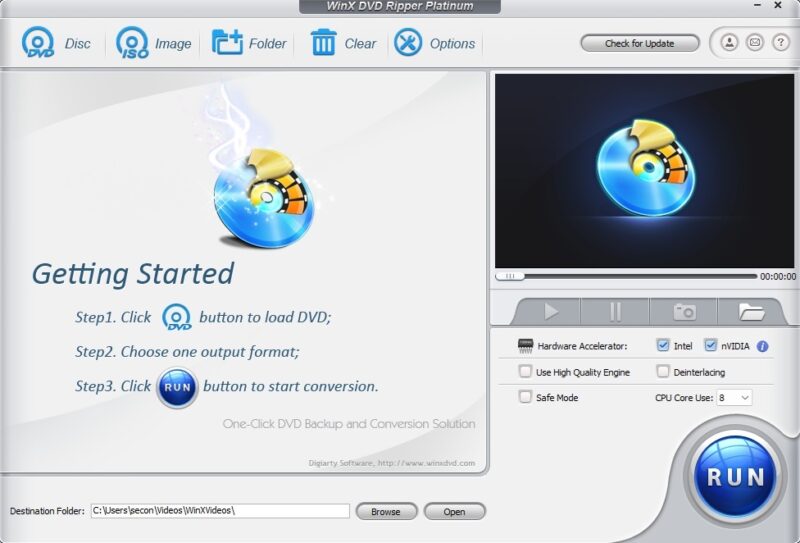
Select the DVD source. Auto detect works fine in most cases, but if it’s not detecting your DVD, try Force UDF or Force ISO.
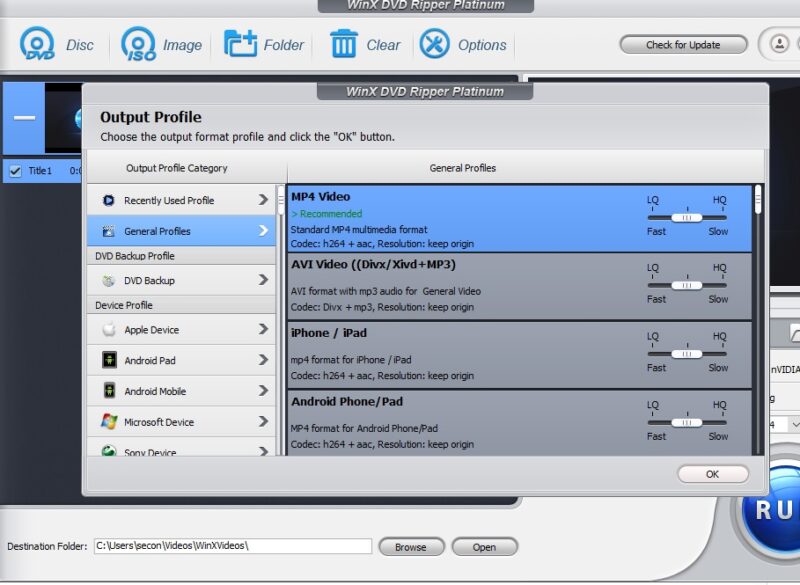
Choose the output format. The default is MP4 since it tends to be more widely compatible, but feel free to choose any desired format. Each one explains what it works with to make the choice easier.
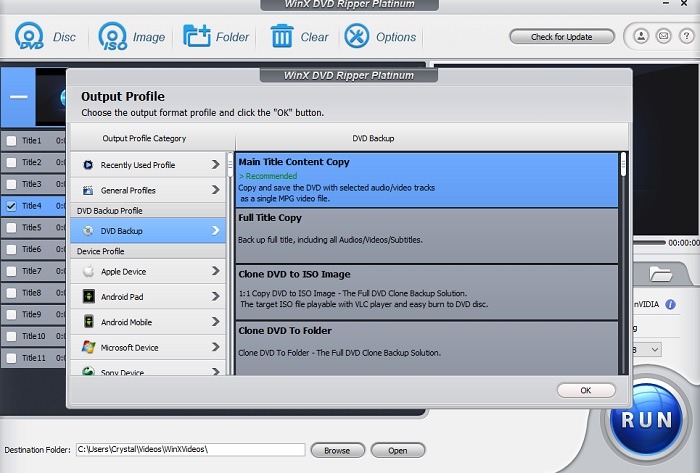
Alternatively, select DVD Backup under DVD Backup Profile. This lets you choose between more options, such as copying just the main title, the full title, or a complete 1:1 clone.
If you’re ripping DVDs for a specific device, select one of the Device Profile options. This ensures it’ll be compatible with your device.
If you want to further customize the output, click the Settings cog next to the DVD disc. Adjust your audio and video codecs, sample rates, and more. This is for more technical users, but I like that I do have the option.
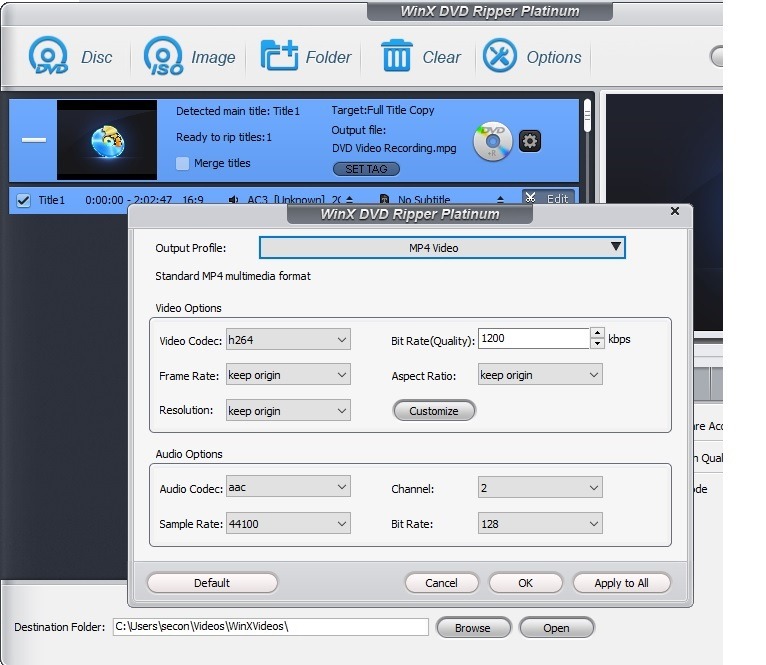
Click Run when you’re ready. Remember to choose your desired output folder, or everything will be stored in the default folder that WinX DVD Ripper sets up.
The speed depends on the size of the file, how many titles are on the disc, and whether you’re using GPU acceleration or not. If you use GPU acceleration, it’s much faster, trust me. It took around 10 minutes for me, though it could be as fast as five minutes.
If you’re ripping copyright protected DVDs and have any issues, use the free DVD ripper software guide. This helps you through any tricky parts.
Even though in my tests, WinX DVD Ripper was able to rip DVDs without quality loss, home footage or older discs might still be low quality overall, just because that’s how the original looks. You can try WinX Video AI to help enhance it after ripping.
Editing Before Ripping
One thing I loved about using WinX DVD Ripper was editing before I ripped my DVDs. After you’ve chosen a profile, click the Edit button next to any title to make changes. From here, crop and trim, add subtitles, adjust the audio volume, and more.
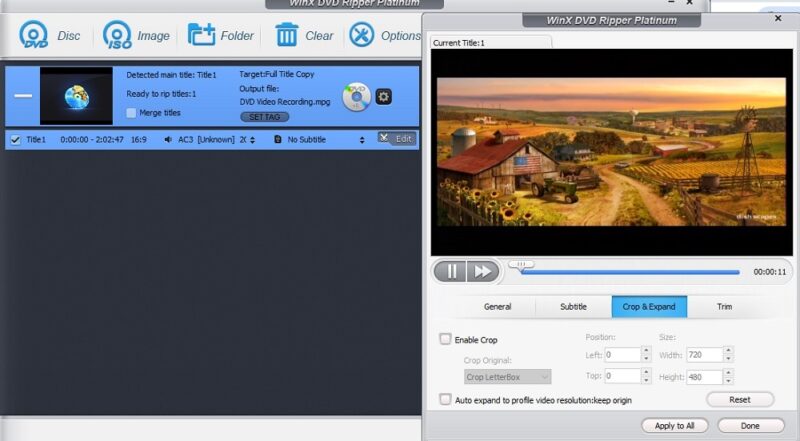
This helps you better adjust the final result for your device or make changes to balance quality and file size. It’s also a great way to trim any footage you don’t want to keep.
Fully Digitize Your Collection
Many DVD ripping tools only support a few formats or a direct clone. They also might not support ripping copy-protected DVDs, even though you legally own them. WinX DVD Ripper lets you fully digitize your entire DVD collection, including priceless home movies.
I appreciate being able to preserve aging DVDs quickly and easily. The app worked fast, and I didn’t notice any quality difference whether it was a purchased DVD or an older home movie.
I do want to point out that you should have a digital storage solution ready. WinX DVD Ripper helps you get the files, but you’ll need a place to store them. Ripped files may be large, so have ample storage on your device, external hard drive, cloud storage, or USB drive. I suggest using at least two storage methods to always have a backup of your files.
If you’re ready to convert your DVD collection, download WinX DVD Ripper for free. For full features and significantly faster ripping, upgrade to the Platinum version for just $39.95.