Spotify Wrapped became a major hit years ago, but it only appears at the end of the year and offers no weekly tracking. To solve this, Spotify has launched a new Listening Stats feature that shows your weekly listening data inside the app.
Spotify’s New Weekly Listening Stats
Spotify’s new feature gives you a frequent mini Spotify Wrapped accessible on a weekly basis. With this, you no longer need any external tools to understand how your music taste evolves week to week.
The fun part is that the feature updates automatically, capturing everything you’ve played and then compiling and organizing all of it into simple, clean summaries.
How to Access and Navigate the Feature
To get Spotify Listening Stats, update your Spotify app. If the feature does not appear afterward, it may not be available in your region yet, as Spotify is rolling it out gradually.
Open the Spotify app and tap your profile icon in the top-left corner. If the feature is live in your region, you will see Listening Stats under What’s New.
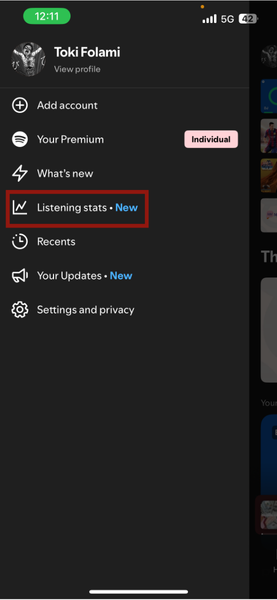
Tap on Listening Stats to open the dashboard.
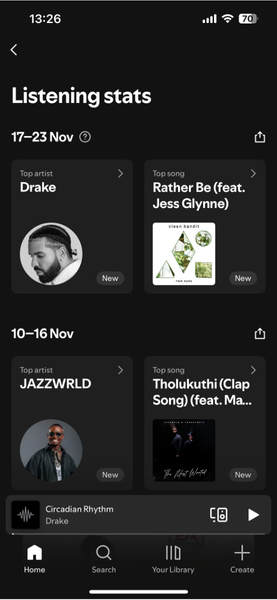
Once inside the dashboard, Spotify presents your listening data using simple tiles and cards. At the top, you see when your Listening Stats were last updated. You can’t change when it last updates, because Spotify does this automatically.
Scroll to move through different categories, and tap each card to see more details. Spotify shows you your Top artist and Top song for the week.
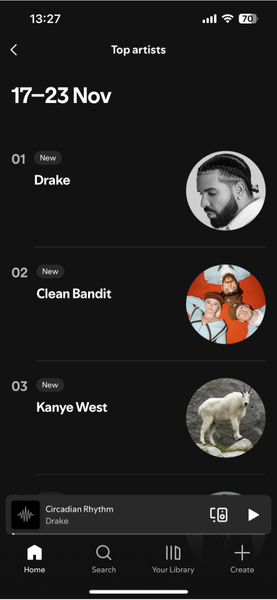
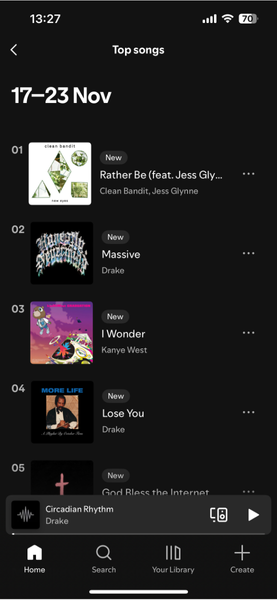
In some cases, it also provides a playlist that combines songs from multiple artists you often listen to.
Also, if you scroll down, Spotify presents you with a mix based off your top artists to keep the theme you’ve been listening to going. For your top songs, the best you get are recommendations under the More like your top songs heading.
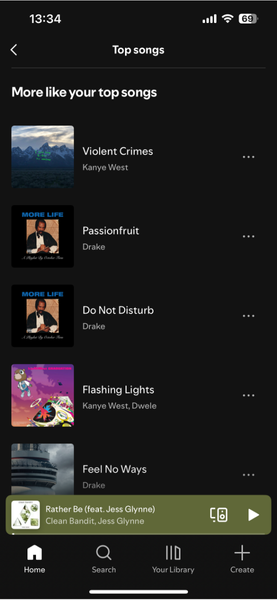
Each tile in the Listening Stats menu has a timestamp showing the period the data covers. You can also view multiple weeks if you want to compare them.
Note: The feature is available for both free and premium mobile users, but is not on the desktop or web versions for now. If you don’t see it, it may not be available in your region yet.
How Listening Stats Differs From Spotify Wrapped
Listening Stats offers insights similar to Spotify Wrapped, but on a much smaller, less detailed but more frequent scale.
The primary features you get to see are your five top artists of the week and your five top songs. However, those little features like genre distribution and how your tastes evolve are still left for Spotify Wrapped to cover.
You also don’t see how much total time you spent listening and how that compares to previous weeks. However, you do get the occasional personalized highlight, like knowing if you have a song on a streak or have listened to an artist more than the average fan.
Listening Stats won’t be replacing Spotify Wrapped, as that remains the detailed yearly recap. It primarily focuses more on your short-term habits, giving you a quick view of what you listen to each week.
With this information, you can self examine what has been going for you and if you need to switch anything up. This at least just makes you aware of music choice on a more active basis.
Why This Feature Matters for Spotify Users
Listening Stats solves a gap users have complained about for years in terms of limited tracking ability. It also reduces the need for third-party apps that track your weekly listening habits, such as Receiptify, Trackify, and Volt.fm, since Spotify now provides a built-in weekly view.
If you want much deeper analytics, those 3rd-party apps may still be useful. But for the average user who just wants a quick view of what they’ve been listening to, Listening Stats is enough and far more convenient.
Spotify’s Listening Stats gives you an easy way to monitor your weekly listening. For more, check out these useful Spotify tips & tricks to get the most from your account. If Spotify is not the right fit for you, you can try this Spotify alternative that makes listening more fun.