Social media accounts usually have sharable links that let people connect with you instantly. You can do the same with WhatsApp, of course, by creating a WhatsApp profile link. Read on to learn how to find and send someone your WhatsApp link.
Tip: check these tips on how to avoid malware on WhatsApp.
1. Share Your Phone Number Directly
WhatsApp accounts do not have a username. Your phone number acts as your username or unique ID. If you want to connect with someone on WhatsApp, you can share your phone number with them. If you’re not sure how to find your WhatsApp number, check our post for guidance.
Normally, the other person would need to save your phone number to their contacts before messaging you, then open the WhatsApp app, tap on the new chat button, and find your contact. However, they could also send you a message without saving the phone number.
2. Create a WhatsApp Link Manually
Alternatively, you can create a WhatsApp profile link. Use it to share your WhatsApp account number with others. When the recipient opens the profile link, they will directly connect with you on WhatsApp.
For example:
- https://wa.me/14134567890, where 1 is the country code of the USA, and 4134567890 is the phone number.
- https://wa.me/914234567890, where 91 is the country code of India and 4234567890 is the phone number.
Once you have your unique WhatsApp link, copy-paste and send it to others via WhatsApp or email, add it in Instagram stories, or send it via another app of your choice. The other person needs to click on the link for your WhatsApp chat to open.
3. Generate WhatsApp Link Online
If you aren’t confident about creating your WhatsApp profile link as shown above, there’s always the option to generate WhatsApp links online using third-party tools.
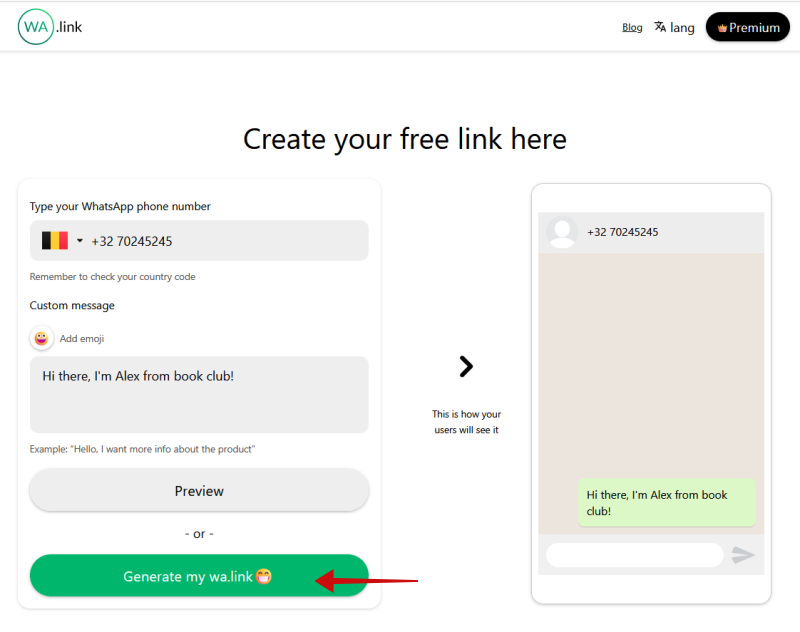
To create a WhatsApp profile link, open create.wa.link in a browser. Scroll down to the Create a free wa.link option.
On the next page, choose your country, and enter your phone number. Add a custom message to make sure the person knows who they’re adding – it’s optional. Click on Generate my wa.link at the bottom.
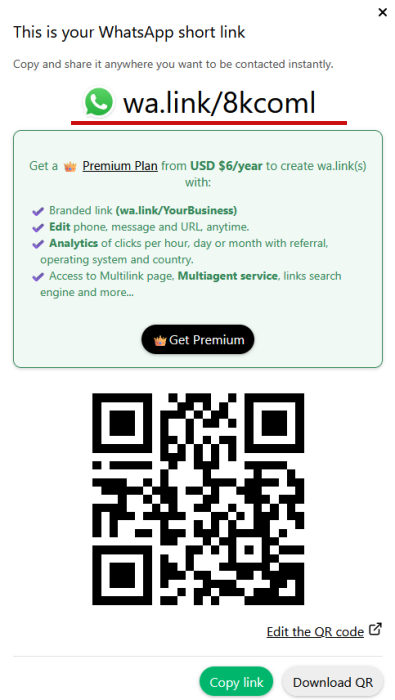
Copy the link or download the QR code, and share it with others via chat apps, email, etc.
Other WhatsApp link generators to try:
Tip: here’s how you can talk to ChatGPT right from within WhatsApp.
4. Generate WhatsApp Short Link on WhatsApp Business
Unlike regular WhatsApp, WhatsApp Business offers a built-in feature to generate a unique link for your WhatsApp number. Share the WhatsApp Business short link with others so that they can connect with you on WhatsApp.
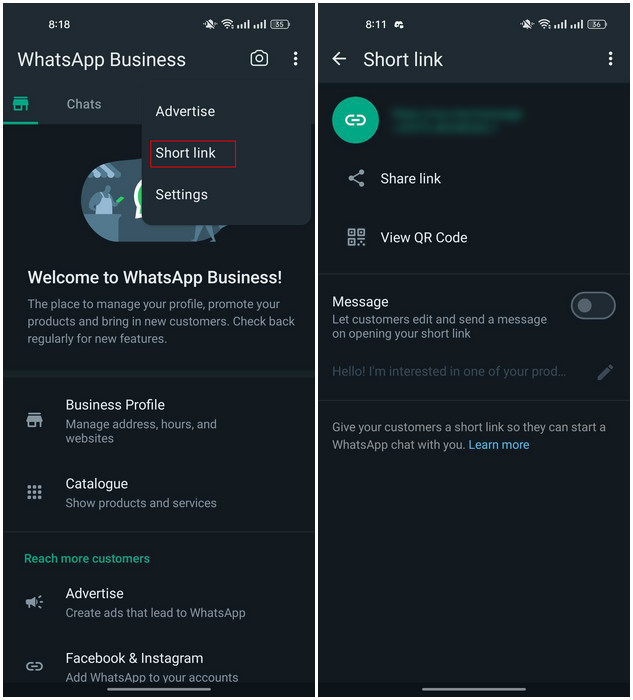
Open the WhatsApp Business app on your phone. If you’re on Android, select the three dots in the top right, and choose Short link.
Tap on the Share link button to send the link to others.
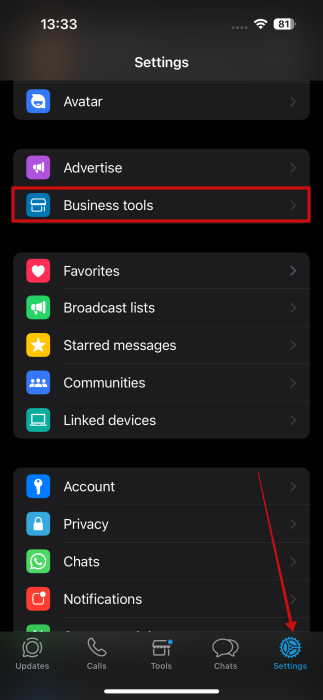
On iPhone, select the Settings button at the bottom and then navigate to Business tools.
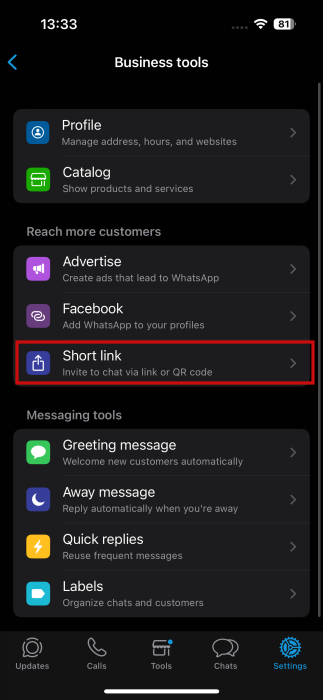
Select Short link from the options.
Add an optional message, if you want. Then, you can either press on Share link or Copy link.
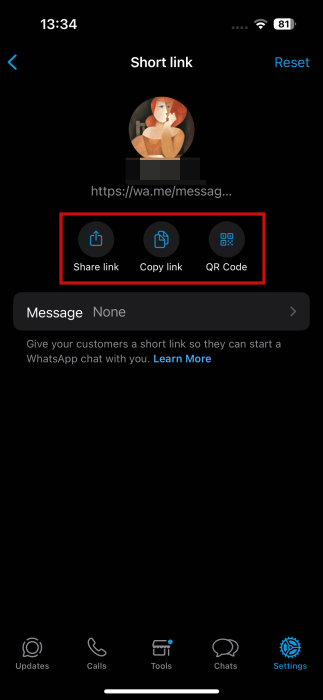
Pro Tip: if you want to block your current profile link so that no one can message you via the link, tap on the three-dot icon at the top, and choose Reset link on Android. On iPhone, the Reset button is on the Short link page. The existing link will become non-functional. You must then create and share a new link with others.
5. Share WhatsApp QR Code
Did you know that WhatsApp has a native feature to generate a QR code for your WhatsApp number? Surprised? WhatsApp hasn’t marketed the QR code feature much. You can easily create, share, and scan WhatsApp QR codes, all within WhatsApp on both Android and iPhone. The option is also available on WhatsApp Business.
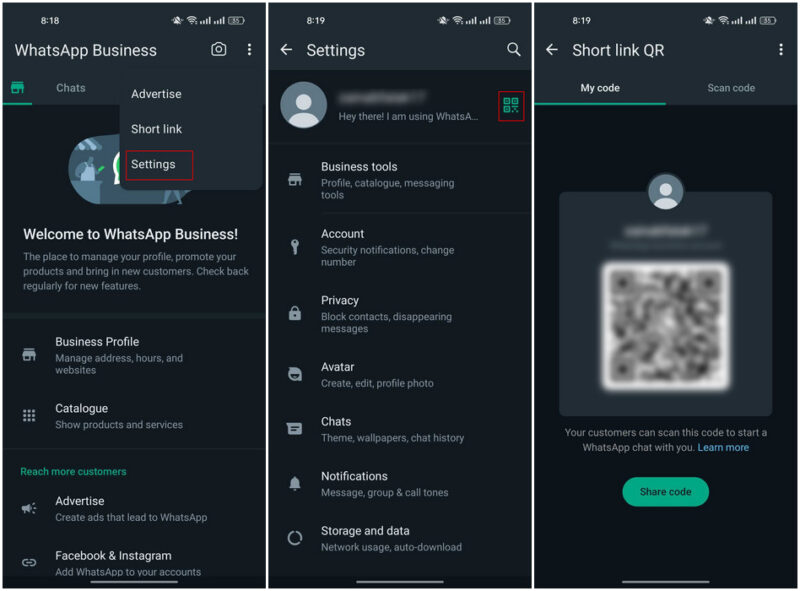
To view your WhatsApp QR code on Android, open the WhatsApp app, tap on the three-dot icon at the top, and go to Settings.
Tap on the QR code icon next to your name to see the code for your WhatsApp number on the next screen. Select Share code to send the QR code to others via WhatsApp or other apps. Alternatively, take a screenshot of this QR code, and share the screenshot with others.
On iPhone, switch to Settings at the bottom and tap on the small QR code next to your name to view your QR.
Use the regular methods to scan the WhatsApp QR code, such as the Camera app, Google Lens, etc., or navigate back to the QR code screen on WhatsApp, and tap on the Scan code tab.
Bonus: Share WhatsApp Group Links
If you are an admin of a WhatsApp group, you can create and share a link to your WhatsApp group. Anyone with the link can request to join the group.
Open the WhatsApp group on your Android or iPhone. Tap on the group’s name at the top to open the group info screen. Go to Members -> Invite via link. You will have multiple options to share the group link, such as Send link via WhatsApp, Copy link, Share link, or QR code.
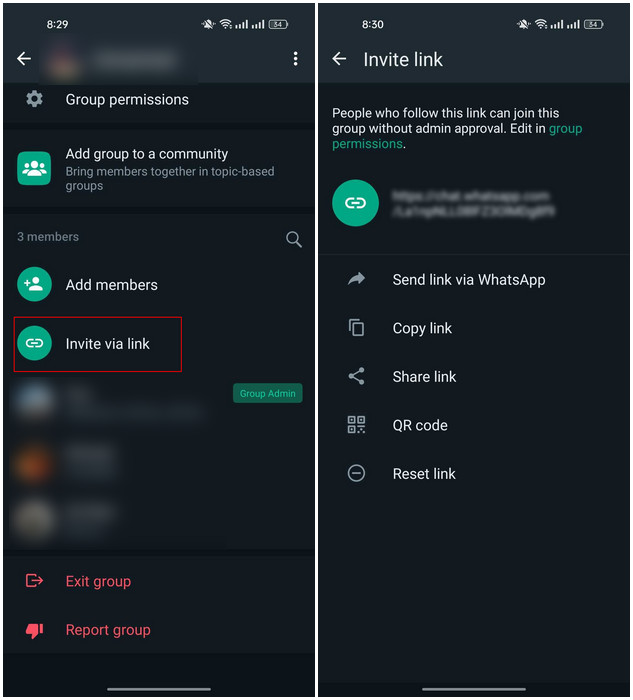
To make the WhatsApp group link non-functional, tap on Reset link.
Creating and sharing your WhatsApp profile link is a powerful way to enhance your connectivity and streamline communication in both your personal and professional circles. Whether you’re looking to grow your network, promote your business, or simply make it easier for friends and family to reach out, these five methods offer convenient and effective solutions.
WhatsApp is constantly adding new features. For instance, did you know that you can now add music to your WhatsApp status. However, if you ever find yourself no longer satisfied with using WhatsApp, you can always opt to move to one of these WhatsApp alternatives.








