The Linux terminal gives us the power and capacity to perform tons of tasks with a few keyboard strokes. For those who spend most of your time in the terminal, you can also send email directly from the Terminal. This guide takes you by the hand and shows you how you can use various methods and tools to send email straight from the Linux terminal.
The first and simplest way to send email from the Linux terminal is to use the mail utility. This simple utility allows you to specify the recipient, email subject and even add attachments with a few options.
By default, the mail utility comes preinstalled in most Linux distributions. You can verify whether you have it installed by executing the which command as follows:
which mail
if you get a result like “/usr/bin/mail”, then it is already installed on your distro. If you don’t have mail installed by default on your Linux distro, you can install it using the package manager for your distro. For example, on Debian, you would run the command:
To use mail to send an email, use the mail command followed by the -s option and specify the email subject. For example, to send a message stored in the file “message.txt”, use the command:
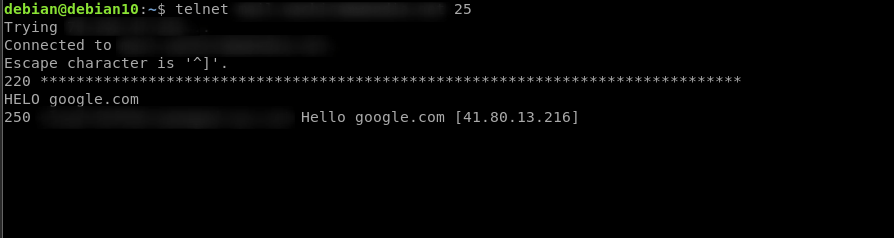
For those who spend much of their time working with remote servers, telnet is probably the go-to tool to send email. To use it, start by launching the terminal and entering the command:
telnet test.server.net 25
If you have the mail server running on a different port, replace 25 with the target port. Once connected, use telnet to say hello to a server:
helo example.com
Note that some servers will also reply to ehlo instead of helo or sometimes either.
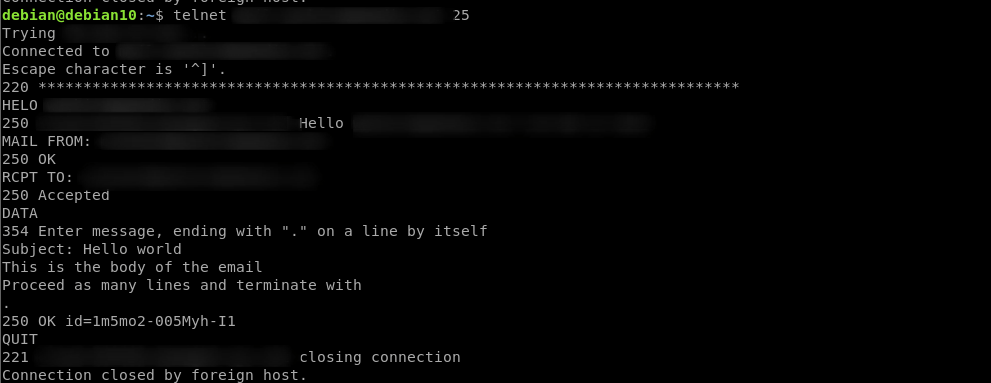
DATA
Subject: Hello world
Hello world,
This is the body of the email
Proceed here and terminate with
.
Finally, close the telnet session with quit.
QUIT
Mutt
Mutt is another helpful utility for sending and reading email from the terminal. You may find it similar to the mail command. To install it, run the command: