
RedTiger is an open source toolkit built for ethical uses like enterprise security testing, but attackers have weaponized its infostealer to target gamers and harvest gaming and financial account credentials. Read on to learn how RedTiger evolved into sophisticated malware and how to protect yourself.
How RedTiger is Being Used for Stealing Data
Because RedTiger’s code is public, hackers have modified and compiled it using PyInstaller into standalone Windows binaries (.exe) to run on victims’ machines. Those binaries are then renamed to attract gamers, like names of game mods, boosters, or Discord utilities.
Once it infects a device, it tries to run the following jobs:
- Search for Discord tokens and related files, validate tokens, and then inject custom JavaScript into the Discord client to intercept API calls. This allows it to intercept the Discord username and password, MFA status, and stored billing/payment information.
- Steal browser data, including saved passwords, cookies, history, payment details, and installed browser extensions.
- Copy crypto wallet files and game-related directories (like Roblox cookies/APIs).
- Take desktop screenshots and spy through the webcam.
All of this information is then uploaded to the free cloud storage service GoFile, and its link is sent to hackers via Discord webhook. To make matters worse, these RedTiger-based infostealers use sophisticated methods to avoid detection and ensure persistence, like anti-sandbox checks or process spamming to confuse analysis.
Protect Yourself From RedTiger-Based Infostealers
To protect against this threat, you need active and proactive solutions to prevent the malware from reaching your device or to minimize its impact in case of an infection. Below are some steps you can take to stay safe:
Be careful of EXE Links in Discord or Other Unofficial Sources
The distribution of these infostealers heavily depends on unofficial sources and direct communication. They are usually distributed in Discord channels, forum comments, YouTube comments, and direct conversations. If you see a recommendation to download a game booster, hack, or any other special utility, don’t download it unless its origin can be verified.
Real game-related tools have official websites and a positive reputation in the community. You should especially avoid a directly downloaded tool if your antivirus blocks it.
Enable Passkey Login for Discord
While this attack can steal your username and password, it won’t work if you have passkey enabled for logins. Passkey will require your Windows device PIN or the hardware security key (if you use one) for authentication, making your Discord username and password useless even when stolen.
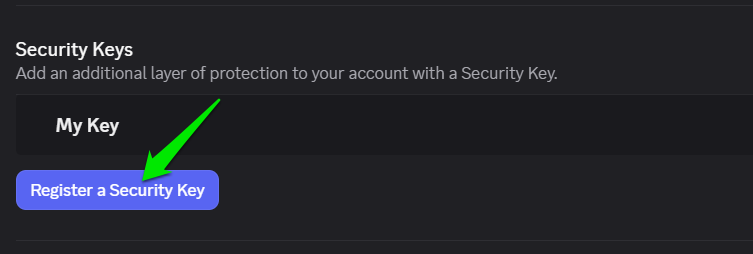
In Discord, go to User Settings → My Account and click on Register a Security Key under Security Keys to set up one.
Don’t Save Passwords and Payment Information in the Browser
While most browsers aggressively ask you to store passwords in their password manager, they aren’t as safe as a dedicated password manager. A browser password manager saves and protects encryption keys locally, which is easy for an infostealer to decrypt. On the other hand, a dedicated password manager encrypts your passwords and any information you save in them using a master password that only you know.
For best protection, you should use a reliable password manager; even free ones will work fine, like KeePass or other free password managers.
Manage Administrator Access
Many tasks RedTiger-based infostealers need to perform require administrator access. You should be extremely careful about providing this to unknown apps, especially if they pop up out of nowhere. A better solution is to use a standard account as the main account, or even use a separate user account for gaming.
Block PC’s Access to GoFile
In observed samples, the malicious actors have programmed the infostealer to send data to the GoFile cloud storage to evade detection. If you don’t use GoFile cloud storage for anything, you can block it in your Windows hosts file to prevent access to it. This will prevent the malware from stealing information even if it collects it.
Here are instructions to open the hosts file in Windows. Just open it and copy/paste the following lines at the bottom of the hosts file to block access to the GoFile website on your PC.
0.0.0.0 gofile.io
0.0.0.0 www.gofile.io
0.0.0.0 gofile.me
0.0.0.0 api.gofile.io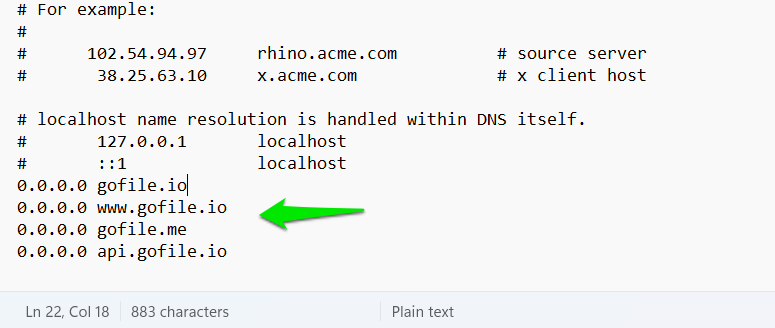
What to Do If Your PC Gets Infected
If you think you have accidentally installed such an infostealer on your PC, you’ll have to immediately act to protect your accounts and data. Here are the steps you should take:
- Disconnect the PC from the Internet or power down the PC if possible.
- Use another clean device to reset the password of Discord and all accounts you had used/saved on the PC. It’s better to enable multi-factor authentication wherever possible, so your old password isn’t exploited.
- Sign out of all devices through the service’s security pages, like Discord or Google account. This will prevent abuse of stolen sessions and tokens.
Afterward, follow our guides to remove malware from your PC. You can either remove malware using an Antivirus or remove it manually without an antivirus. This specific malware also doesn’t persist through resets, so resetting the PC is an option too.
While gamers are the main target of this infostealer, it poses a threat to all users since it steals browser data, crypto wallets, and takes screenshots. You should also enable these Windows security features and advanced Microsoft Defender features for the best protection against such threats.








