Unable to log into Facebook because your account was disabled unexpectedly? Check this post for suggestions on what you can do to reclaim your account. We caution you to be patient, however, as the process can take a while.
Good to know: looking for a new job? Give Facebook Marketplace a try and take the next step in your career.
What Happens When a Facebook Account Gets Disabled
If Facebook disables your account, you’ll no longer be able to sign in, cutting off access to your feed and interactions such as posting, commenting, or liking content. You might also lose access to the Facebook Messenger app on your mobile device.
At the same time, your profile will no longer be visible to others on Facebook. What’s more, if you use Facebook to log into other apps or services (although it might not always be a good idea to do so), it may also disrupt access to those, causing further inconvenience.
Reasons Why Your Account May Get Disabled
In case you’re wondering, Facebook outlines several reasons why it may choose to disable an account, including:
- Violating Community Standards – if you’ve posted content that goes against Facebook’s Community Standards, including hate speech, harassment, or explicit content. However, Facebook’s policies also include additional aspects, such as using your authentic name. Personal accounts must represent individual people only, and it goes against Facebook’s policies to represent anything other than yourself, including pets or fictional characters. In addition, you cannot create or maintain multiple accounts on the platform.
- Identity Verification Issues – Facebook may disable your account if it believes you haven’t provided accurate identity information, such as using your real name, and you fail to comply with verification requests.
- Suspicious Activity – Facebook might have detected suspicious activity related to your account, such as unusual login activity.
- Phishing and Spamming – if hackers or phishing attempts breach your account, Facebook may choose to disable it. Alternatively, if your account has been spamming promotional content, Facebook might have taken action against it.
- Reports from other users – other users may have reported your account for harassment, abusive behavior, or other policy violations.
How to Recover Your Facebook Account
If Facebook disables your account, you have 180 days to file an appeal with Facebook and plead your case for the reinstatement of your account. If you don’t follow through in the 180 days at your disposal, Facebook will permanently disable your account, so you need to act as soon as possible to increase your chances.
Note: please keep in mind that we can’t guarantee these steps will result in the restoration of your Facebook account, as the final decision rests with Meta. The company independently determines how these cases are reviewed and resolved.
Check Your Email
In some cases, Facebook might also notify you through a notification or email if it disables your account. It should contain the general reason why your account is no longer accessible. If you’re eligible, Facebook will also provide you with information on the steps you can take to recover your account. For example, Facebook might prompt you to verify your identity by sending a picture of your ID or other official documents.
Unfortunately, in some cases, you might be informed that the decision to disable your account cannot be reversed. If that’s the case, the message might include something along these lines:
“We cannot review the decision to disable your account. Your Facebook account was permanently disabled because it did not follow our Community Standards.“
If you haven’t received an email yet, we recommend waiting it out for a day or two. According to some users on Reddit, this issue might resolve itself automatically. If you changed your Facebook email recently, make sure you can that inbox.
Tip: here’s how you can set a paskey for Facebook on your mobile device.
Go Through Help Center
Try logging in via a web browser with your Facebook username and password. You’ll likely see a message stating that Meta has disabled your account.
Click the Go to Help Center button below. You can also Download your information if you like to make sure all your data, including photos and videos, is safe.
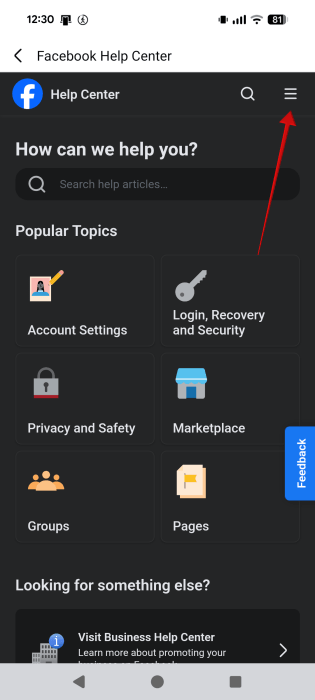
Once in the Help Center, click or tap the hamburger menu in the upper right corner.
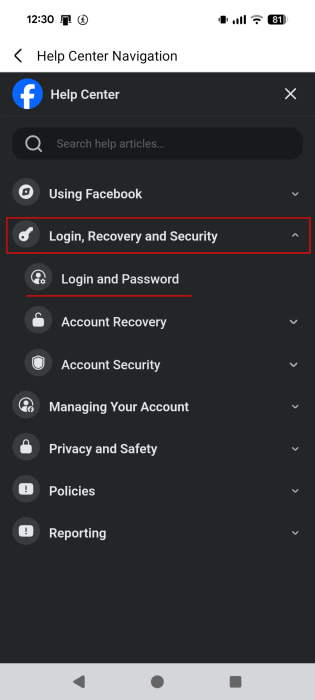
Tap the tiny downwards arrow next to Login, Recovery, and Security, and select Account Recovery.
Go to the bottom of the page and select My account is suspended or disabled.
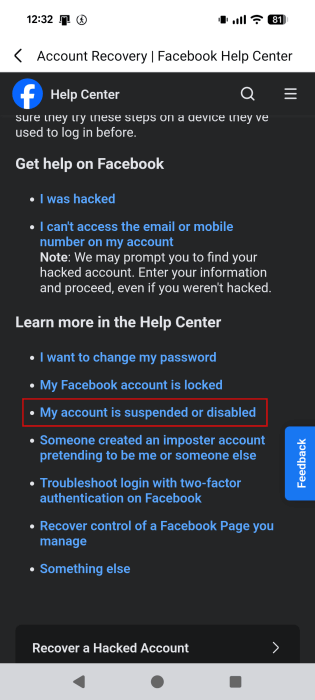
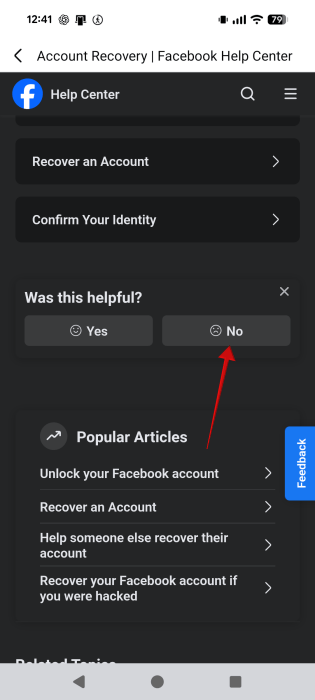
On this page, Facebook explains that you need to appeal if you believe your account has been mistakenly disabled, but it doesn’t offer a straight forward way of doing so. What you can do is scroll down to the bottom, and tap on No on the question Was this helpful?
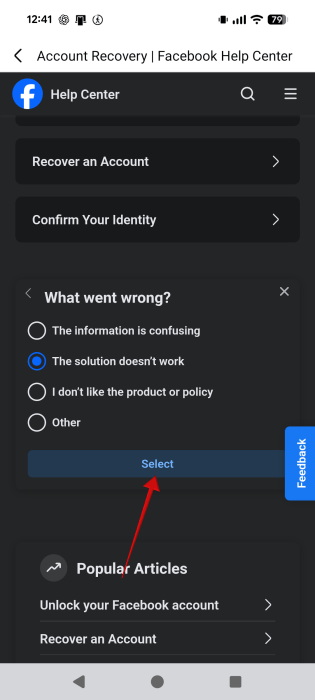
Next, tick The solution doesn’t work and press Select.
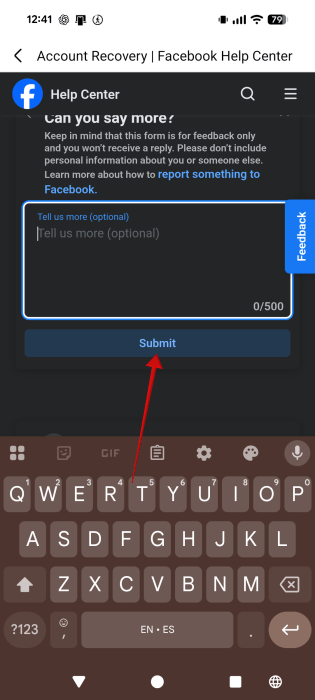
Now, go ahead and write a message that should include your name, email, and a brief explanation of why you believe the disabling was a mistake. When you’re done, press Submit.
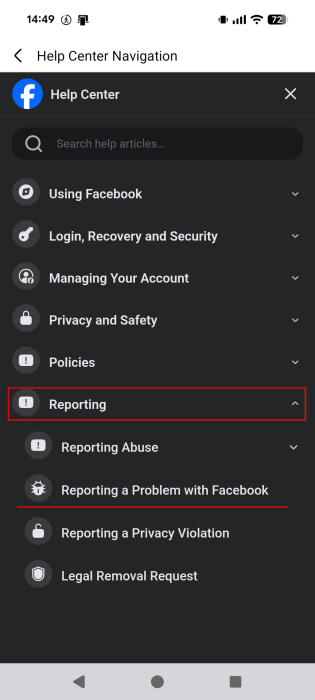
Another thing you might want to try is to go back to the main Help Center and tap the hamburger menu at the top once again.
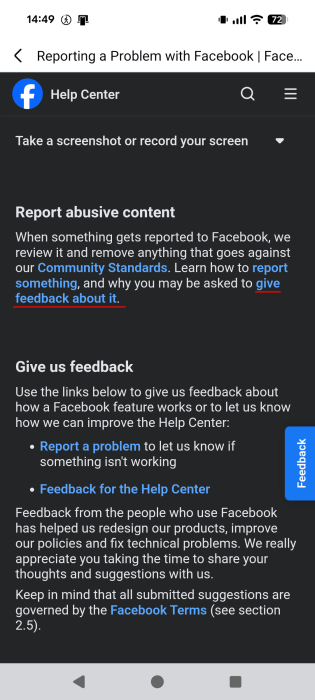
Select Reporting -> Reporting a Problem with Facebook.
In the Report abusive content section, click Give feedback about it.
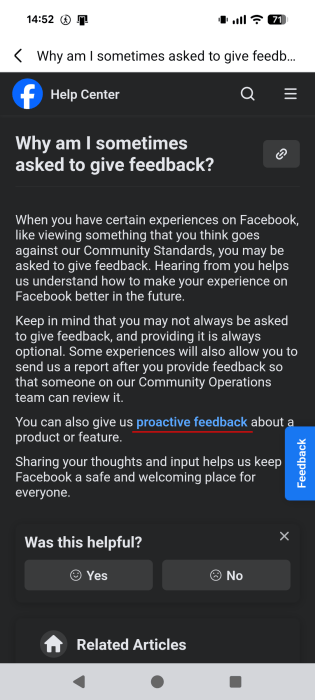
Next, select Proactive feedback.
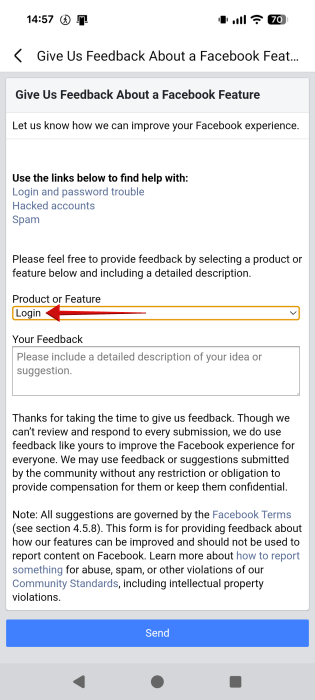
The feedback page will appear. Under Product and Feature, select Login. Then, proceed to write about your issue regarding the disabled account in the Your Feedback box.
Contact Facebook via Alternative Avenues
According to various reports online, some users have had some success contacting Facebook about their disabled account through other social media apps such as X or LinkedIn. You may explore this option, though your expectations should remain modest regarding its outcome.
Try the paid alternative
If you’ve heard nothing from Facebook and you’re starting to get worried, you can try this trick. If you have a still-working Instagram account, you should try to get Meta-verified. This is a paid service that starts at $14.99 per month.
Doing this will allow you to contact support and actually get a guaranteed reply in a short period of time. According to multiple users on Reddit, they managed to fix the problem using this method.
Tip: learn how to hide likes & comments in Instagram Reels Friends tab.
Check the Facebook Business Support Home
If you have a Facebook business account (meaning you managed an ad account or are a Facebook Business manager), then the approach to recovering a disabled business account varies slightly. In these cases, it typically means that your personal account remains active.
As such, you can navigate to the Meta Business Support Home. From Account Overview, select the account in question and check the What you can do section, which should appear below if the account is disabled, for further steps.
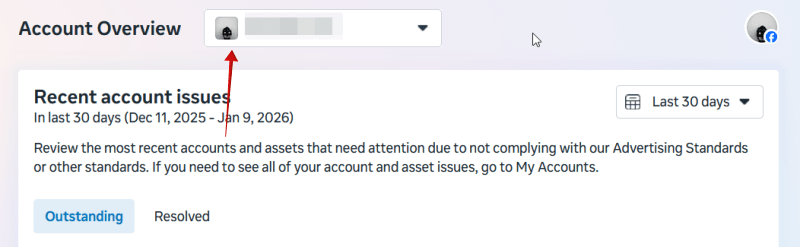
Meta might ask you to do things like confirm your identity, complete verification, or secure your account.
You can also request a review from the Meta Business Support Home, but you will need to be an admin on the account for that.
Can I Create Another Facebook Account?
As long as your account is disabled, creating a new Facebook account is not recommended. During registration, Facebook collects multiple data points, including IP address, device ID, and contact details. Reusing this information may cause the new account to be flagged and disabled shortly after creation. Even if you attempt to create a new account on a different IP and using a different email/phone number, Facebook might still ask to verify your identity. If Facebook recognizes you, it will most likely get disabled.
At the same time, maintaining multiple accounts can complicate the appeal process and make recovering the original account more difficult.
Suspended vs Blocked vs Banned on Facebook
Facebook disabling your account isn’t the only complication you might encounter while using the app. Your account can also get suspended, blocked, or banned. Below, we explain the differences between all these states:
- Suspended account – Facebook can suspend your account for violating the Community Standards. Once this happens, you’ll receive an email, or when you try to log into Facebook, you should be prompted to appeal the suspension within 180 days. If you don’t do so, Facebook can move to permanently disable your account. You might have the right to challenge the decision in court or refer the decision to a certified dispute settlement body. Keep in mind that Facebook can disable your account without suspending it first, like in cases of severe or time-sensitive violations.
- Blocked account – any user can block other Facebook accounts. For instance, if you had a disagreement with someone on Facebook, that person might block you as a result. To know whether someone blocked you on Facebook and what you can do about it, check our post.
- Banned account – Facebook group admins or moderators can ban you from a group if your behavior has violated the group’s guidelines. Banned members won’t be able to find the group again in search or see any content within the group. They also can’t be invited back in (unless they get unbanned.)
Once you get access to your Facebook account back, learn how to stay safe on the app. For instance, here’s what to do to avoid the Brokewell malware that’s spreading through Facebook ads.








