Malware is always evolving, and this time, it’s coming in an all-in-one package. The new RatOn Android malware does everything from automatically transferring money to phishing credentials, and even uses ransomware for extortion. Read on to learn what RatOn malware is and how to protect yourself.
What is RatOn Android Malware
RatOn is similar to any other Remote Access Trojan (RAT) that tries to take control of your device remotely. However, it goes a mile further by incorporating automation to steal money and information in different ways. When it’s done or doesn’t find anything to steal, it locks the screen and shows a ransomware message to try to get money by force.
While it needs to be sideloaded like most other malicious software, RatOn has successfully convinced victims to install it using fake Google Play Store pages and adult-themed apps. Once installed, it asks for critical permissions, like Accessibility services, to take control and stay persistent.
After successfully infecting a device, it can perform the following tasks:
- Fake overlays: it will display fake overlays on banking and crypto apps to steal credentials and seed phrases.
- Automatically transfer funds: after gaining access to accounts, it can perform the necessary taps to fully automate fund transfers.
- NFC relay attack: it can intercept NFC payments by intercepting the contactless communication in real time, allowing remote contactless payment at a different POS.
- Use ransomware: when it’s done stealing or doesn’t find anything to steal, it removes user access and shows a ransomware screen. While it isn’t a full data encryption ransomware, it can still cause panic and require technical steps to regain access.
It’s difficult to stop RatOn once it takes over, but you can take some proactive measures to prevent infection or minimize damage in case of an infection.
Beware of Fake Google Play Store Pages
Fake Google Play Store pages have heavily contributed to the spread of RatOn malware, so you need to be careful when downloading apps from fake pages. Thankfully, this is easy to do due to the way the official Play Store handles app downloads.
A fake Play Store page will always open in the browser tab and ask to sideload the downloaded app. This doesn’t happen with official apps on the Google Play Store. If you click an official app link, it will automatically open the Google Play Store app, and you can install it from there without any further prompts.
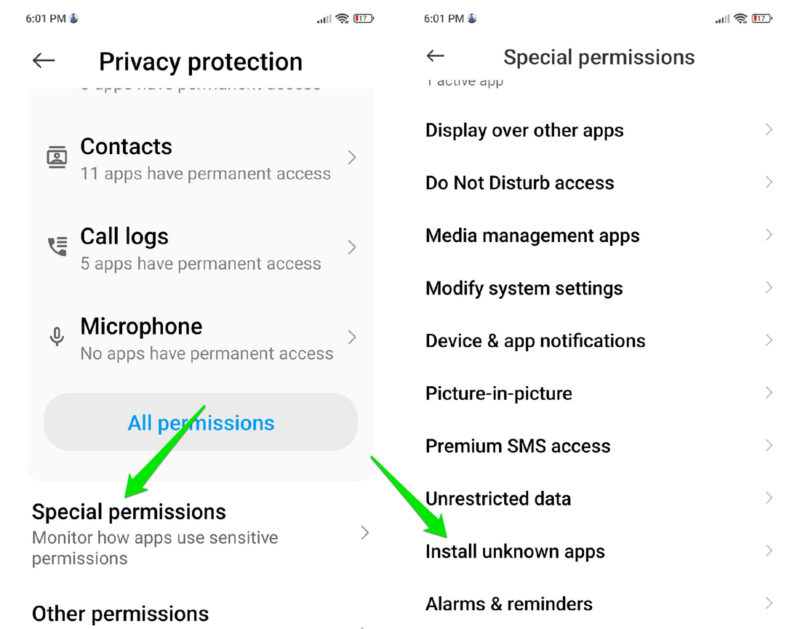
If the above doesn’t happen, then it’s a malicious attempt, and you shouldn’t install the app. Better yet, you should revoke Install unknown apps permission for all apps by going to Settings → Privacy protection → Special permissions → Install unknown apps.
Carefully Manage the Accessibility Permission
RatOn heavily depends on the Accessibility services permission to function. This permission allows an app to read screen content and interact with it, making it extremely dangerous in the wrong hands. The apps need to ask for this permission directly, and you need to manually allow it.
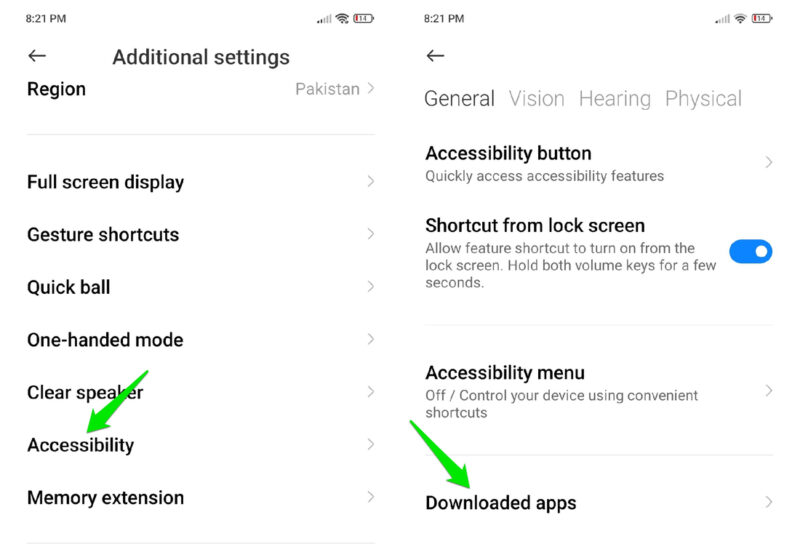
Never give this permission to any app you don’t trust, and definitely not the ones you sideloaded or apps that don’t need to automate tasks on your phone. You can go to Settings → Accessibility → Downloaded apps (or Installed apps) to view all apps that have the Accessibility service access.
Turn Off NFC When You’re Not Using It
To avoid NFC relay attacks by RatOn, the easiest way is to keep the NFC function disabled when not in use. In Settings, go to Connected devices → Connection preferences → NFC and turn it off.
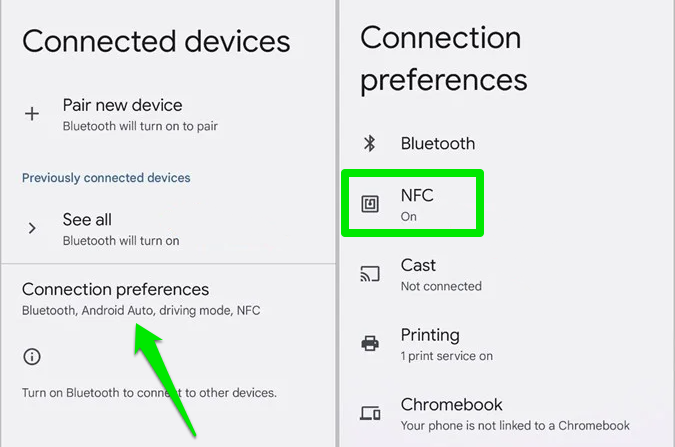
While this will prevent exploitation in the background, RatOn can still convince you to perform an NFC payment using fake overlays. If you get unexpected payment requests or a prompt to prove payment details, get suspicious and start to investigate the cause.
Use Hardware Wallets for Crypto
Malware often targets crypto wallets, and RatOn isn’t an exception. In fact, one of its main functions is to steal crypto seed phrases using fake overlays. The best way to prevent the seed phrase from getting stolen is to use a hardware crypto wallet.
While they require an initial investment, they are worth the security to keep your cryptocurrency safe. These wallets work offline and store security keys of your digital assets. Even if RatOn manages to construct a transaction, it will still need validation from the hardware key.
Use a Password Manager to Automatically Fill Fields
Most reputable password managers won’t fall for the fake overlay trick to steal credentials. They will only fill fields that they know are associated with the official app/website. While an overlay may trick you into providing credentials, it shouldn’t trick a password manager.
The best way to stay safe from RatOn is to avoid sideloading apps, especially if they are given to you via an unsolicited link. Also, if it shows a ransomware message, you’ll have to enter safe mode or repair mode and get rid of the infected app.