
Meta using your data for targeted ads isn’t anything new. But now, your AI chats are the latest casualty of Meta’s greed and the cost of using Meta AI for free. There are a few tricks to prevent targeted ads from Meta AI chats.
Meta AI Chats Help Advertisers
Meta sells your data across Instagram, Facebook, WhatsApp, etc. to help advertisers reach their target audience. All those eerily personal ads you see while scrolling are what keep your favorite social media platforms free.
While Meta has toyed with including ads within Meta AI chats, the first step is to simply collect data from your chats to sell to advertisers.
Maybe you’re using Meta AI to chat about new fitness ideas. Don’t be surprised if you start seeing ads on Instagram and Facebook for fitness gear, gyms, and diet supplements.
Even if you’ve set your chats to private, targeted ads from Meta AI chats still affect you. What’s worse is Meta isn’t providing any way to opt-out.
Just like with other Meta services, there isn’t a way to completely stop targeted ads and data collection. You may be able to remove third-party companies and interests from your Meta profiles, such as checking which websites have access to your Instagram data. But, if you use the services often enough, ads are still highly personalized.
The full policy won’t be available until December 16, 2025, though users are already being notified about the change. Currently, users in the UK, European Union, and South Korea won’t be affected due to privacy laws in those areas.
Delete All Meta AI Chats and Stop Using It
While it’s likely Meta will develop targeted ads from Meta AI chats currently on their servers, deleting your chats now may still prevent Meta from using your chats for annoying personalized ads.
Log in to Meta AI, tap the hamburger menu at the top left of the app, and tap Settings. Tap Data & privacy -> Manage your information -> Delete all chats and media.
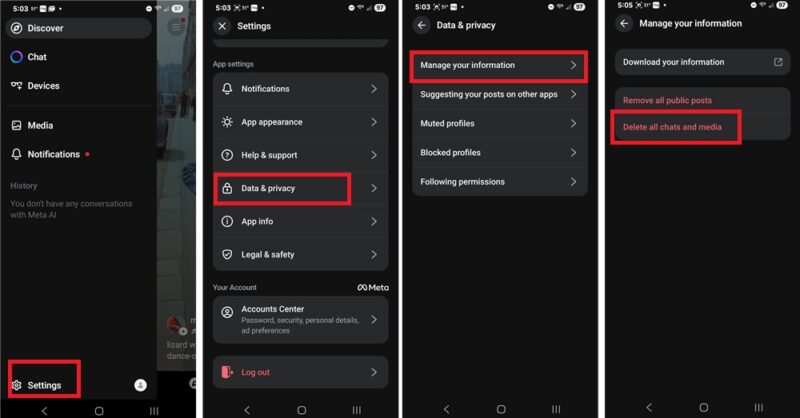
If you want a backup of your chats and anything you’ve created, tap Download your information first. Once you’ve downloaded what you want to keep, then delete your data.
This won’t delete your Facebook, Instagram, or WhatsApp data. However, if you’ve shared Meta AI content on any of those platforms, it will be removed.
Once everything’s gone, stop using Meta AI completely.
The Simple, Yet Nuclear Fix – Delete Your Account
Since Meta isn’t offering a way to opt-out unlike LinkedIn, the quickest fix is to just delete your account. I know this isn’t an option for everyone, especially if you need to use Meta products for work, school, or community programs.
The problem is Meta AI is tied to your existing Facebook or Instagram account, so you must delete your entire account. You can’t just delete Meta AI.
We have quick guides on how to delete your Facebook and Instagram accounts. These also cover how to download your information, such as media, messages, etc. before you delete anything.
Meta claims to fully remove your information, but they likely still retain at least some of it. But, since you won’t be using any Meta services, they don’t have anyone to target and no new data to sell.
If you use WhatsApp, disable Meta AI so it’s not tied to your account. As long as you’re not using it, Meta can’t create targeted ads from Meta AI chat data.
There are some private alternatives, such as Ask Brave and Proton’s Lumo.
Create Another Instagram Account
Facebook’s rules forbid you from having a second account. While many users have two or more accounts, this can get them banned and locked out of their accounts permanently. You can create extra profiles, but all your data is still used for targeted ads, including Meta AI chats.
But, there isn’t a limit on Instagram accounts. It’s a sneaky workaround that lets you still use Meta AI without it affecting your other Meta profiles. Chat all you want and you’ll never see targeted ads because you never really use that Instagram account.
If you have an existing Instagram account and have the app on your phone, create a new account directly from the Instagram app. Tap your profile icon and tap your username at the top. Tap Add Instagram account -> Create new account.
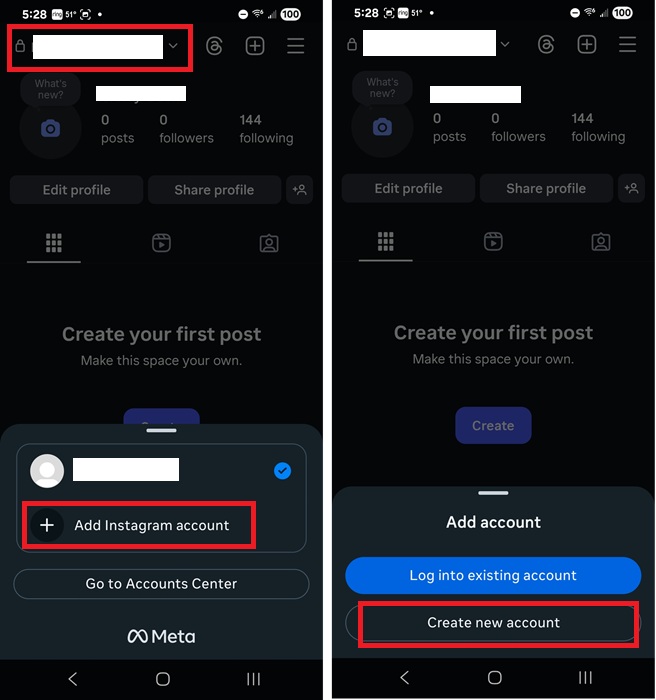
While you can have numerous Instagram accounts, you’re limited to five accounts to switch between in the Instagram app.
Or, if you’re new to Instagram, create a new account. Remember, you don’t have to do anything with it. You just need a Meta account to use with Meta AI.
Now, delete your previous Meta AI data and start over with your shiny new Instagram account. Don’t use Meta AI in any other Meta accounts to avoid targeted ads invading your space.








