Data is the backbone of AI tools, which is why the training data size is often highlighted when introducing a new model. By default, almost all AI chatbots use your chat data (including files and photos) to train their models. If you don’t like this behavior, this guide will show you how to disable it in popular AI chatbots.
Should You Prevent AI From Training on Your Data?
Before you decide to opt out of AI model training, it’s worth considering whether it’s something you want to do. You don’t need to follow the “all data collection is bad” mindset here. Below is an explanation of how companies use your data for training and how it can be both good and bad for the users.
Why you want to allow your data to be used for AI model training
AI models heavily depend on real-world interactions to learn and improve. This improves their accuracy and allows them to solve user-specific problems better in the future. The privacy policy of most AI chatbots, like ChatGPT or Gemini, confirms that all this data is collected anonymously. While the exact anonymization method isn’t revealed, usually they use aggregation or masking of identifiable information.
Furthermore, these chatbots’ privacy policy also confirms that user information is not used for company marketing or creating user advertising profiles. This means the information collected doesn’t directly impact the user’s experience, it only helps AI companies improve future models.
Why you want to disable AI model training
While AI companies don’t leave much space for concern regarding data use (at least on paper), there are still a bunch of user concerns worth considering. Below are some reasons you may want to disable AI model training:
- Deanonymization concerns: users don’t know what anonymization methods are used. What if data could be re-identified using cross-references with other sources? There is no guarantee your data is truly anonymous when it actually matters.
- Data leakage is common: ever since the breakout of AI chatbots, popular chatbots like ChatGPT, Gemini, and DeepSeek have faced multiple data breaches. This means your stored data can be stolen by malicious actors, and they might even be able to trace it back to you, depending on the anonymization method.
- Sensitive information: what if you work in sensitive sectors like healthcare or finance, and use AI for help with work? You probably won’t trust AI with the sensitive data, especially considering it could get leaked. HIPAA or GDPR policies might also force you to opt out.
- Ethical concerns: users have also raised ethical concerns, like using user data for model training for profit without compensation, the environmental impact of training (high energy use), and unfair labor practices. You might want to disable model training to not to be part of the activity.
Here’s how to disable it in popular AI chatbots:
Disable AI Model Training in ChatGPT
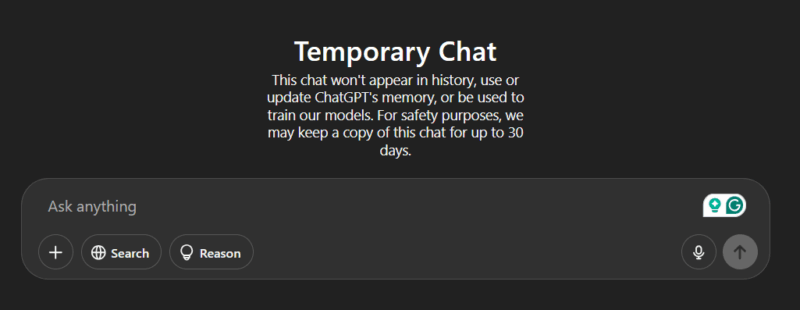
If you just want to disable the model training for specific chats, open a new chat in ChatGPT and click on the Temporary button at the top-right corner. Now, any chat in this window will not be stored in your account history or used for AI training.
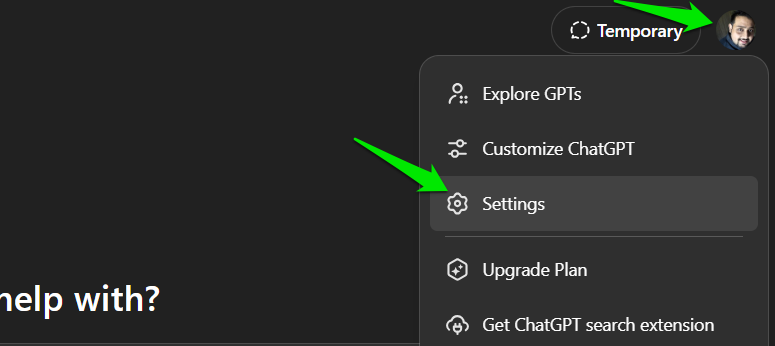
To permanently disable model training, click on your profile image in the top-right corner and select Settings.
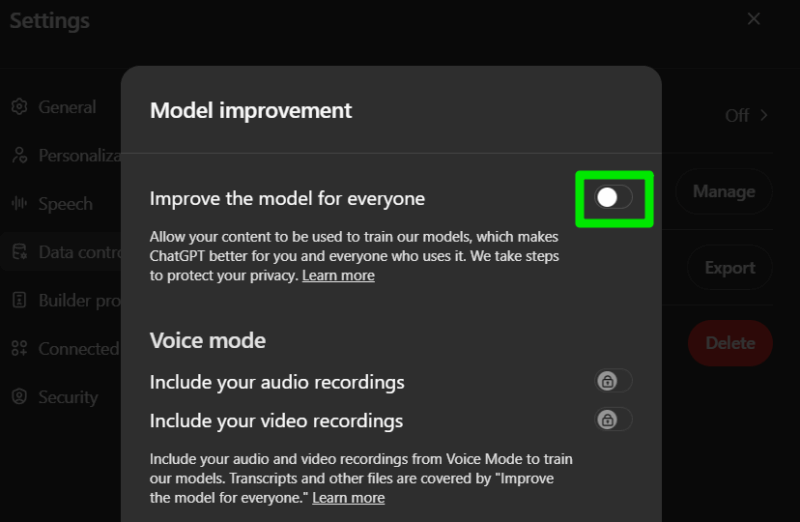
Move to the Data controls section, click on the Improve the model for everyone option, and toggle off Improve the model for everyone.
Disable AI Model Training in Microsoft Copilot
Launch the Copilot app in Windows and select Settings from the profile icon at the bottom-left corner.
Click on the Privacy option and disable both the Model training on text and Model training on voice options. While you are at it, you might also want to disable the Diagnostic Data Sharing option that will allow Microsoft to improve its other products based on your Copilot usage.
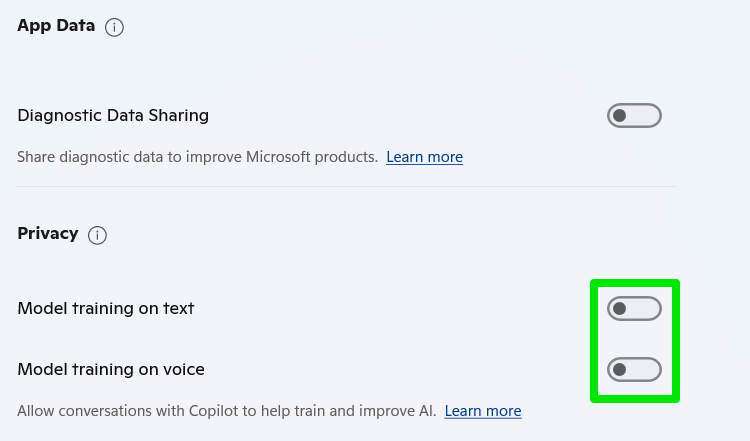
You can keep the Copilot personalization option enabled, as it only impacts your personal experience.
Disable AI Model Training in Google Gemini
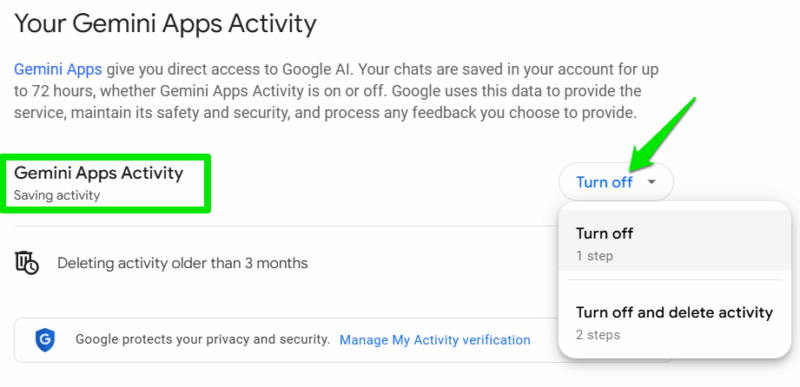
The setting to disable AI model training in Gemini is a bit of a double-edged sword. You’ll have to disable storing your personal activity data altogether to prevent Google from using it for model training. So you won’t be able to access your conversations once disabled.
Click on the Activity button in the left panel. In the new window, click on Turn off next to Gemini Apps Activity and select Turn off or Turn off and delete activity. The first option will disable AI model training for future activity, and the second option will delete previous data as well.
Disable AI Model Training in DeepSeek
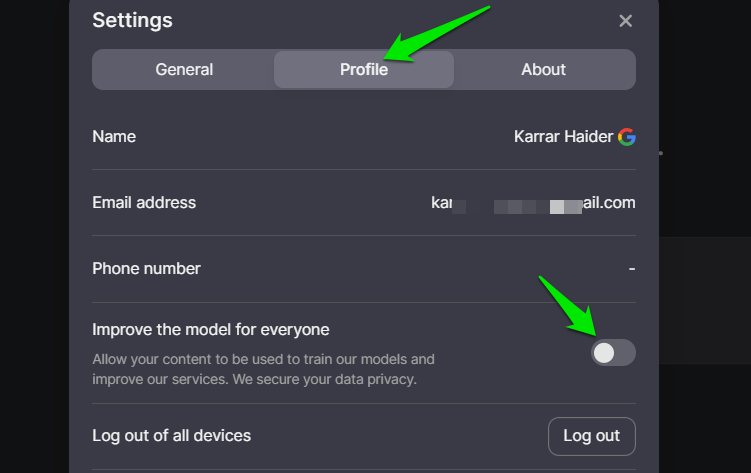
DeepSeek uses a similar approach to ChatGPT for turning off model training. Just click on the My Profile button in the left panel and select Settings.
Here, move to the Profile tab and disable the Improve the model for everyone option. That’s it, the AI model training will be disabled.
Keep in mind that these toggles affect future conversations only. To remove past data, use each service’s “Delete history” option on the same settings page. If you are concerned about how your data is applied to AI models, you should learn what is a large language model.








