As a parent, keeping your kids safe online feels like a full-time job. With Instagram being a go-to platform for teens, it is full of risks like creepy DMs from strangers, sextortionists, or inappropriate content. Meta’s recent safety updates for teen and child accounts are a solid step towards making the platform safer. I’ve been navigating these tools myself to protect my teen’s account, and they’re surprisingly a relief, though not perfect.
Let’s be real, while I appreciate Meta’s effort to curb scams and sextortion, these tools are only as good as how you use them. They’re not a babysitter, just a solid starting point.
Setting Up Teen Accounts for Enhanced Protection
First, if your teen is under 16, switch their account to a Teen Account if the account isn’t new. Otherwise, it’s a teen account by default, and it’s set to private.
This means only approved followers see their posts, Direct Messages (DMs) are locked to just people they follow, and sensitive contents are filtered out. You can review all these in Profile -> Settings -> Teens safety settings.
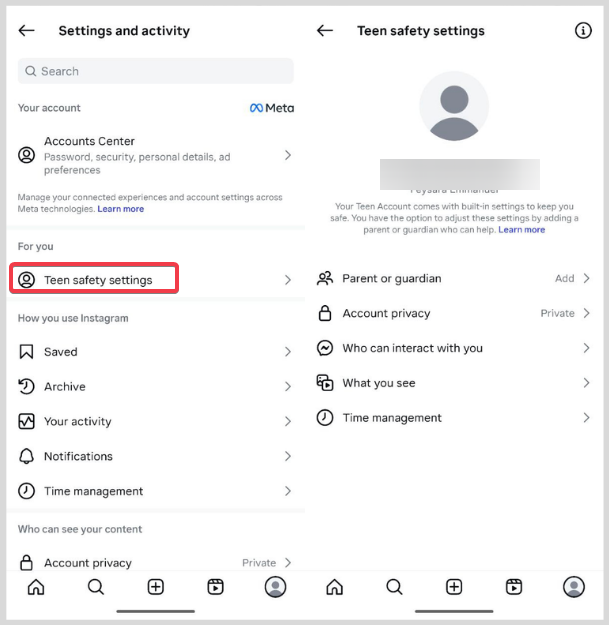
I set this up for my young one, and it was a relief to know random accounts couldn’t send follow requests or slide into his DMs anymore.
Also, you can link a parent account by navigating to Settings -> Teens safety settings -> Parent or guardian. Tap Continue and follow the prompts to send an invite.
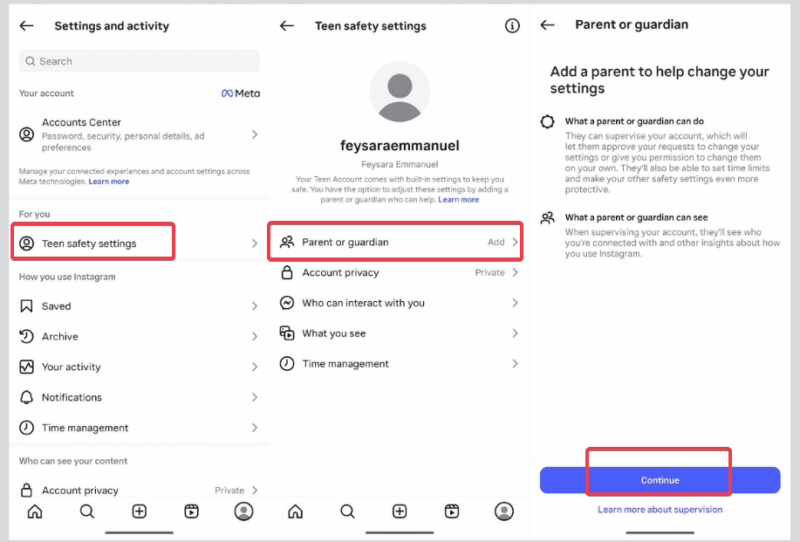
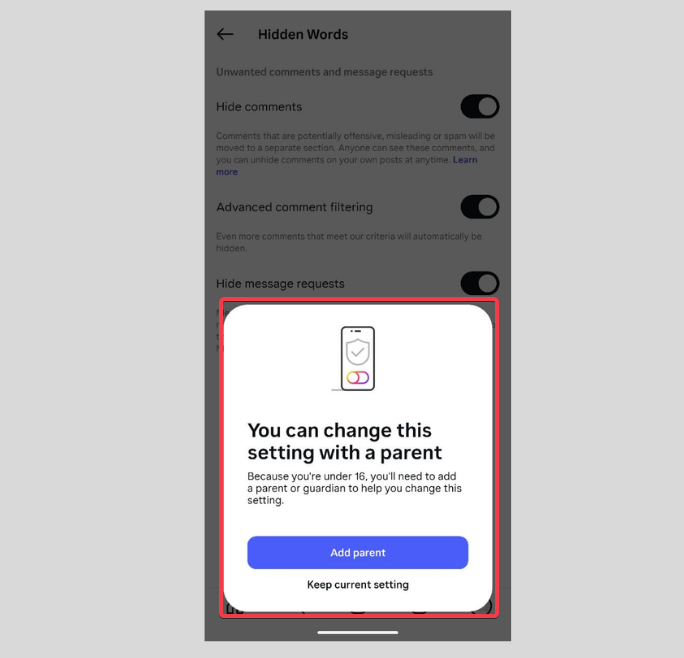
Teens need parental approval to tweak these settings or go Live, which forces you to stay in the loop. While it’s not foolproof since teens are sneaky, it’s a strong foundation to know what they’re up to.
Extra: Try exploring how to activate parental controls on TikTok if your teens use that too.
Activating Safety Features for Adult-Managed Child Accounts
The Meta teen safety features on Instagram extend to adult-managed accounts featuring kids, like those cute dance pages you run for your little ones.
Update the bio to clearly say it’s adult-managed to comply with Meta’s strict age rules. Go to Profile -> Edit Profile and add Managed by an adult.
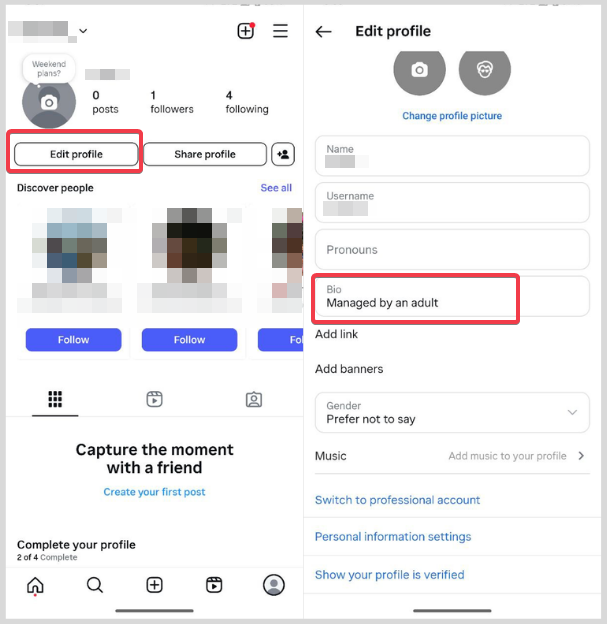
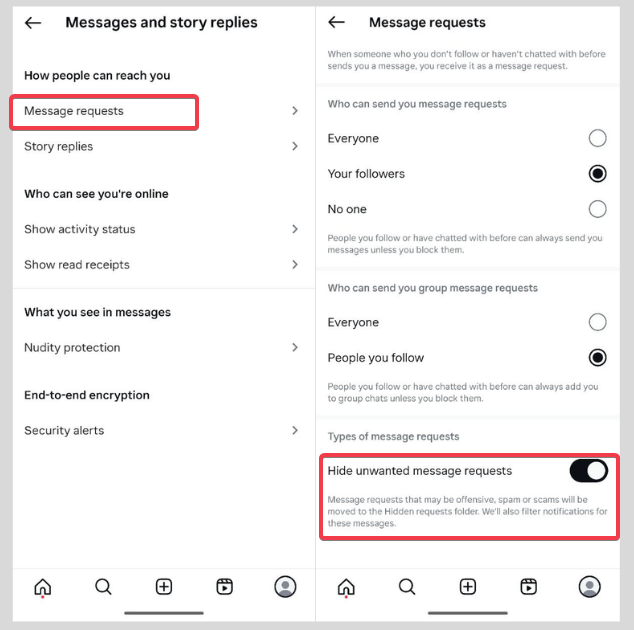
Enable strict message filters and prevent strangers’ DMs in Settings -> Messages, Message requests, and turn on Hide unwanted message requests.
Turn on Hidden Words to block sexualized or inappropriate comments or DMs. Go to Settings -> Hidden Words to filter out sexual or offensive comments.
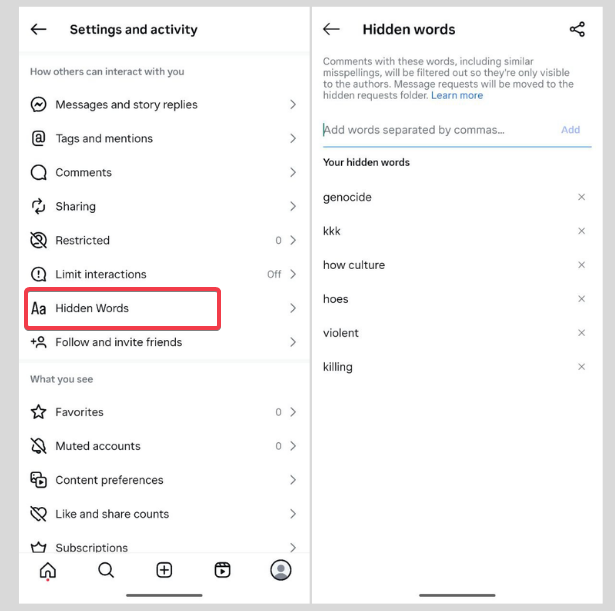
I tested hidden words on my account, and it caught some gross comments right away. So, it’s a no-brainer to use for your kids’ account.
Plus, blocked users by a teen’s account no longer appear in other teens’ recommendations, which is a nice touch from Meta.
If your kids use other social media, you can explore more ways to secure their social media accounts here.
Using New DM Tools to Stay Safe from Strangers
Meta’s new DM features are a lifesaver. Enable safety alerts to flag sketchy DMs in Settings -> Messages -> Safety Notices. This helps you spot fakes by showing you when an account was created.
The Location Notice shows if someone’s messaging from another country, which is usually a red flag for scammers.
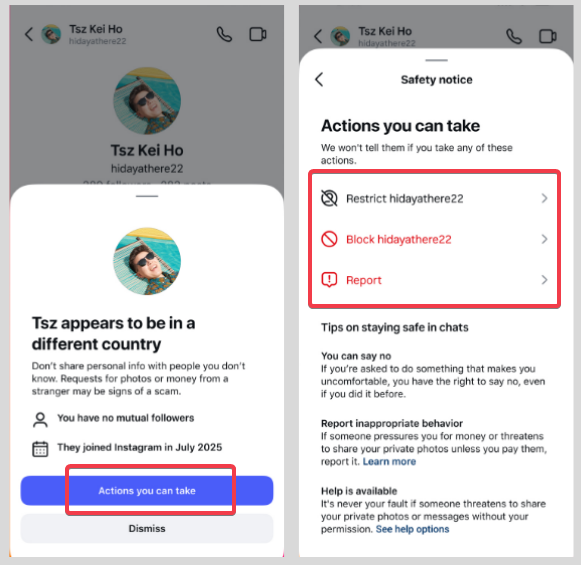
Also, nudity protection is turned on by default for teens to blur explicit images, which is intuitive and perfect for busy parents.
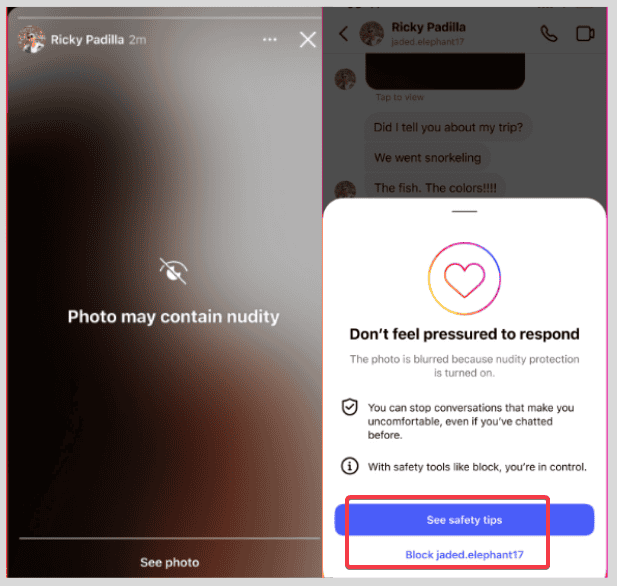
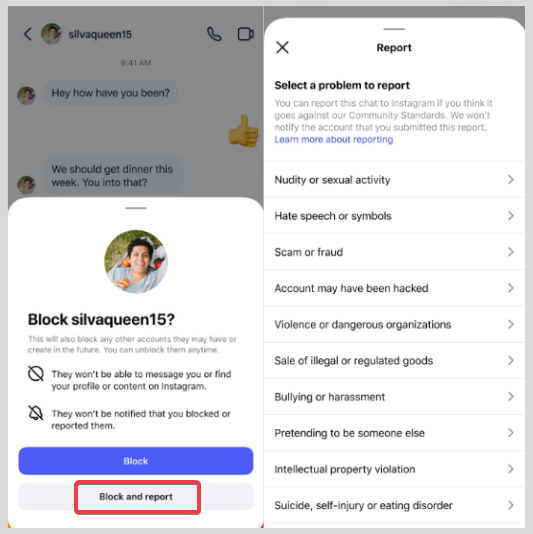
There’s also a one-tap block and report option, but I wish Meta made it easier to report repeat offenders. It’s a step forward, not a cure-all yet.
For more data privacy, learn how to prevent Instagram users from finding you.
Monitoring and Reporting Suspicious Activity
Keeping tabs on your teen’s activities with Meta’s supervision is key to keeping them safe. I check in on my cousin’s account at intervals, and it’s reassuring to know his interactions are safe.
If something feels off, act fast by blocking and reporting with one tap. Meta has removed over 600,000 predator accounts, which sounds impressive, but new ones pop up daily. So, you’ve to keep an eye out.
The real game-changer is talking to kids about spotting red flags, like strangers asking for photos. Also, helping them to limit their data on Meta can prevent attracting inappropriate attention.
Meta’s teen safety features on Instagram are a solid toolkit, but they’re not a set it and forget it deal. Set up these features today, get involved in monitoring them, and give your kids a safer and more controlled Instagram experience. Besides, it lets you worry a little less while they share their world.








