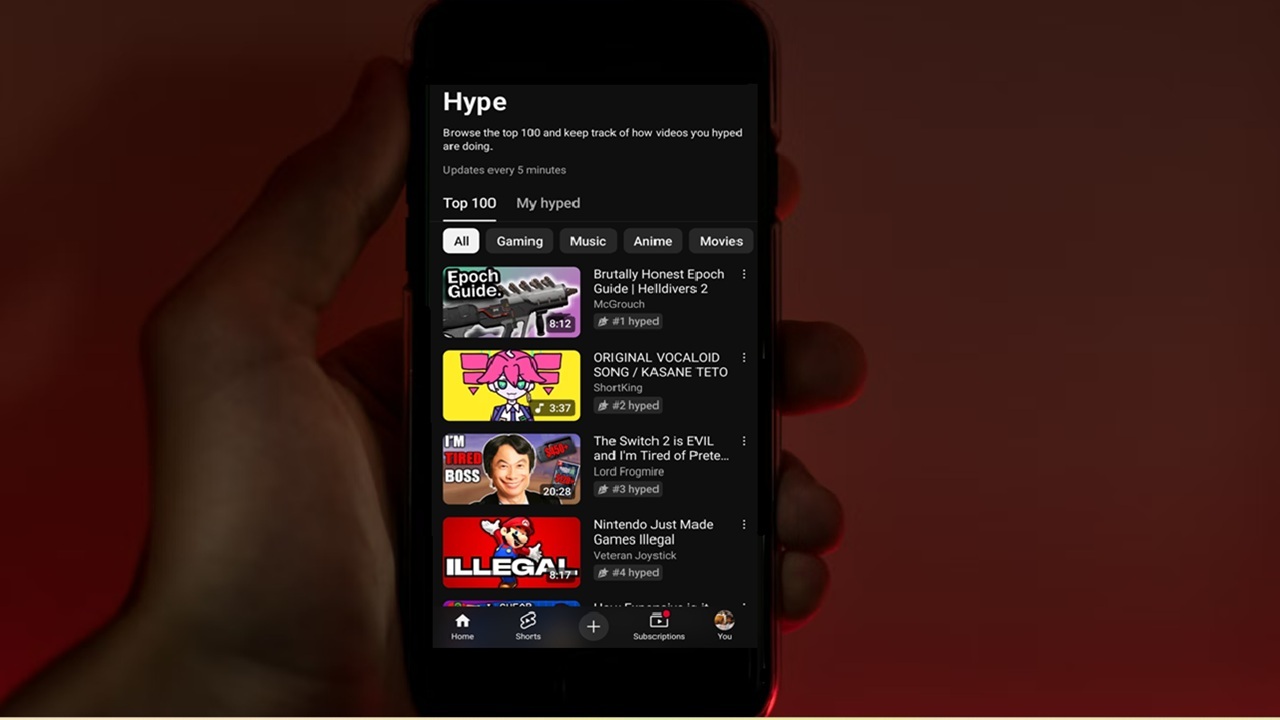
Every YouTube creator wants their channel to grow, but YouTube’s algorithm doesn’t make it easy. If you’ve seen hype on YouTube videos, this is your chance to help your favorite smaller creators finally get the recognition they deserve.
YouTube Hype Button Balances Playing Field
For most of us, hype on YouTube just suddenly appeared over several weeks as the new feature rolled out to mobile users. No announcement, just a new Hype button under certain videos and a Hype section to view weekly results.
The hype feature is designed to help smaller creators gain more traction on YouTube. It’s completely free for users to hype their favorite videos each week. Every hype earns the video points. Creators with the most points are added to a weekly leaderboard. The videos also get a badge showing their current leaderboard rank.
This is a new leaderboard and chart that places creators with 500 to 500,000 followers in front of eager new fans. Instead of having to compete with top videos from creators with millions of followers, the chart is limited to smaller channels still trying to get noticed.
Hype Restrictions to Prevent Abuse
If your first thought was just to hold down the Hype button to give your favorite creator and videos endless points, YouTube already thought of that. There are several restrictions in place to prevent abusing the hyping system:
- Each user is limited to just three free hypes per week. You can use them for the same video, multiple videos from the same creator, or across multiple channels/videos.
- Additional hypes cost extra. YouTube hasn’t disclosed exactly how much extra hypes cost or exactly how many paid hypes you can give. But, revenue is shared between YouTube and the creator, so it’s an extra way to financially support your favorite creators. At launch, it is only applicable for Brazil and Turkey users
- Hypes start over on Mondays. This levels the playing field yet again to let new videos rise to the top on the leaderboard.
- Brand accounts can’t hype videos. This prevents brands from trying to hype partner videos to help boost their own brand.
- You’re limited to videos from the last seven days. This is a simple precaution to ensure only active creators get the benefits of the Hype feature.
Why Don’t You See the Hype Button
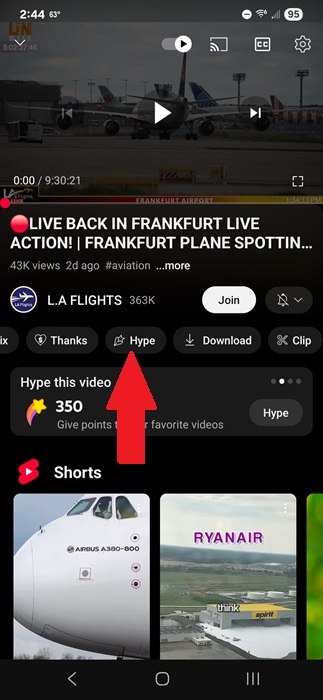
The Hype button is located just under the channel name when viewing a video on the YouTube mobile app. There’s also a Hype button to the right of the comments. Both do the exact same thing.
If you open a video and don’t see it, there are several reasons why:
- Hype on YouTube is only available is certain countries. YouTube plans to add more countries as the feature gets more popular.
- The channel isn’t part of the YouTube Partner Program. If you want to help your favorite creators, comment on their videos and suggest they join the Partner Program so you can better support them and hype their videos.
- The channel has fewer than 500 subscribers or more than 500,000 subscribers.
- The video is older than seven days. Only videos within the last seven days are eligible.
- The video is too short. Only long-form content is applicable for hyping. For hype, long-form is anything horizontal that’s not a Short, even if you watch Shorts in landscape.
- You’re not currently logged in or you’re using an older version of the YouTube app. Take a second and update your YouTube app to the latest version and log in.
- You’re viewing YouTube in a browser. Hype isn’t available on desktop or mobile browsers. Only the app itself.
How to Hype on YouTube
Start playing a long-form video from your favorite smaller YouTube creator from the past week. You can’t hype live videos. Keep YouTube in portrait mode. Look just under the channel name where you’d typically like or dislike a video. Scroll to the side and tap Hype.
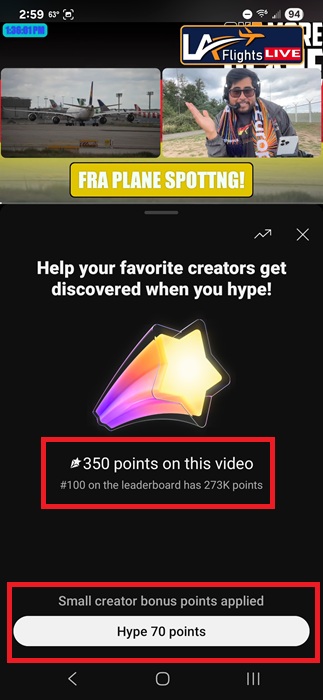
Tap Hype # points at the bottom of the Hype window. The smaller the channel, the more points you can give at once. This is another way YouTube has designed the system to grow the smallest channels at a more even rate as larger channels.
Before you hype the video, you’ll also see how many points the video currently has. There’s also some fine print just below the total points that shows how many points the last video on the leaderboard currently has (top 100). This helps you to see how close the video is to ranking.
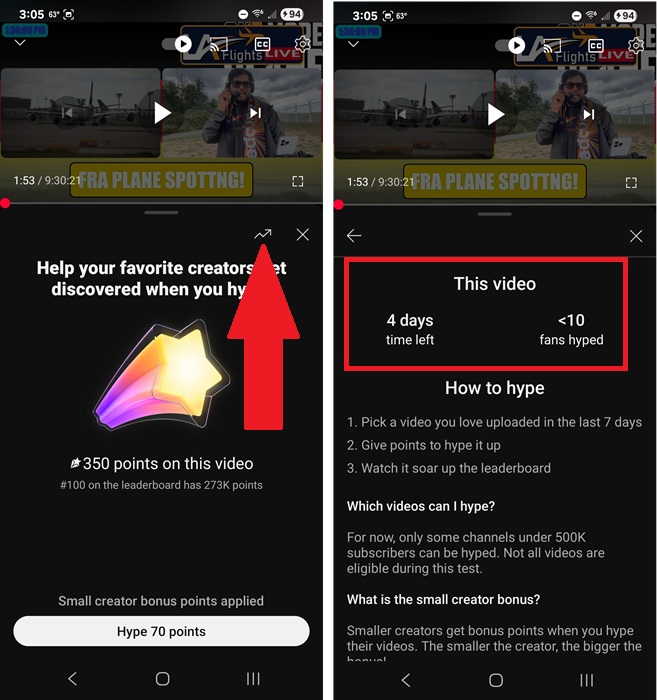
Tap the Chart icon when giving points to view more stats about hypes for this particular video. This shows you details about how many days are left and how many fans have hyped the video.
Check the Hype Leaderboard
Whether you hype on YouTube or not, you can still check out the Hype leaderboard. It’s a good way to find new content on YouTube, though Gemini can help you find great content too. The leaderboards are refreshed every five minutes.
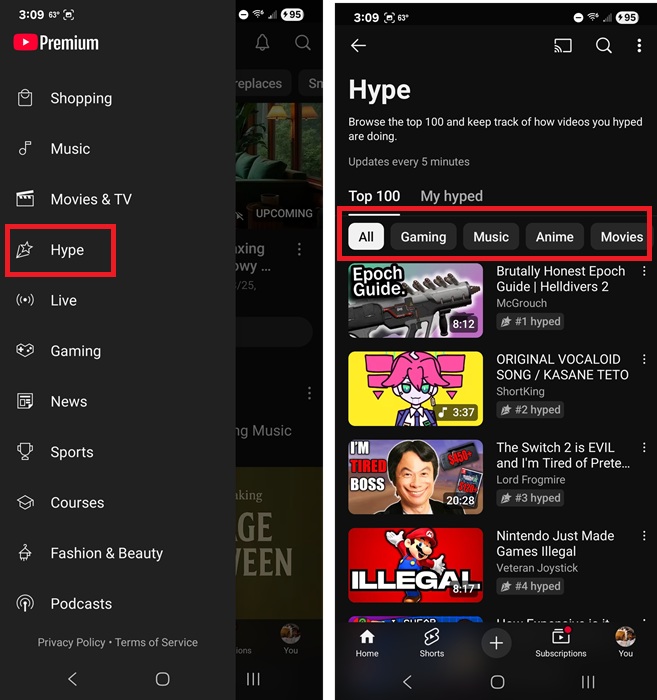
From the main YouTube feed, tap the menu icon (the compass) at the top left. Tap Hype. The leaderboard is the same for all viewers in the same country. It’s not personalized.
Want to just see certain types of videos? All is the default. Or, tap any of the other leaderboards to view the top Hyped videos across gaming, music, animals, travel, and more. There are currently 10 leaderboards available.
View Your Hyped Videos
Want to check in on how a video you’ve hyped is performing? Open the Hype leaderboards in the YouTube app. Beside Top 100, tap My hyped. This lists all your hyped videos from the past week.
Tap any video to start playing it, tap the Hype button under the video, and tap the Chart icon to view the current stats.
Currently, YouTube doesn’t offer a way to un-hype a video. That’s why it’s a two-part process. You also can’t get any refunds for hypes you pay for.
When you run out of hypes, continue supporting your favorite videos, channels, and creators by subscribing, liking, and commenting on videos. This boosts engagement, showing YouTube that users like the content. If you want to skip ads while watching, use these hacks to get YouTube Premium for less.








