


At some point, you’re probably going to do some work on the web — whether you plan to or not. That work could be writing a blog post or article, adding a page to a web site, or regularly writing for a site like Make Tech Easier.
No matter what you do, knowing some HTML (Hypertext Markup Language, the language used to format web pages) can’t hurt. It’s easy to learn and with HTML, you can write and format your documents in any text editor on any operating system.
But you know what? HTML is often overkill for most people. Why? They might not use it very often, and will need to pore over a tutorial whenever they need a refresher. A simpler and more efficient way of formatting documents for the web is to use Textile.
Taking a Closer Look
Textile is a lightweight markup language (also called a humane text format). All that means is instead of using formatting tags surrounded by angle brackets:
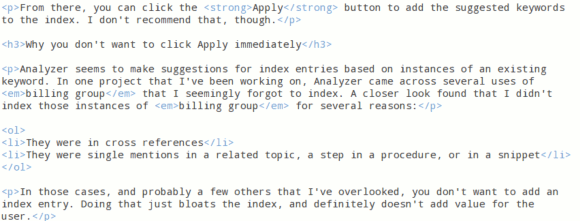
Textile uses keyboard symbols to format your documents. For example, surrounding a word or a phrase with asterisks:
*This is some sample text*
Makes that text bold. You can add other formatting – like headings, lists, tables, and a lot more – to your documents too. How? Let’s take a look at how to create headings.
And that’s easy. Like HTML, Textile supports six levels of headings – 1 is the largest, and 6 is the smallest. To format the largest heading, you’d write this in your document:
h1. My Heading
Make sure that there’s a space between the period and the text that will be the heading.
To create a numbered list, but a hash symbol (#) in front of each item:
# Item 1
# Item 2
# Item 3
For a bulleted list, replace the hash symbol with an asterisk.
Tables can be a bit trickier. You create cells using vertical dashes (|), like this:
|Name|Rank|Serial Number| |Scarlet|Captain|12345| |Nimitz|Admiral|02771|
One great feature of Textile is its support for Cascading Style Sheets (CSS – a way to add custom formatting to a web page). Say, for example, you have a paragraph style called article. You can add that a heading or paragraph in a Textile document like this:
h2(article). A Formatted Heading
Here’s what a document formatted with Textile looks like:
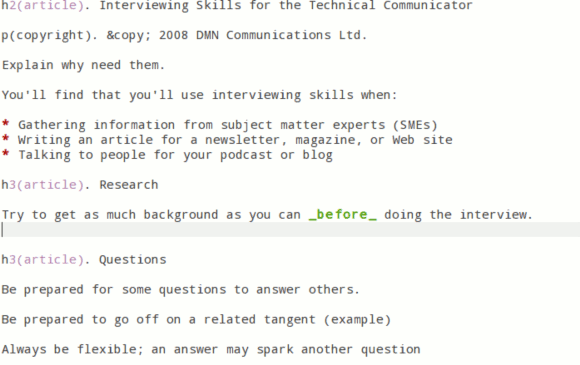
There’s a lot more to Textile. And it’s a lot easier to learn than HTML. If you’re looking for a good reference, you can find one here.
Converting to HTML
So you have all these documents formatted with Textile and want to publish them to the web. How do you do that? The easiest way is to use the online processor. Just copy the contents of your document into a text field, and then click the Text to HTML button.
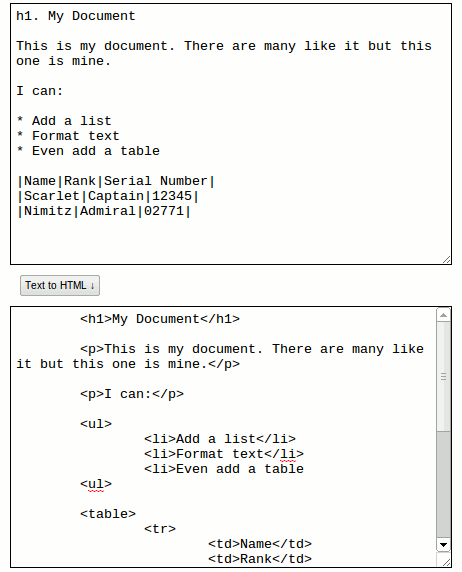
If you’re a command line junkie, check out Xilize. It enables you to convert documents formatted with Textile even when you’re offline.
Do You Need to Convert?
Well, that depends. If you’re building and maintaining web pages by hand, then Yes! You’ll have to do the conversion. But if you’re using a blogging platform or content management system, then you have another option.
WordPress, Movable Type, Joomla! and Drupal all have Textile plugins. With the plugins installed, you don’t need to convert your content to HTML. Just copy and paste it into the text editor in your blog or content management system and publish from there. You get the best of both worlds: a simple way to format your documents and a powerful way to making them available to the world.
Final Thoughts
Textile is a fast, simple, and efficient way to format content for the web. It’s easy to learn and, because it’s plain text, you can create and edit documents on any operating system and in any text editor.
It’s not for everyone, though. You might not want to tackle Textile’s admittedly shallow learning curve or have to deal with the conversion step. But if that doesn’t bother you, give Textile a try. It can seamlessly fit into your writing and web publishing workflow. And it can save you time and effort when you want to put content on the web.
Photo credit: svilen001