
Facebook features seem to disappear overnight, but Meta is finally bringing back the Facebook job board to help users and local businesses partner up. You might not find jobs to make you a millionaire, but you could find a great part-time or entry-level gig.
What You Need to Know About the Facebook Job Board
A few years ago, Facebook let users post job listings and you could apply directly on Facebook. There is no need for a separate social network just for job hunting (aka LinkedIn). For reasons unknown, Facebook phased this feature out, leaving the Facebook Marketplace just for items and services.
Now, when you visit the Marketplace, you’ll see a Jobs section. It looks almost identical to other Marketplace listings, but instead of buying things, you can now apply for jobs.
Just like with buying and selling items, the listings can be rather random. Some days, you may not see much at all, but other days might feel like you’ve hit the job search jackpot.
For now, it’s only available in the Android and iOS apps. It may roll out to the web version soon. If you don’t see it in the mobile app yet, try updating the Facebook app. As usual, Facebook’s rolling out the feature in phases, so it may be a few weeks before everyone sees it.
Accessing the Facebook Job Listings
You must be 18 or older to access the Facebook job board. I know younger teens would love to have an easier way to find local jobs, but this is just the rule for now.
Open the Facebook mobile app and tap the Marketplace icon at the top. If you don’t see it, tap the hamburger menu and select Marketplace.
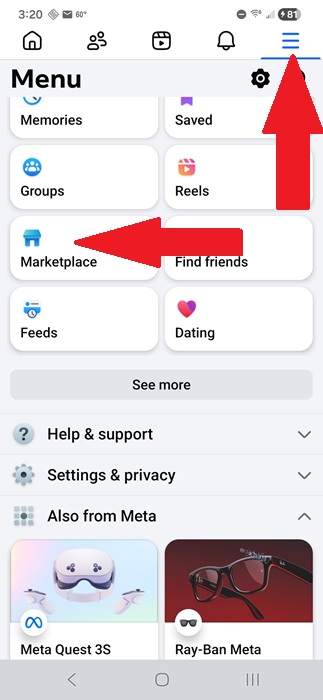
Tap Jobs at the top to just view job listings. By default, listings are based on your local area.
Filter Jobs Based on Your Needs
If you live in a more rural area, you might not have that many listings, so filtering might be pointless. For larger areas, endlessly scrolling gets tedious.
Instead, use the filters at the top of the Facebook job board to sort and filter jobs to only see what’s relevant to you.
Your options include:
- General filters – This groups all the filters in one place. But, they’re also listed one by one beside the general filters icon.
- Sort by – If you don’t want to waste your time with lower wage offers, older listings, or anything too far away, filter your results by distance, wage, and listing date. I highly suggest looking at the newest listings first. Sometimes, older listings are for roles that have already been filled, but the company just hasn’t removed it yet.
- Job type – The Facebook job board lets businesses and charities post open positions. These range from full-time to volunteer work. Use this filter to only see roles that match what you’re searching for.
- Category – Only looking for work in a specific industry? Try the Category filter. Just remember that sometimes employers may list roles in more than one category or even a closely related category, so be open to expanding your search to other categories.
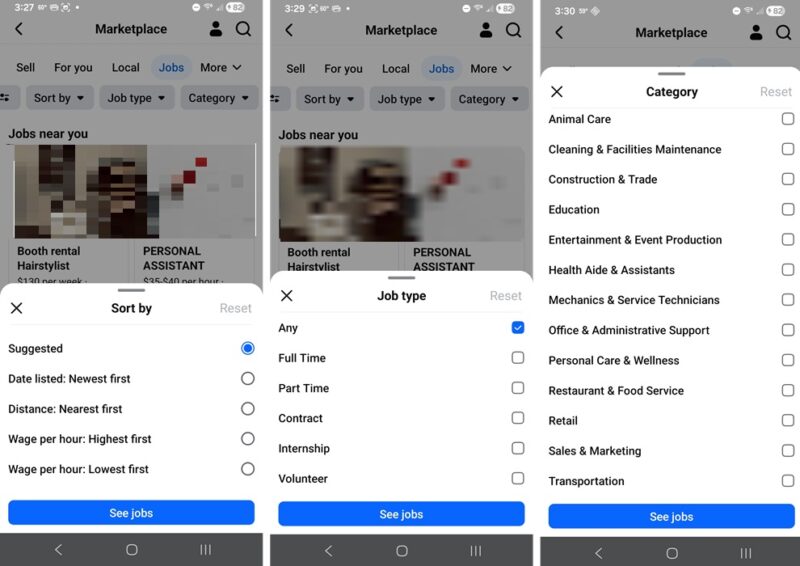
If you’re not seeing what you’re looking for with a filter, bring up the filter again to change it. Tap Reset on the filter window to go back to the defaults.
Consider Changing Your Location Radius
Facebook uses your current location to suggest local jobs for you. While that’s useful, you might not always be looking for a job in that specific area. Maybe you’re willing to drive an extra 10-20 miles, or you’re about to move and want to have a new job lined up in advance.
In the Facebook Marketplace job board, tap your location just below the filters. Tap the Search icon (magnifying glass) to enter a new address. Or, drag and drop the radius circle to a new area.
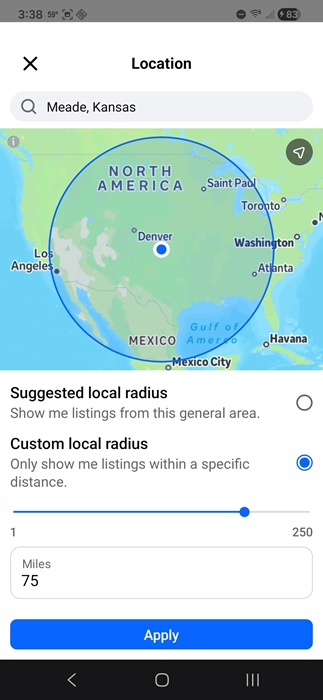
You can also choose Custom local radius to customize the distance. The default is 75 miles, but you can boost it to 250 miles if you want.
Tap Apply to save your settings. As with the other filters, you can reset this at any time by reverting to Suggested local radius.
Check All Details and Ask Questions
Facebook’s job board offers a social element, as you might expect. It’s not just a link to an application. Instead, when you click a listing, you’ll see all the relevant details listed. However, don’t just apply blindly.
If you have a question, use the Send a message feature to send a message using Facebook Messenger. If your Messenger is a little out of control, you might want to clean it up to make sure you don’t miss any responses from prospective employers.
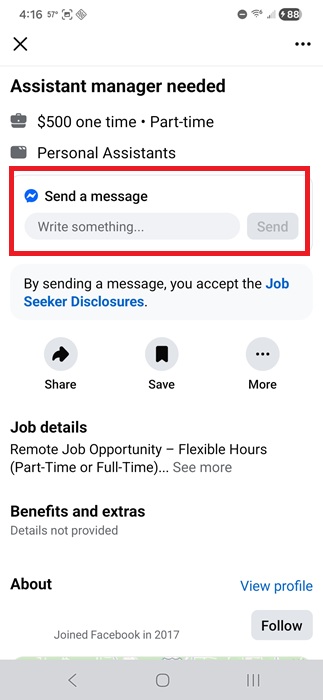
You don’t have to apply to send a message. But, when you’re ready, use the messaging feature to let the business or employer know you’re interested.
Include a link to your resume, portfolio, or anything else that shows you’re perfect for the job.
Clean Up Your Facebook Profile
Numerous people have missed out on great positions and even lost jobs because of something they posted on Facebook.
Before you start applying to roles on the Facebook job board, take a few days to check over your profile to see if there is anything you wouldn’t want an employer to see. Maybe take down embarrassing photos from a party or remove controversial memes you’ve shared.
At the very least, ensure you set more personal posts to private to look more professional when someone checks out your profile.
Check Often and Respond Promptly
New job listings can appear daily, so check back often. The more active you are in viewing and applying, the more likely you are to get a job quickly. Also, if an employer messages you, don’t ghost them. Respond promptly and professionally.
Skip any slang, acronyms, or overall poor grammar. If you need help, ChatGPT, or any of the various alternatives, may be useful.








