
As you already know, AI is everywhere and now Amazon AI shopping guides are here to help you pick the best possible products. But, do these guides have your best interests in mind or are they more biased toward specific brands?
What Are Amazon AI Shopping Guides
Much like user-generated shopping guides Amazon often shows, AI shopping guides pull together data from millions of products to help you better understand types of products in a particular category, price points, what to look for, and recommends some of the top options.
The purpose is to not just throw a bunch of products at you, but help you learn the jargon and what it means for you. Then, you can make a more informed decision.
How Amazon Generates The Guides
Amazon’s AI shopping guides utilize Amazon Bedrock, which leverages the latest AI models to offer you the most accurate information. As with all AI-generated content, there could be incorrect details – AI tend to hallucinate and may also pull from not-so-reliable sources at times.
One thing I do like about these guides is the information doesn’t just come from Amazon. It’s a mix of the following:
- Amazon’s marketplace, including third-party sellers
- Community Q&As
- Reviews
- Terminology pulled from non-Amazon sites
- Common shopping needs for various products, such as buying a computer for gaming, video editing, basic browsing, or student
All of this is then combined into a guide that steps you through the research before suggesting products labeled with use cases or shopping needs.
How to Access Amazon AI Shopping Guides
This is the trickier part and one Amazon is going to have to improve to make Amazon AI shopping guides worthwhile. Supposedly, you enter a search term (on mobile apps or mobile site only) and Amazon lists an AI shopping guide in the suggested search queries before you complete the search.
You may also see a guide listed just below the first several suggested products after performing a search. In my experience, I saw the AI guides pop far more this way than when using the search box. Also, I had more guides show on the mobile site versus the mobile app.
For example, below are two screenshots. Both are searches for “televisions,” but the mobile site shows the guide, while the mobile app on Android doesn’t. It also didn’t matter whether I was logged in or not. On the other hand, when I searched for “laptops,” the guide appeared on both the site and app.
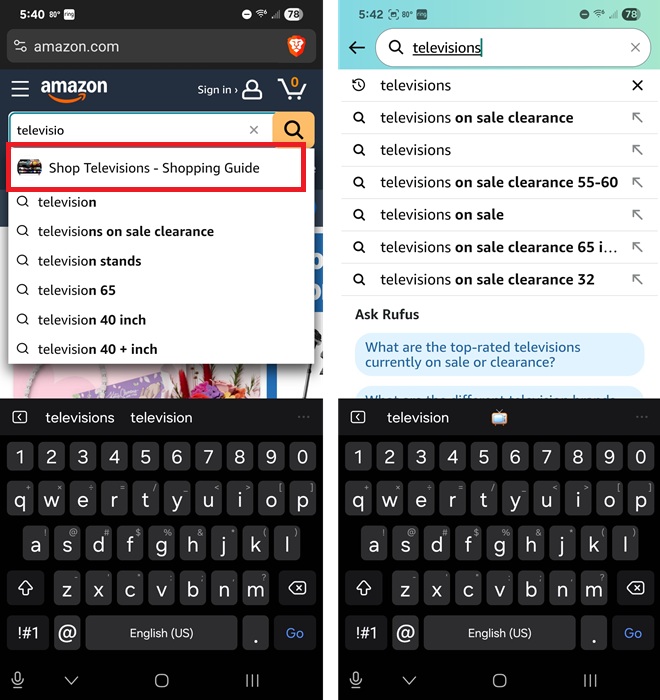
Currently, AI-generated shopping guides are still limited on Amazon, though the company is working on more.
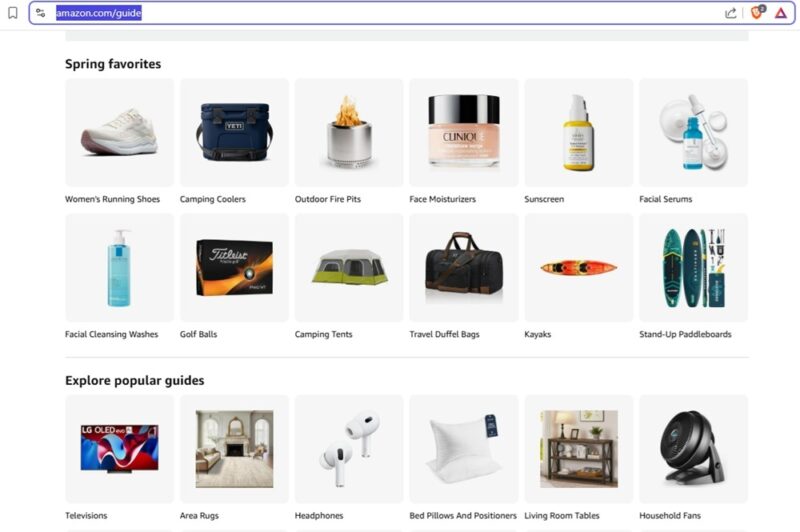
To see guides in some of the more popular categories, check out the Shopping Guides page. It currently lists 24 guides that will likely change out as seasons and holidays change. It’s also a good way to get to guides on your desktop. Or, if you want to view guides on a larger screen than your phone, just make a note of the URL on your phone to use on your desktop browser.
Should You Rely On The AI Guides?
The good part is since they’re not user-generated, there may not be the same bias. But, that doesn’t always mean these guides are perfect and 100 percent trustworthy, either.
Overall, I was impressed with how detailed the guides are. For example, the Smartwatches Buying Guide started off with seven suggestions in different categories, such as top overall pick, best deal, longest-lasting, and sleep analysis. It then jumped to my favorite section, which explains what factors to consider along with a series of recommendations that are best for those factors. Images are from the desktop site to show more of the guide.
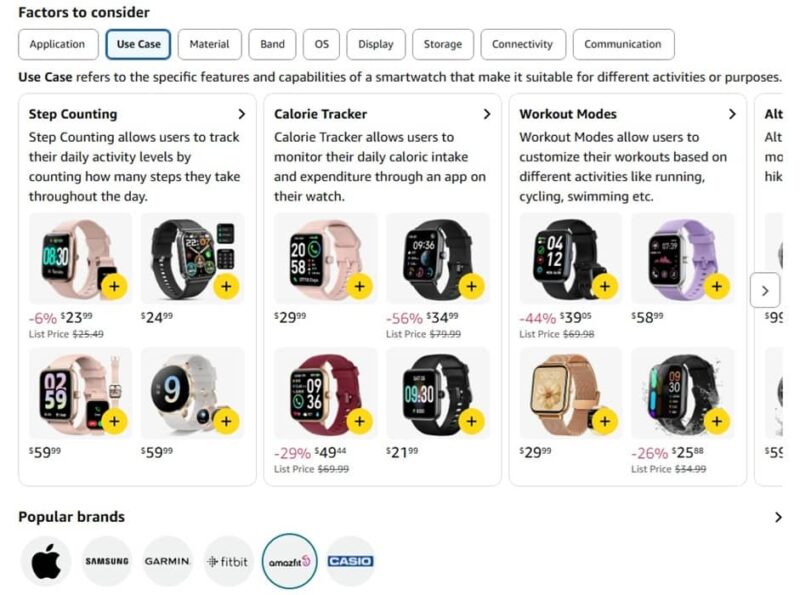
You’re then able to see popular brands, along with customer reviews for each brand. It then goes into sections on shopping by type and price, along with a list of common Q&As. Then, there’s a longer list of recommendations.
When comparing with shopping guides on popular tech and consumer sites, much of the recommendations are similar. The downside is you don’t always get the same in-depth reviews of individual products.
For now, guides are only in more general categories. For example, there’s a guide for “televisions,” but not “smart TVs.” You’ll find a guide for “laptops,” but not “gaming laptops.”
I’d also recommend using these strictly as a guide versus a guarantee of the best products. Always do a little extra research and see what other guides recommend as well. Personally, I do trust them slightly more than the influencer guides on Amazon, simply because they’re not as biased.
How to Ask Rufus for Details
While the guides themselves are relatively detailed, you’ll get even better results when pairing them with Rufus, Amazon’s AI shopping assistant. You might have already encountered Rufus when searching for answers and/or reviews while looking at a product.
Even when Amazon AI shopping guides don’t pop, you’ll usually see suggested Ask Rufus questions while typing in the search box. For instance, there isn’t a shopping guide for “smart TVs,” but Ask Rufus lists three questions about finding clearance TVs in various sizes.
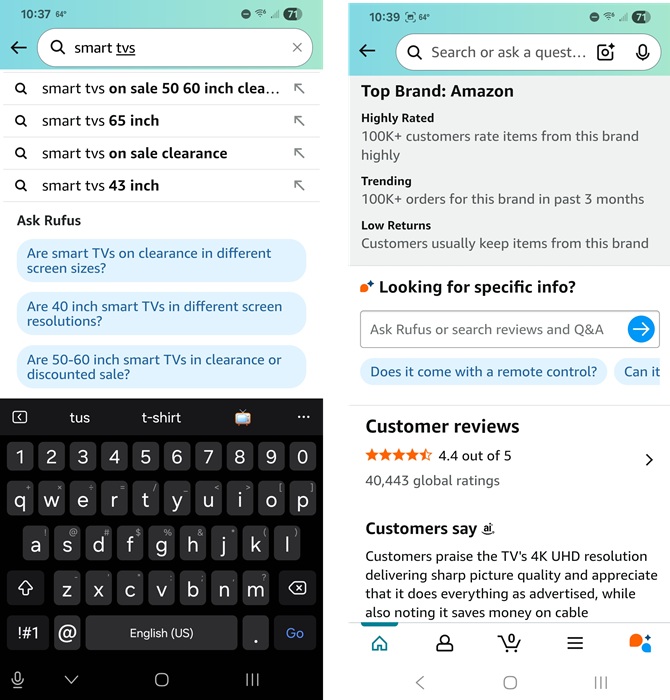
Also, if you’re looking at a product, scroll down to just above the Customer Reviews section to the Ask Rufus box. This helps you learn more details. There are even suggested questions just below the search box.
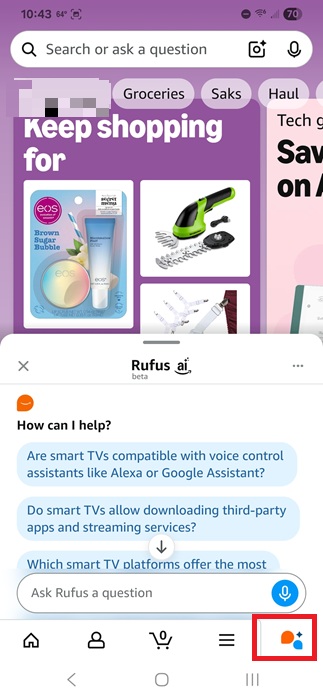
You can even access Rufus without looking at a specific product. Click the Ask Rufus icon at the bottom right of the Amazon Shopping app. Then, ask any shopping related question. You’ll see some suggested questions based on your recent browsing history on Amazon, but you’re not limited to those.
Use a combination of Amazon AI Shopping Guides, Rufus, and a little outside research to make the most informed decision, especially for big purchases. You could also use other AI tools, such as ChatGPT search’s shopping feature.
While you’re shopping, try these money-saving browser extensions, along with these tricks to save money on Amazon.








