
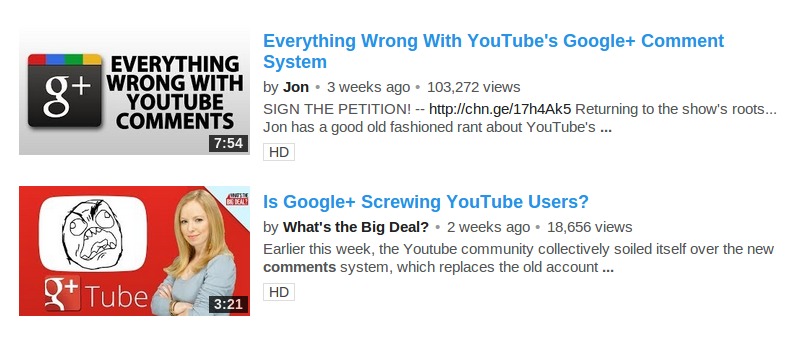

Ever since YouTube switched their commenting system to Google+, there has been an outrage among its users. Many are not very happy with this new partnership, mainly because it forces them to create a Google+ account in order to comment on YouTube. Others are not happy that they are forced to use their real names.
If you’ve vowed to never use YouTube again, you may be happy to know that if you had a previous username on YouTube, you can go back to using it. This means that you will not need a Google+ account in order to comment on YouTube. In fact, you can even delete your Google+ account if you don’t like. This tutorial will show you how to disconnect Google+ from your YouTube account and go back to using your previous username.
1. Sign into your YouTube account and click on the arrow next to your picture at the top right corner of the page, to display the YouTube menu.
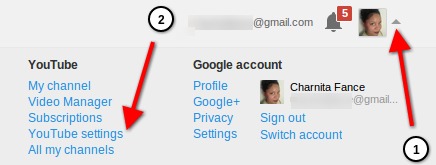
2. Click on “YouTube settings” in the menu that pops down.
3. Underneath your email address and next to your picture (on the Overview tab), click on “return name to (your username here), and disconnect Google+ profile.”
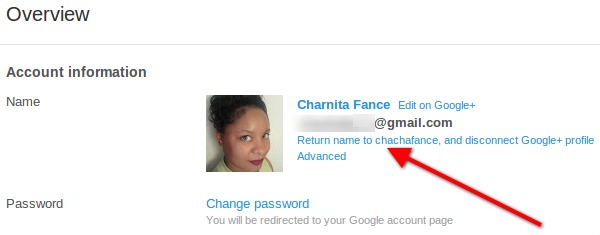
4. On the next page click on “OK.”
Here’s what will happen once you complete this process:
- The name of your YouTube channel will be whatever your old username was. For instance, mine would be “chachafance” instead of “Charnita Fance.”
- Your Google+ profile will still exist with real your name on it, but you can delete it if you don’t like. If you choose to keep Google+ profile, it will no longer be connected to your YouTube account.
- You won’t have to worry about a your comments and the videos you comment on automatically being posted to your Google+ profile.
Unfortunately, this will not get you the old commenting system back, but it will help you get rid of an unwanted Google+ account that you may have created just so that you can comment on YouTube. Also, you won’t have to use your real name anymore.
Note: I am unaware if this will work for those who do not have a previous YouTube username, since that seems to be the only fallback option. I’m also not 100% sure if you can go back to using your Google+ name in the future, but seeing as Google really wants the two to work together, I don’t see why this wouldn’t be possible.