
Ever wanted to spice up your Instagram Reels feed? Instead of just viewing what Instagram suggests for you, check out what your friends see too by using the new Instagram Blend feature.
What is Instagram Blend?
Much like the Spotify Blend feature that lets you blend music from multiple friends into one epic playlist, Instagram Blend lets you and your friends blend together recommended Reels.
Obviously, you may want to carefully choose who to invite or you could end up with some pretty off the wall suggestions if you and your friends have polar opposite interests. Then again, it could be exactly what you need to expand your horizons a bit. This also saves you time from constantly sending Reels back and forth to each other.
The feature was initially released in beta back in early 2024. Now, it’s finally available for most users. Just make sure you update your Instagram app to see if it’s available to you. For now, it’s only available in the mobile app. Sorry, desktop users.
Create Your First Blend
To create a blend, you have to first have private messages with the friend(s) you want to invite. This works whether it’s a one-on-one chat or a group chat. If you want to create an Instagram Blend with multiple friends, start a group chat first.
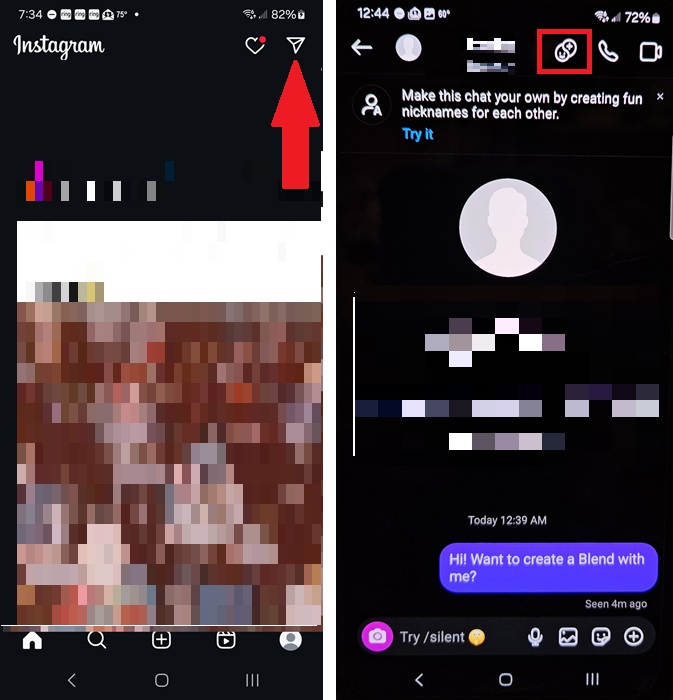
Open the Instagram mobile app and tap the Messages icon (flying envelope) at the top right. Tap a message to view your chat. Then, tap the Blend icon next to the user’s name at the top. It looks like a yin and yang symbol with a smiley face.
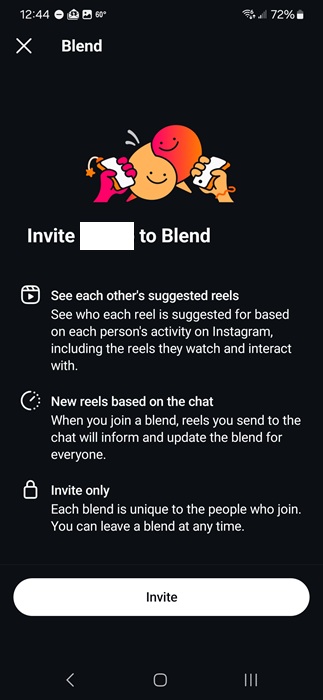
Tap Invite on the next screen. The most important thing to note here is a Blend is only created if the other user(s) accept the invitation. If they decline, no Blend. I’d suggest letting your friend(s) know you’re sending an invite beforehand so they don’t think it’s spam.
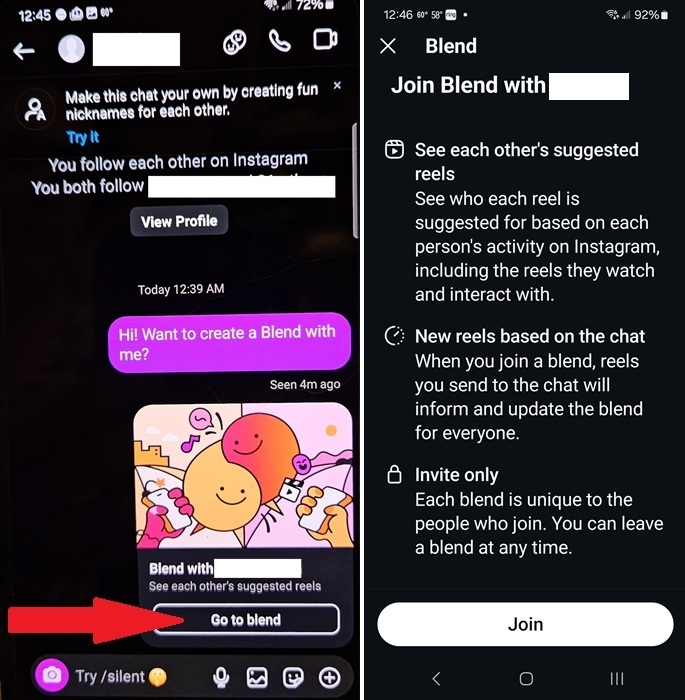
To accept, just tap Go to blend in the chat. Then, tap Join.
Accessing Your Collaborative Blend
Access your blend at any time by open your messages on Instagram. Tap the one-on-one or group message you created the Blend in, tap the Blend icon, and enjoy your custom Reels feed.
This Blend stays private between you and your friend(s).
As you scroll through suggested reels, you’ll see Suggested for just above the account name. This lets you know who it was suggested for, such as just you or just your friend. If you have common interests, it may be suggested for both or everyone in the Blend.
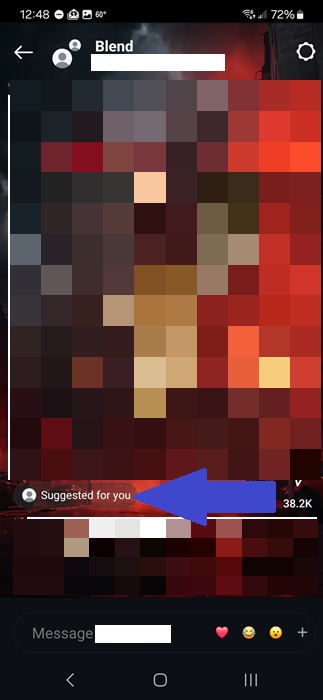
What makes a Blend more interactive is you’re able to chat with each other as you scroll through your custom Reels feed. Instead of having to share a Reel with your friend, then chat about it, you chat as you scroll.
You’re free to create an Instagram Blend with different users. You’re not limited to just one.
If you want to change things up, remember you can always change your Instagram nickname at any time.
Deleting a Blend
Not enjoying the Blend you’ve created or been invited to? Not a problem. You’re not locked in. Tap the gear at the top right of your Reels Blend and tap Leave this Blend at the bottom. Tap Leave to confirm.
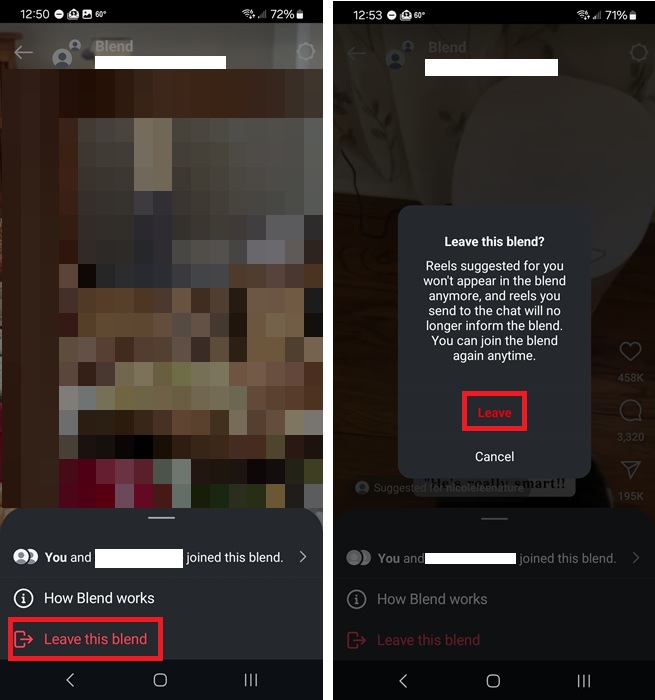
If there are still at least two people left in the Blend, they’ll continue to share the Blend with suggestions just for the two of them. Any suggestions for you no longer show up or affect the Blend.
If it’s just the two of you, your friend will see a message to Resend invite if they try to view the Blend again.
Remember, you can always create a Blend again in the future if you change your mind.
Get Better Suggestions
An Instagram Blend is a mixture of two or more users’ Reels feeds. So, it’s all based on each user’s individual algorithm. If you feel the suggestions on your Blend aren’t right for either of you, there are a few ways to personalize what you see:
- Like, comment, and/or share Reels you enjoy – The more you engage with a Reel and/or account, the more similar content you’ll see.
- Chat about what you see – Instagram considers chats about a Reel (in your Blend) as engagement. Whether it’s just something quick and simple like “That’s definitely you” or “I can’t believe we both love this” or a more thorough discussion, it’s engagement.
- Follow suggested accounts – See something new you love? Follow the account. It doesn’t matter if it was suggested for you or your friend. Following helps change your Instagram algorithm.
Overall, it’s a nice new feature. However, it could backfire and result in fewer shares and interactions between users. For me, it feels more like another feed to endlessly scroll through versus a reason to chat with my friends. On the other hand, it has led to several interesting discussions on Reels we usually wouldn’t share with each other.
If you want a more private Instagram experience, learn how to view someone’s Instagram Stories anonymously. And, see which sites are sharing your activities with Instagram.








