


If you’ve ever looked into protecting your privacy online, you may have heard a thing or two about browser fingerprinting. Before I started researching this subject, I’d actually stumbled upon the term a few times while working on finding privacy extensions.
Now, I actually know what browser fingerprinting is, and very soon, so will you.
What Is Browser Fingerprinting?
Browser fingerprinting is what occurs when a web site, web page, plugin or advertisement takes a “fingerprint” from your browser. This isn’t like a cookie, which is saved information from a site stored on your computer.
Instead, browser fingerprinting involves digging into settings and configuration information that the browser gives when the page or plugin suggests it. This information includes the user agent string from your browser, information like your resolution, the plugins and fonts you have installed, etc.
A lot of the time this information adds up to the point where there are very few other people out in the wild configuring exactly who you are, making it easier for third parties to track you.
Best Method for Avoiding Browser Fingerprinting: Tor Browser
The Tor browser, which we’ve covered before, remains the most powerful application there is for securing and protecting user privacy. Tor blocks browser fingerprinting and other forms of tracking completely while also circumventing any kind of website block you might be dealing with.
Unfortunately, Tor is fairly slow due to the nature of its connections. In addition, poor privacy practices on Tor can undermine its effectiveness, resulting in you being fingerprinted or tracked anyways.
Great Method: Privacy Badger and Disconnect

The Electronic Frontier Foundation’s Privacy Badger extension is a good way to help protect your privacy online, but it won’t completely block fingerprinting. It also requires some additional configuration.

Disconnect is a service that blocks most advertising and tracking domains. This extension, in addition to a great adblocker, will help you block the domains that are trying their hardest to fingerprint and track you. However, it still doesn’t have the full effectiveness offered by Tor.
Good Method: Disable Javascript and Flash
Most fingerprinting methods (at least, deep-level fingerprinting methods) use Javascript or Flash to get the extra information required to make a more complete fingerprint.
Disabling JavaScript and Flash is a good way to circumvent a lot of (but not all) browser fingerprinting, but unfortunately, remains incomplete. While Flash can usually be disabled just fine without breaking all but the oldest websites, Javascript remains a key part of many website functions. Disabling Javascript will negatively impact your browsing experience at some point.
Okay Method: Random User Agent Extensions
While these are supposedly the most effective methods of preventing browser fingerprinting aside from the Tor Browser, there is a reason why these extensions for Chrome and Firefox are ranked so low.
Like Javascript, using Random User Agent extensions means that on some web pages your browsing experience is going to get broken or otherwise aversely effected.
The reason here is that the extension is reporting false information about your browser. While this is great for preventing you from getting fingerprinted, pages with low compatibility range outside of a single browser can end up giving you some trouble.
Conclusion
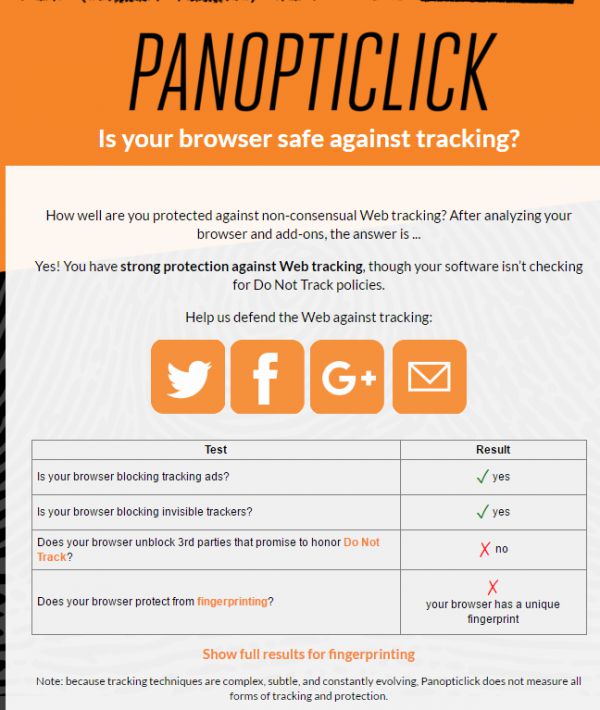
Use the EFF’s Panopticlick Tool to discover how well your browser is avoiding third-party trackers and fingerprinting. Unfortunately, outside of Tor, there’s no real, super-solid way to completely block fingerprinting without having a real negative impact on your browsing experience.
It is a good sign, however, that things are being done. Perhaps one day every browser will value security and privacy like Tor does with little to no cost to user experience. Of course, now we’re just entering pipe dream territory.
But what do you think?