


If you’re interested in browser extensions like AdBlock or uBlock, or privacy-oriented extensions like Ghostery, you may have heard of something called “Privacy Badger.”
The EFF (Electronic Frontier Foundation) has released a browser extension for Chrome and FireFox called Privacy Badger. It’s an extension designed to block trackers and advertisements that track you and your personal information. While other extensions serve a similar purpose (and Privacy Badger’s code is rooted in that of AdBlock Plus), Privacy Badger functions quite differently and serves a separate purpose. Let’s get into that.
How does it function?
Adblocking extensions typically use what is called a “black list” which filters known URLs for various advertisements in order to block them. Privacy Badger functions differently in that it doesn’t use a black list at all. Rather it operates on its own code to decide what domains are collecting your personal information.
Privacy Badger does, however, include what is called a “yellow list” – sites that are known to use third party resources despite Do Not Track requests. These sites have cookies blocked instead of being blocked completely, allowing many advertising services (like Google) to continue functioning with this extension active.
Why should I use it?
Does Windows 10’s data collections bother you? Do you want to protect your privacy in your browser? If so, Privacy Badger should be a no-brainer for you. Here are some questions you might have about using it answered:
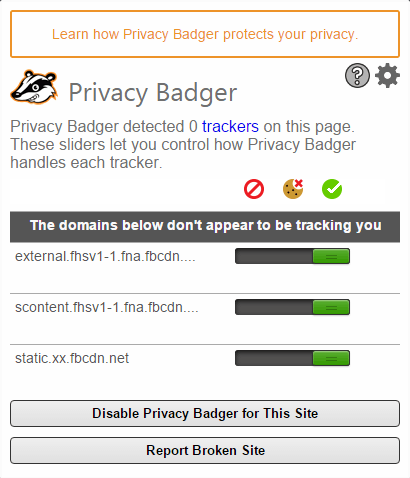
- Can I still whitelist individual sites? – Yes, as you can see from the screenshot above.
- Is it compatible with other AdBlockers and privacy extensions? – Yes, though it risks being redundant. Avast’s browser extension has issues with it, however, and will attempt to block its installation.
- Does it support anything besides FireFox and Chrome? – Other browsers are planned for support, but unless you’re running FireFox, Chrome or Chromium, no dice.
- Will it block tracking from Facebook (or another site) while I’m on that site? – No. It only blocks third-party resources, meaning external sites trying to get information from the one you’re using at the time.
- What exactly is “Do Not Track”? – Do Not Track is a feature on just about every modern browser, and it submits a Do Not Track request to every site you visit. Unfortunately, many advertisers and other groups don’t care if you don’t want to be tracked, but that’s where Privacy Badger comes in. If the site continues tracking you after you ask it not to, Privacy Badger steps in.
- What do I do if it messes up certain sites? – Due to the way Privacy Badger functions, it may be seen as an adblocker on certain sites. Since some websites don’t function properly with an adblocker enabled, all you should need to do is disable Privacy Badger for that site in particular and then reload the page.
Anything else?
That’s about all the important information, actually. Privacy Badger is still in development, so be sure to report any bugs you may find while using it. Developers typically enjoy user feedback, especially if it helps them make a better application/extension/product. I personally recommend giving Privacy Badger a spin, even if you aren’t concerned about your privacy, and then opening it on your favorite websites to see just how many trackers are being blocked at any given time. It’s a very interesting, enlightening experience, even though it really just increases the paranoia if you’re a privacy nut like some of us.