


WordPress is bundled with a comprehensive User Management System that allows you to control the amount of permissions that a user has on your website.
These permissions include administrative tasks such as installing plugins and editing site-wide settings, content-related tasks such as writing, and editing drafts or publishing posts.
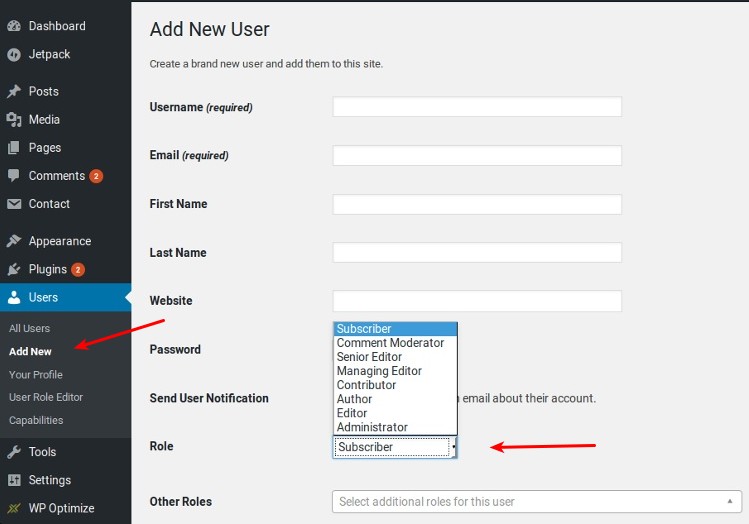
By default, we have five distinct user roles which you may be aware of if you have used WordPress for a reasonable amount of time.
Once you understand how each one works, you will be able to make a more informed decision about what roles are suitable to specific users on your website.
1. Administrator
The administrator is, as you can imagine, the most powerful user on a regular WordPress install. Any user with admin permissions can add, delete or edit the information of any other user including other admins. They also have complete control over the website’s content and can modify themes, plugins and other core site settings at anytime.
This role should be strictly reserved for only those who need full control over all website settings, such as site owners. If you run a multi-site WordPress network, there is a Super Administrator who can add or delete websites within the network or perform other network-wide operations. Super Admins are not available on regular WordPress installations.
2. Editor
Users with the editor role have complete control over the content of a website, but they cannot change any other core settings or install plugins and themes. They can, however, add new posts, edit, publish or delete posts by any user on the website. Editors can also publish new pages or delete old ones and can add or delete tags and categories. In addition, an editor can moderate or delete comments as well.
The editor role should be reserved for users who act as editors for the website’s content. Regular contributors should never be assigned this role due to the generous permissions.
3. Author
Users with the author role have total control over the content they produce. They can add, edit or publish their own posts, but they do not have access to the content produced by other users of the website. They can also delete their own posts from the website, including their published posts.
Authors cannot create categories or do anything to the pages on a WordPress site but can upload images or delete anything they have previously uploaded.
In practice, many websites do not assign this role to users because of the fact that authors can delete their published posts and images which is not always desirable.
4. Contributor
The contributor role is a more restrictive version of the author role. Users with this role can only add or edit their posts but cannot publish or delete their posts after they are published. Content produced by contributors has to be reviewed by an editor or administrator before it can be published.
It is important to note that contributors do not have access to the media library, so they cannot upload images to their posts without the assistance of an editor or admin.
5. Subscriber
This is the default role for new users on a WordPress website, and it is the most restrictive. Users with this role can only log in to your website and read its content or posts comments. They do not have access to any settings and cannot create their own content.
This role could be useful if you want users to register on your website before they can access specific content.
Wrap-Up
We have covered the default roles on regular WordPress installations and what each of them can do. There are ways to modify the permissions of each user or even create your own custom user roles. We will cover those in depth in a later article.