


In this day and age the gullible computer user is becoming rarer. With malware education prevalent on the Internet, people aren’t so easily fooled by the scam emails claiming they’ve won millions of dollars.
That doesn’t mean hackers have gotten any less determined, however; it just means they’ve had to work smarter. From spying on company infrastructure and sending emails to employees from the boss’s address, to abducting users’ Facebook accounts and messaging friends, abuse of trust is the method of choice for hacking these days.
One method they have up their sleeve is redirecting your computer from a legitimate URL to a fake copy of it where they can acquire login details when you enter your information into the false site. This is known as “pharming”, and it can be quite scary in its methods. Here we’ll explain what pharming is and how it works?
What Is Pharming?
By itself, pharming is a two-step process that combines two attack vectors; DNS poisoning and phishing. By utilizing the strengths of both, it creates a highly believable trap for people to fall into. While phishing works by dropping bait and hoping people take it up, pharming can take over entire DNS servers and redirect people to fake websites.
So in order to answer “what is pharming?” we first have to analyse the two components it’s built upon and see how they interact with each other to form the overall pharming attack.
DNS Poisoning

You can tell how nefarious this attack vector is by the name alone! DNS poisoning works by hijacking a DNS lookup. When you enter a web address (such as www.facebook.com), the computer has to convert it into an IP address. This is because computers don’t understand what “Facebook” is! URLs are there to make it easier for us humans to remember the addresses of websites. Computers, however, know what an IP address is. So in order to talk to Facebook, a computer converts the URL into an IP address.
They do this by querying a DNS server, which acts like an address book for URLs and IP addresses. They use the DNS server to find the URL’s IP address (www.facebook.com -> 157.240.1.35), and then use it to talk to the Facebook servers. When a computer has discovered the IP address of a URL, it can note down the address in a cache. This is so it can avoid wasting time looking up the same IP address over and over again. In this example it’ll note that www.facebook.com goes to 157.240.1.35 in its cache.
DNS poisoning works in two ways: either by getting into a cache on an individual PC and changing the IP addresses to direct to malicious websites or by infecting the DNS servers themselves so that PCs performing the lookup get an “infected” result. In either case the next time the user types “www.facebook.com” into their browser, they end up loading the “poisoned” fake IP address instead.
Phishing

DNS poisoning allows an attacker to direct users from a legitimate site to a malicious one even though the user typed the address correctly. This is only step one, however; after all, simply directing the user to a different website doesn’t do much! In combination with the poisoning, hackers can use phishing in order to turn a simple redirect into a gain.
In our example the attacker is redirecting the user away from Facebook to a website of the attacker’s choosing. There are many options the attacker can pick, but in a pharming attack the attacker will choose a website they’ve previously set up to look identical to Facebook. When the user types www.facebook.com into their browser, the DNS poisoning redirects them to the hacker’s fake Facebook.
Now that the user is on the fake site, it will then prompt the user for their Facebook login credentials. Believing they’re on the real Facebook site, the user enters their login details and transmits their information to the hackers, completing the pharming attack.
What Can Be Done
First off, it’s useful to know that DNS servers are usually owned by the ISP that you use. As such, in order to avoid pharming attacks against DNS servers, make sure you pick a reliable ISP. Good ISPs will know about pharming and will have countermeasures to protect their servers from being poisoned.
But what is pharming’s weakness when it comes to infecting your own computer’s files? First, always make sure you have a good antivirus or anti-malware solution installed. These should hopefully be able to detect an edit to your computer’s address cache file and alert you before any damage is done.
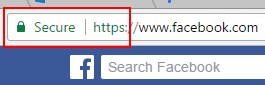
Even without antivirus, however, you can stop a pharming attack by using your wits. When you access a popular or secure website, such as social media or banking sites, you’ll see a padlock in the address bar and “HTTPS” at the start of the URL. This means the website has been validated by an authoritative third party to be what it claims to be. As such, it’s been awarded a certificate, and its communications have been encrypted.
Of course, if a pharming attack has redirected you to a spoof site, that site shouldn’t have a certificate identifying it as genuine. Even if the URL looks identical to the real thing, the sight of a missing certificate is a dead giveaway. When logging into a popular site, make sure the HTTPS certificate is present. If you’ve noticed that the certificate has suddenly “gone missing,” something might be afoot!
Fooling Pharming
With multiple steps to create an intricate vector of attack, pharming can be a little scary. Now you know the details of what pharming is and how it works. Even better, if you’re sharp and use a secure ISP, you may not need to worry about falling victim to pharming.
Have you or someone you know ever been tricked by a realistic-looking website? Let us know below.