Have you ever wanted to search that particular file, but can’t remember where it is located or the name of the file? VX Search is an application for Windows that can help you find that file quickly and easily, and yes, we have a giveaway. Read on for more detail.
VX Search is an automated, rule-based file search solution allowing one to search files by the file type, category, file name, size, location, extension, regular expressions, text and binary patterns, creation, modification and last access dates, EXIF tags, etc. Once you have performed a search, there are also ways to categorize and filter the search result and to copy, move and delete files right within the interface.
VX Search comes in three version: Free, Pro and Ultimate. The Free version is able to index 500,000 files and take up a maximum disk space of 2T while the Pro and Ultimate version are able to index much more files, more disk space and many more premium features.
Once installed, you can start to search files from the main interface.
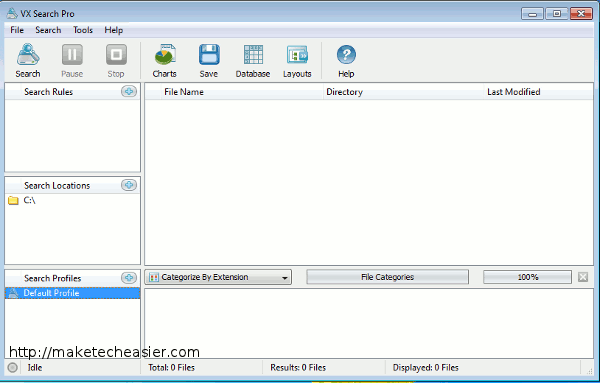
Click the Search icon and you can type in the search term to perform a search.
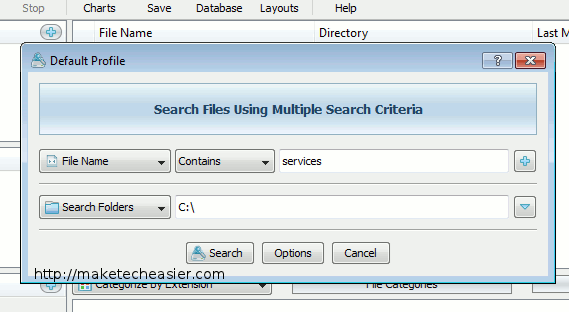
Additionally, you can change the filter criteria for it to better search your files. The filter contains a big list of items, including filename, extension, file attribute, file size, created date etc. You can also use a wildcard search or regex to locate those ambiguous files. A good thing is that you can set multiple rules to help you find your files quickly.
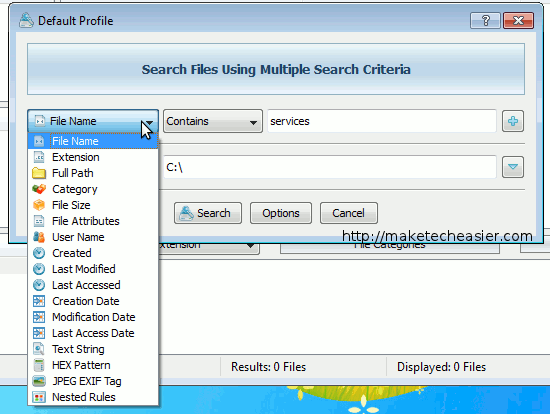
Lastly, you can also narrow down to the directories for it to search.
During the first run, it will take some time to index the files in your system. This also means that the first search could take a slightly longer time. Once it has completed indexing the files, subsequent files will be much faster.
One good thing about VX Search is that you in the search result, you can sort it by various criteria, such as by File Type, Extension, Last Accessed Time, Last Modified Time and more. This allows you to zoom in to the file you want quickly.