

There was a time when Safari was a joke of a web browser, but that time has passed. As Mac devotee John Gruber says, “Safari is a terrific browser.” It’s the only browser that feels designed to integrate with macOS, both technically and aesthetically. But Chrome is pretty great too. What stands to make Safari better than Chrome?
1. Better Privacy
Google makes their money by obtaining, retaining and using user information. It’s obscured by anonymizing techniques, sure, but this still makes plenty of people a little uneasy. And while Google isn’t exactly looking over your shoulder at every page you visit in Chrome, it’s not far off.
If you sync your browser history with Google, it will automatically be added to “Web & App Activity”, which Google uses “to provide personalized Google products and services to you.” Google also uses aggregated, anonymized browsing data to “improve other Google products and services.” While this is far from specific, neither that language nor Chrome’s terms of use preclude selling ads based on browsing and search history, a core part of Google’s business.
For privacy-conscious users, this can be a little unpleasant. Safari offers a fast, modern browsing experience without the looming specter of potential privacy invasions. Of course, it’s not exactly anonymous: Apple does collect information about Safari’s usage, though it’s mostly about how well websites run, and it’s obscured via differential privacy. What they do with that data is the big differentiating factor: Apple’s business is not founded upon the idea of tracking and analyzing user data. Google built their business on that; they don’t need your help collecting their data.
2. Improved Aesthetics
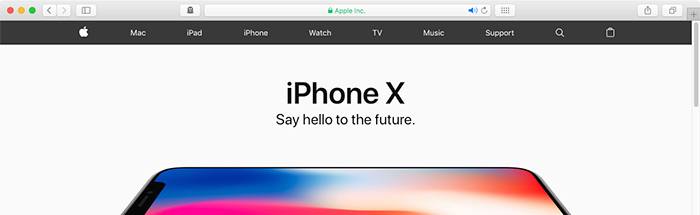
It’s true that aesthetics are a matter of personal preference. But if you like a minimal user interface that shrinks into the background when not in use, then you’ll love Safari’s design. The primary toolbar of the window is just one line, with all the primary functions immediately available.
This does sacrifice some of the flexibility of Chrome, and it hides some URL information to make everything fit, but for casual web browsing, it’s ideal. It also integrates more completely with the macOS aesthetic, with correctly-styled notifications and Apple-themed aesthetics.
3. Enhanced System Integration
Safari offers an improved user experience over Chrome for macOS users thanks to a greater degree of system integration. One example is Picture-in-Picture, which lets you pin any HTML5 video to an always-on-top floating window in the corner of your screen. This makes it easy to watch video content while you work on something else.
Safari also integrates with macOS’ built-in Keychain functionality for autofilling names, addresses, usernames and passwords. This Keychain information syncs to all Apple devices over iCloud (alongside your bookmarks, open tabs and browser history), so it’s up to date on your Mac, iPhone and iPad.
On laptops it’s even better: Safari integrates with the Touch Bar and Track Pad Multitouch fluidly and elegantly. Handoff works more smoothly with Safari, and push notifications let websites send you updates to your desktop, with no extensions required.
4. Smooth Operation
As a rule, Chrome is just about the fastest browser out there. But regardless of load times, users tend to report that Safari is more responsive to user input than Chrome. While page loading time isn’t vastly different between the two browsers, and Chrome beats Safari in most rendering benchmarks, Safari boasts better integration with Apple’s graphics rendering pipeline. This allows the browser to offer a smoother scrolling experience and snappier interaction feedback while using less system resources that Chrome.
5. Improved Battery Life
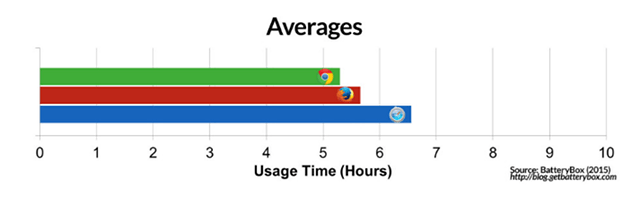
Apple optimized Safari to maximize battery on Apple’s MacBook and MacBook Pro. According to Daring Fireball’s tests, using Chrome over Safari could cost you as much as an hour of battery life each day. This is especially true on older Macs which see greater benefit from Safari’s optimization for Apple’s tight hardware ecosystem. Safari is also less likely to spin your fans up. It runs fewer individual processes than Chrome and is generally less processor-intensive.
Conclusions: Safari’s Downsides
Of course, Safari is far from perfect. It lacks a robust extension ecosystem, which is one of Chrome’s strongest selling points. Its rendering engine isn’t as popular as Chrome’s, meaning developers are less likely to test their websites on Safari’s infrastructure. It’s also not as great for developers, lacking Chrome’s powerful web developer tools and Inspect Element functionality. But for generalized web browsing, it’s fast, secure and attractive.
Do you use Safari browser on your Mac?