


Microsoft Edge is the default browser of Windows and is used by many people. It comes with some useful features, including the built-in dictionary that makes it possible for you to see the meaning of words just by hovering above the words.
Here is how you can make full use of the built-in dictionary in Edge.
Also read: How to Disable Video Auto Play in Microsoft Edge
Enabling Dictionary in Microsoft Edge Browser
1. Open Microsoft Edge and click on the “More” button. This often will be the three dots at the topmost right edge of the browser.
2. On the General tab turn on the “Show definitions inline for” toggle switch. You can check the checkboxes beneath it according to your preferences.
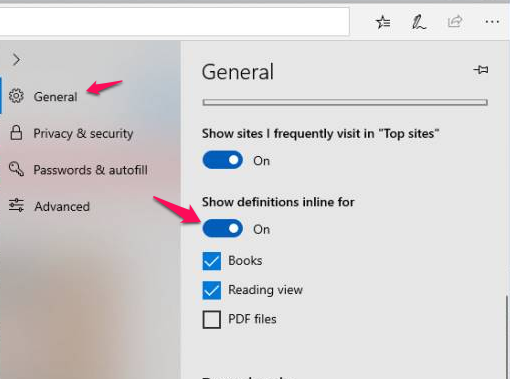
3. Close Settings to have the Microsoft Edge dictionary functioning.
Using the Microsoft Edge Dictionary
To make use of the dictionary, you have to view web pages in reading view. Try one of the following:
- Use windows hotkey Ctrl + Shift + R.
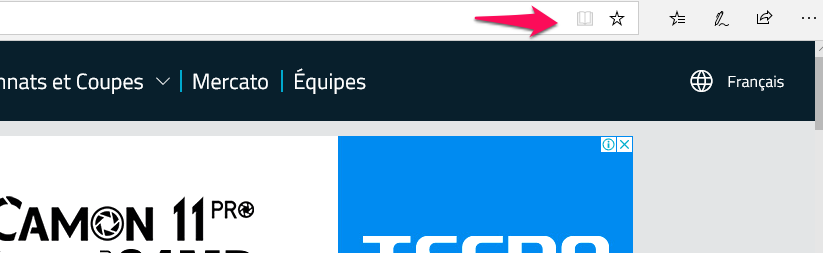
- Click on the Reading View icon and the rightmost part of the address locator. The Reading View icon looks like a book. You should note that the Reading View is available for most websites but there are some exceptions.
Once you are in the reading view of Microsoft Edge, double-click the word you want to look up the meaning for. For words with available meanings, a little pop-up will appear giving you the word’s definition.
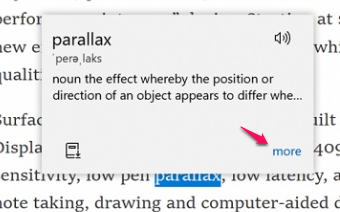
For additional details on the word that has been selected, you need to click on the “More” button. This displays a panel with more information for the word.
The Edge dictionary is powered by the Oxford dictionary and contains standard definitions for words you will come across. Note that this feature only works when you are online.
Also read: How to Set Tabs Aside in Microsoft Edge
How to Use Edge Dictionary Offline
For Edge’s dictionary to work offline, you must get the immersive reader tool. The immersive reader is downloaded by clicking on the “More tools” menu while in the reading view mode of the browser.
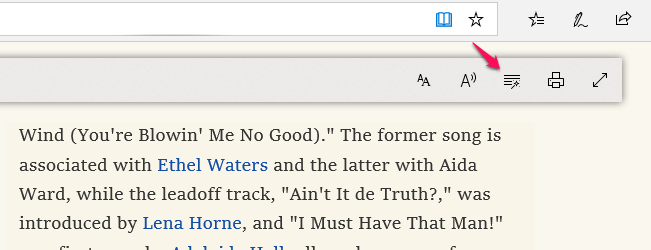
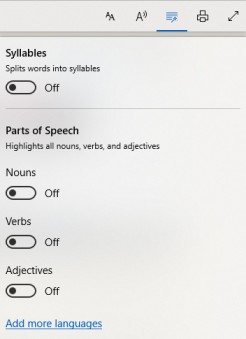
The immersive reader tool offers some grammar help. It can be used for searching for various parts of speech by switching on the corresponding toggle switches as shown in the image below. You can also get this help in a different language by clicking on the “Add more language” button. This will, however, only work based on the region that your computer is set to.
Conclusion
This is one of the few features that Microsoft Edge beats Chrome and Firefox with. It is especially useful when you are a newbie in the English language, as you can easily look up words on the fly while reading.