


Updates usually bring some much-needed features. Windows 10 Creators Update, for example, adds a feature that’s going to help you better organize your tabs in Microsoft Edge. With the “Set Aside” feature you’ll finally be able to declutter your browser and only use the ones you need at that precise moment without losing a single one.
You can place your tabs somewhere else so that you can continue working or browsing without distractions. The tabs you set aside will be available even if you close Edge or restart your computer. Keep reading to find out how you can use the Set Aside feature in Microsoft Edge and enjoy a cleaner browsing experience.
How to Use the Set Aside Feature in Microsoft Edge
Having a lot of tabs open is something you just can’t avoid but try to anyway. You may be doing research on something and need those tabs open but not so much that you end up bookmarking them.
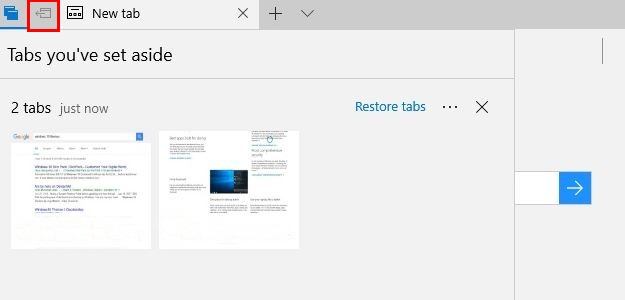
If you have Windows 10 v1703, you’re going to notice two new buttons when you open Edge. Those buttons are at the top-right corner called “Tabs you have set aside” and “Set these tabs aside.” They are what you’ll be using to take advantage of this great feature.
There is no way to only set aside one tab in particular. It’s an all or nothing situation. Once you click on the tab icon with the arrow pointing left, all of the tabs you have in that window will appear like in the image below. To see the tabs you’ve already saved, click on the double-tab icon to the left.
What Happens After the Tabs Are Saved?
What happens when Edge saves all of your tabs? Edge won’t close automatically, but instead it will show you a new window with a new tab.
Let’s say you want to recover all the tabs you saved in a window you had open two hours ago. When you go to the Tabs you’ve set aside on a page (depending on how many times you’ve saved your tabs), you’ll see a certain amount of rows that preview the tabs you had open.
To the right and below the last tab preview you’ll see an option that says “Restore tabs.” Click on that option, and Edge will open all the tabs. There will also be an X that will close all the tabs in that row.
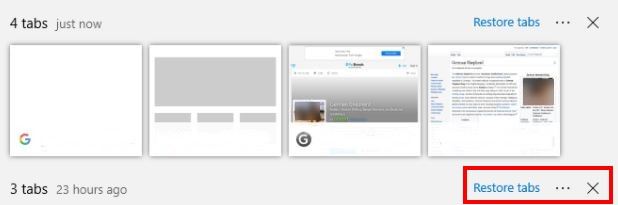
What you can do if you need to recover certain tabs is click on the “Tabs you have set aside” button, and click on the tab you want to recover. That tab will pop right back out.
You’ll know you have tabs aside because the “Set these tabs aside” button will change color indicating that you’ve saved some. Keep in mind that once you recover a set of tabs, they will disappear from the “Tabs you’ve set aside” option, and if you accidentally close Edge, you’ll lose those tabs.
Conclusion
Setting tabs aside in Microsoft Edge is definitely a useful feature. It will help you save important tabs for later and clear up that tab clutter. It would have been better if you could save certain tabs and not all of them, but hopefully this feature will be added in the near future. Do you find the feature useful? Leave a comment and let us know.