


AI chatbots are useful for gathering information and helping with your research, but do you know that you can use it to stay safe online too? You can avoid many online attacks by using ChatGPT to get a second opinion when you are suspicious. Below are some smart ways you can utilize ChatGPT to stay safe online.
1. Scan Phishing Emails
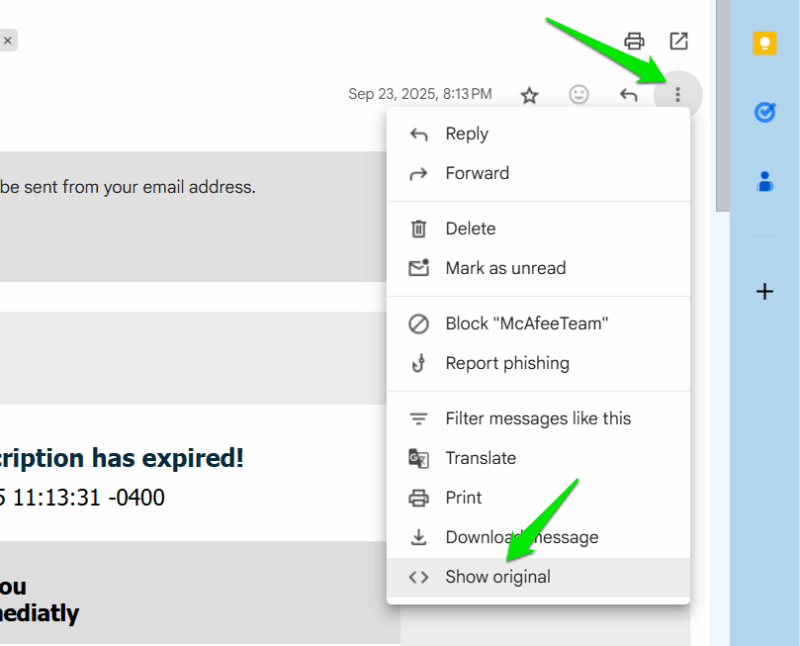
While phishing emails are often easy to detect, many sophisticated ones can still be very convincing. ChatGPT can scan those emails to look for clues to guess if it’s legit or a scam. You can either provide a screenshot of the full email (hide sensitive info) or open the raw source message and copy/paste its content. For example, to open the raw source in Gmail, click the three dots menu on the right side and select Show original.
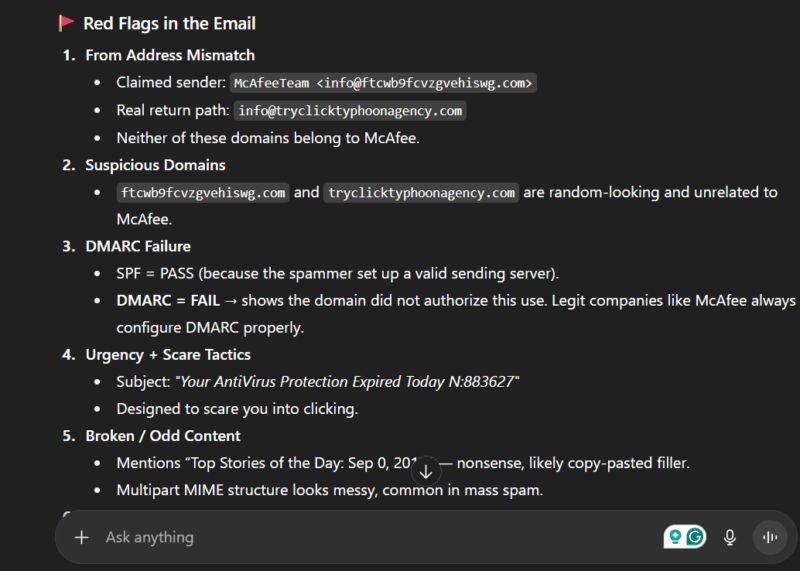
ChatGPT will not only look for clues in the email body, but also the header to confirm it’s from the intended source. Afterward, it will provide complete details about why it thinks it’s a scam or if it’s safe. You can also do this to detect phishing websites or even phishing SMS.
2. Scan Commands and Code for Malicious Instructions
You often find commands and scripts online to run on your PC for specific tasks. While most are safe, many can hide malicious instructions to take over your device, like the recent FileFix attack. If you don’t know what each instruction in a command or script does, paste it in ChatGPT to confirm. You can just ask it to check if the code does anything suspicious.
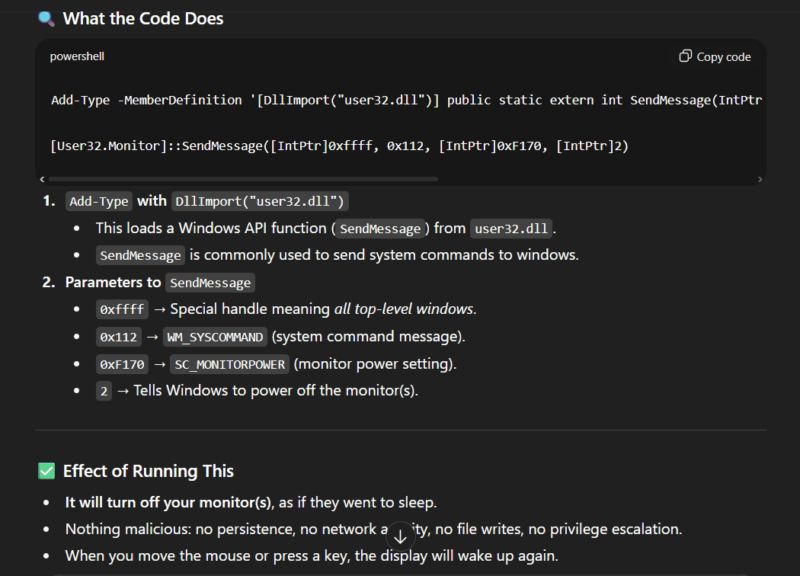
ChatGPT will break down each instruction so you are sure it doesn’t include any bad instructions. This can work for the source code of open source apps as well. Just copy/paste the code and ask ChatGPT if the code matches the exact purpose of the app.
3. Evaluate Apps and Extensions Permissions
Malicious apps and extensions often ask for permission they don’t need for their function. When you are skeptical about the permissions an app is asking, you can ask ChatGPT to confirm if it actually needs the specific permission. You can usually find all the permissions on the app/extension listing page or when downloading it.
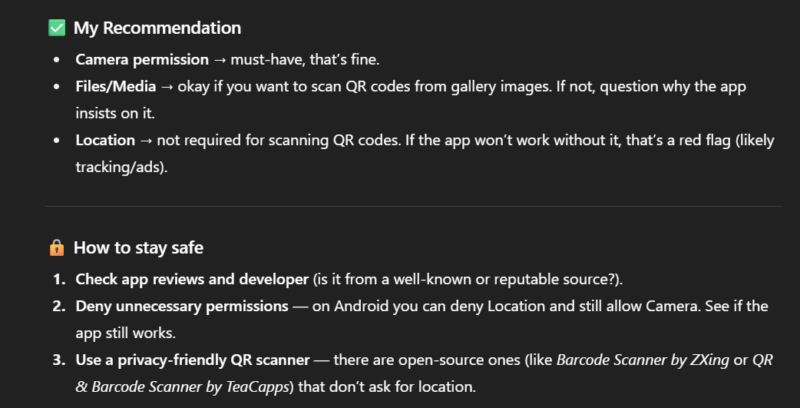
You can screenshot or copy/paste the permissions of an app in ChatGPT and tell the app’s purpose. It will tell you why it needs specific permissions to work. While you can provide the app/extension link directly, we don’t recommend that, as ChatGPT often fails to retrieve full permissions just from the link. However, a direct link can help it search for more information about it.
4. Scan Privacy Policies and Terms of Service
Many shady companies have privacy-invasive policies or company-favoring terms that users normally won’t accept. However, they hide them in lengthy pages with lots of legal jargon, so an average user doesn’t see them. ChatGPT can instantly summarize lengthy privacy policies and TOS pages and separate concerning points.
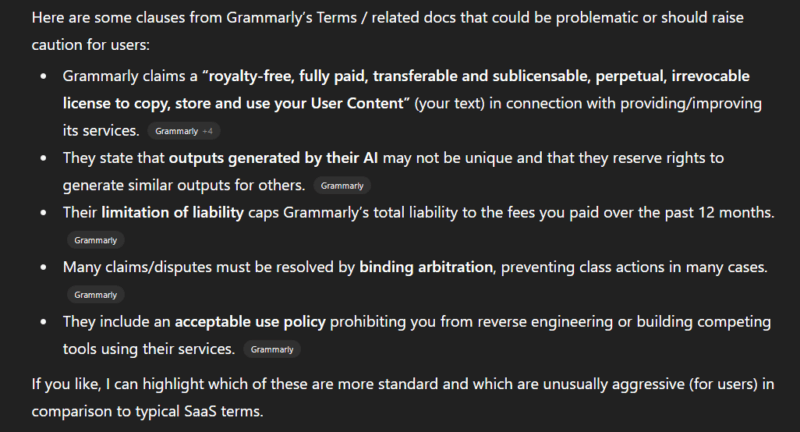
If you have a specific concern, you can directly ask if the page has anything related to it. Otherwise, just ask it to tell if there are any privacy-invasive policies or terms that could negatively impact users.
5. See How Much of Your Information is Revealed Online
If you’re concerned about how much information is publicly available about you, or worse, you think you got doxed, ChatGPT can help. ChatGPT can run a deep search based on the basic information you provide to identify yourself, to see how much information is available about you online.
The precision will depend on the information you are willing to share, like name, work, email, city/country, etc. You can use a simple prompt like “Search the web for profiles, bylines, images, posts, forums, public records, and news about me. Use the information below to identify me: (provide information)”.
It may not be able to find hard-to-access information, like data-broker websites or data breaches, but you’ll get a general idea of information someone else can find about you, and if any sensitive information is publicly available.
6. Detect Scamming Tactics
Scammers can employ many tactics for attacks, like calling scams, pig butchering scams, or even AI scams. If you are suspicious about an interaction (especially unsolicited ones), you can share details with ChatGPT to get a second opinion. Either tell it what happened, or share the conversation if it’s via messages.
ChatGPT can detect most of the known scam tactics and tell you exactly what the scammer wants to do. Even if it’s a new tactic, ChatGPT can still point out red flags to keep you safe.
While ChatGPT is handy to confirm suspicions, it can still make mistakes. So make sure you double-check the information it provides and make a sound decision. You can also use these prompt generator tools and hacks to get better results from ChatGPT.