


Privacy is the big buzzword right now, especially as certain powers-that-be seem intent on ripping it away from us and selling our data to the highest bidder. The best thing we as consumers can do, short of hitting the streets and protesting, is to use the simple tools at our disposal to cover our tracks.
If you use a VPN for web browsing, however, that doesn’t automatically extend to making you anonymous when you use BitTorrent to download files. So here’s how to reroute your BitTorrent client connection through your VPN so you can torrent anonymously – focusing specifically on Vuze and the official BitTorrent client.
A Few Things of Note
This guide assumes that you’re already using a VPN for your day-to-day browsing and won’t go through the details of how to set up a VPN. I use Steganos myself, but different people have their preferences, and the same basic rules in relation to Torrent clients, so this guide will apply to anyone who already has a VPN.
Use a VPN on BitTorrent
The official BitTorrent client is the go-to for most people because it’s official, so we assume it must be good. That’s not always the case, but thankfully in this case that facile statement applies. Here’s how to enforce your VPN on it.
Switch on your VPN, then go to Google and type “whats my IP” to instantly bring up your public IP address. Highlight this number and copy it to the clipboard.
Open BitTorrent, click “Options -> Preferences” then Advanced in the pane on the left side.
In the Filter box type net.bind, then in the Value box type the IP address you copied over from Google and click Set.
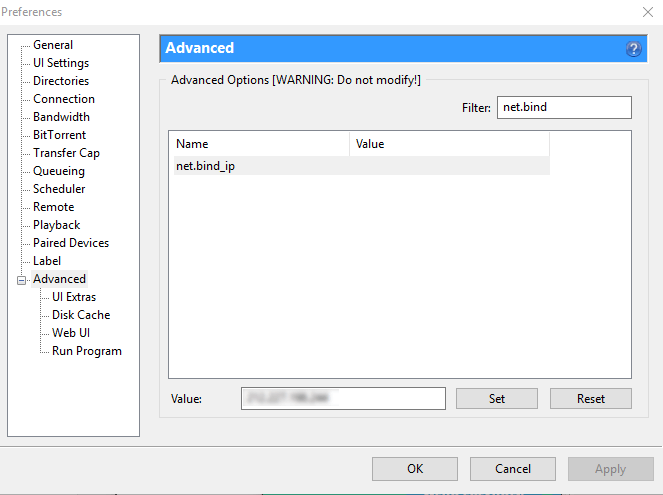
Next, type net.outgoing_ip in the Filter box, select it, paste your IP into its “Value” box, and click Set. Click OK to confirm the changes, restart BiTorrent, and you’re good to go!
Use a VPN with Vuze
I’ve been using Vuze ever since its Azureus days, and it’s always served me well. It’s also very easy to get working with your VPN, so here’s the lowdown.
With your VPN open, open Vuze, then go to “Tools -> Options -> Mode” and select “Advanced” to unlock Advanced Network Settings. Click Save.
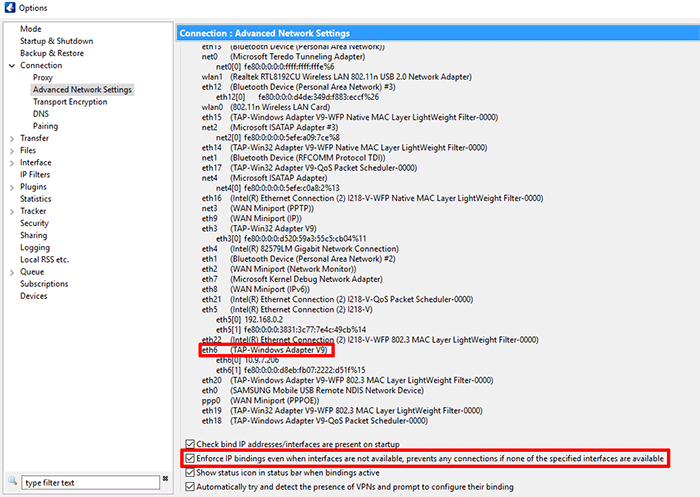
Next, click Connection in the left-side pane in the options, then Advanced Network Settings and scroll down to see which “eth” port corresponds to something called “TAP-Windows Adapter V9.” That’s the port for your VPN.
Type the name of this port (eth6 or eth9 or whatever) into the box at the top of Advanced Network Settings called “Bind to local IP address or interface.”
Next, scroll all the way to the bottom of the Advanced Network Settings window, and tick the box that says “Enforce IP bindings even when interfaces are not available.” Click Save, and Vuze is ready for VPN-enabled torrenting!
Conclusion
Of course there are plenty more Torrent clients out there than the ones I mentioned above, and maybe we’ll add them here at a later date if you shout at us enough about it in the comments. Something to remember is that the same general rules may apply across different Torrent clients, so have a look in your Torrent client’s network settings and see if, with a few tweaks, you can use the same method as we did here. Good luck!
Also read: How to Set Up OpenVPN in Windows