Netatalk is a kernel level implementation of the AppleTalk Protocol Suite that allows any Unix/BSD system to run as a file, print and time server for any Mac machine.
While the Netatalk package is included in the Ubuntu Intrepid’s repository, the package is broken and does not work in the way it is intended to. The following instructions can help you to build, install and configure Netatalk to work in your Ubuntu Intrepid (It works in Ubuntu Hardy too).
In your terminal,
mkdir -p ~/src/netatalk
cd ~/src/netatalk
sudo apt-get install devscripts cracklib2-dev dpkg-dev libssl-dev build-essential
sudo apt-get build-dep netatalk
apt-get source netatalk
cd netatalk-2.0.3
DEB_BUILD_OPTIONS=ssl dpkg-buildpackage -us -uc
sudo debi
That’s it. Netatalk should now be installed and started.
You will have to start everytime you log in.
To start Netatalk,
sudo /etc/init.d/netatalk start
To restart Netatalk
sudo /etc/init.d/netatalk restart
To Connect to Ubuntu From Mac OS X
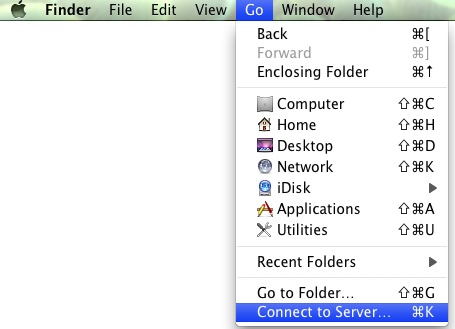
In your Mac OS X, open the Finder. On the menu, click “Go -> Connect to server.”
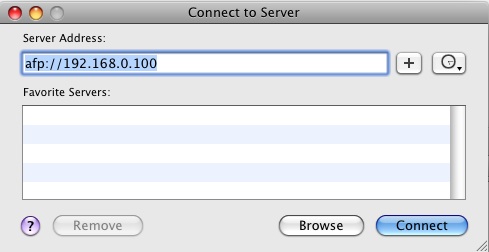
Enter the IP address of your Ubuntu machine and click Connect.
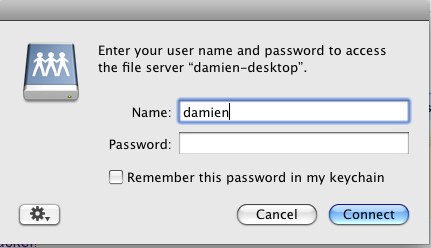
It should ask you for verification. Enter your login name and password.
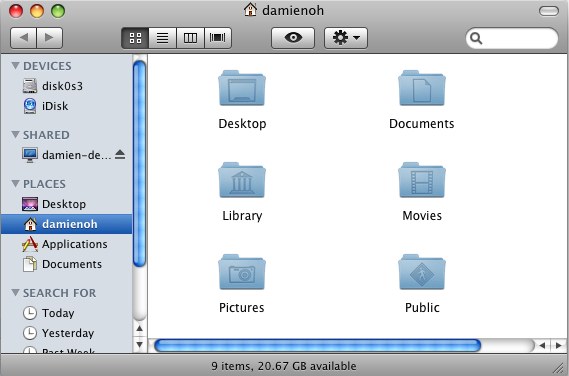
You should now see your Ubuntu Home folder on the left pane of Finder.
Enjoy!